
Masterfile Pages List
List view
Quick Links
Quick Links
BSIT 1
BSIT 1
BSIT 2
BSIT 2
BSIT 3
BSIT 3


OS 601 Lecture Notes
Table of contents
OS 601 Lecture NotesRisk ManagementRisk measurement and evaluation models and methodologiesSecurity Governance and PolicyOrganizational ContextISO27001 Information Security Management SystemSecurity Governance & PolicySecurity GovernanceCybersecurity PoliciesAnalytical ToolsPerformance Measurement (metrics)Security IntelligenceReview Notes on Performance MeasurementSecurity MetricsSecurity MetricsReview NotesSystem AdministrationSecurity Assessment Securing the NetworkWireless NetworksNetwork ReliabilityData SecurityBacking up DataCloud ComputingCyber Planning1. Understand Threats2. Determine Risks3. Use Experts4. Apply Regular Maintenance5. Constant Training6. Preserve and Back Up DataOperational and Tactical ManagementBusiness Continuity, Disaster Recovery, and Incident Response ManagementBusiness Impact Analysis ConceptsSecurity Program ManagementPhysical Security ControlComponents of physical security controlsMost common threats to physical securitySecurity Awareness TrainingTools for Training End UsersSecurity Hiring ProcessThe Difference Between Recruitment and SelectionKey DifferencesIncident Response and Disaster RecoveryThird Party Security
Risk Management
Risk measurement and evaluation models and methodologies
Risk measurement and evaluation models and methodologies are techniques used to assess and quantify the potential exposure to loss or damage from uncertainties such as investments, financial transactions, and operational processes. They provide a systematic approach to evaluate the likelihood and potential impact of identified risks and can be used to prioritize risk management activities. Some common models and methodologies include:
- Value-at-Risk (VaR) - measures the potential loss over a certain time horizon for a specified confidence level.
- Monte Carlo Simulation - uses computer algorithms to model and simulate a large number of scenarios to determine the likelihood of various outcomes.
- Decision Trees - graphical representation of decisions and their potential consequences used to evaluate risk exposure.
- Scenario Analysis - involves identifying and analyzing potential future events that could impact a particular risk.
- Sensitivity Analysis - focuses on determining how changes in certain variables may impact overall risk exposure.
These models and methodologies can be used individually or in combination to support informed decision making and effective risk management.
Quantitative and Qualitative Approaches to Risk Assessment
Risk assessment is the process of identifying, evaluating, and prioritizing potential risks to an organization or system. There are two main approaches to risk assessment: quantitative and qualitative.
- Quantitative Risk Assessment: This approach uses mathematical models and statistical methods to quantify the likelihood and potential impact of risks. This approach provides a numerical value that represents the risk, and the results can be used to prioritize and compare risks, determine the amount of resources to allocate to risk management, and evaluate the effectiveness of risk management strategies. Examples of quantitative risk assessments include Value-at-Risk (VaR) and Monte Carlo simulation.
- Qualitative Risk Assessment: This approach uses expert judgment, subjective assessments, and other non-numerical methods to identify and evaluate risks. This approach is often used to identify potential risks, to assess the likelihood and impact of those risks, and to prioritize risks for further analysis. Examples of qualitative risk assessments include SWOT analysis, scenario analysis, and fault tree analysis.
Both quantitative and qualitative risk assessments have their own advantages and limitations, and organizations may use a combination of both approaches to get a comprehensive view of their risk exposure. The choice of approach depends on the specific needs and constraints of the organization, the type and complexity of the risks being evaluated, and the level of detail and accuracy required for decision making.
SWOT analysis is a strategic planning tool that is used to identify an organization's internal strengths and weaknesses and external opportunities and threats. In the context of cybersecurity, a SWOT
analysis can be used to identify the key factors that could impact the security of an organization's systems and data.Here's how a SWOT analysis can be applied in cybersecurity:
analysis can be used to identify the key factors that could impact the security of an organization's systems and data.Here's how a SWOT analysis can be applied in cybersecurity:
- Strengths: Identify the internal strengths of the organization's cybersecurity posture, such as the quality of its network infrastructure, the expertise of its security team, and the effectiveness of its security policies and procedures.
- Weaknesses: Identify the internal weaknesses of the organization's cybersecurity posture, such as outdated software and systems, lack of security training for employees, and insufficient investment in cybersecurity.
- Opportunities: Identify external opportunities for improving the organization's cybersecurity posture, such as the availability of new security technologies and the potential for collaboration with other organizations.
- Threats: Identify external threats to the organization's cybersecurity, such as the increasing prevalence of cyber attacks, the potential for data breaches, and the risk of cyber espionage.
The results of a SWOT analysis can be used to inform the development of a cybersecurity strategy and to prioritize the allocation of resources to improve the organization's cybersecurity posture. By
considering both internal and external factors, a SWOT analysis can provide a comprehensive view of the risks and opportunities facing an organization and help to ensure that its cybersecurity efforts are aligned with its overall business objectives.
considering both internal and external factors, a SWOT analysis can provide a comprehensive view of the risks and opportunities facing an organization and help to ensure that its cybersecurity efforts are aligned with its overall business objectives.
Security Governance and Policy
Organizational Context
Understanding the Organization & its Context
The ISO27001 Clause 4.1 (understanding the organization and its context) states: The organization shall determine external and internal issues that are relevant to its purpose and its strategic direction and that affect its ability to achieve the intended result(s) of its information security management system.
ISO27001:2013 is about your Information Security management system you do need to focus both internally and externally when it comes to understanding the context of your organization:
- Internal
- Think about how people interact with your systems and processes as they currently are, what are the behaviors that exist that would impact your new ISMS?
- What are the objectives of your Information Security management system and how will it support the organization?
- What, if anything in how you manage information security could impact the growth and development of the organization or put it at risk e.g. you don't patch your servers until the end of year shut down (hint.. this is a very bad practice)
- Who knows that stuff that you don't have documented but really should?
- How do you control secure information?
- Is there proper governance within the company
- External Factors:
- What things could impact the customer experience or satisfaction, is there anything linked to your Information Security management system that would impact your ability to deliver products & services that meet the requirements of your customers or regulatory bodies, what are the market conditions?
The technology changes and so on. Tools that you can use, one tool which is really good is called PESTLE Analyses and it's a great way of really understanding the external influences on your business.
PESTLE is an acronym and is designed to help you look at the key area's that will impact your organization externally around the following areas
- Political
- Economic
- Social / Cultural
- Technological
- Legal
- Ecological
How to do a PESTLE Analysis?
Carrying out a PESTLE analysis should start with thinking through and planning the process. This means following these steps:
- Identify the scope of the research. It should cover present and possible future scenarios, and apply to areas of the world in which the business operates.
- Decide how the information will be collected and by whom. Data gathered is often richer in content when more than one person collects it.
- Identify appropriate sources of information. These could be stakeholders looking for people professionals to address specific issues or current policies that require updating.
- Gather the information – it’s useful to use a template as the basis for recording the information. Please see our practical, ready-to-use template below.
- Analyze the findings.
- Identify which of these factors listed above are most important or could cause issues.
- Identify the business-specific options to address the issues, as demonstrated in the example template.
- Write a discussion document for all stakeholders.
- Disseminate and discuss the findings with stakeholders and decision-makers.
- Decide what actions need to be taken, and which trends to monitor on an ongoing basis.
To be effective, a PESTLE analysis needs to be done on a regular or ongoing basis. Organizations that regularly and systematically conduct such analyses often spot trends before others, thus providing a
competitive advantage.
competitive advantage.
The other one is the good old trusty SWOT Analysis where you will look at your organizations' Strengths, Weaknesses, Opportunities and Threats both internally & externally to the business.
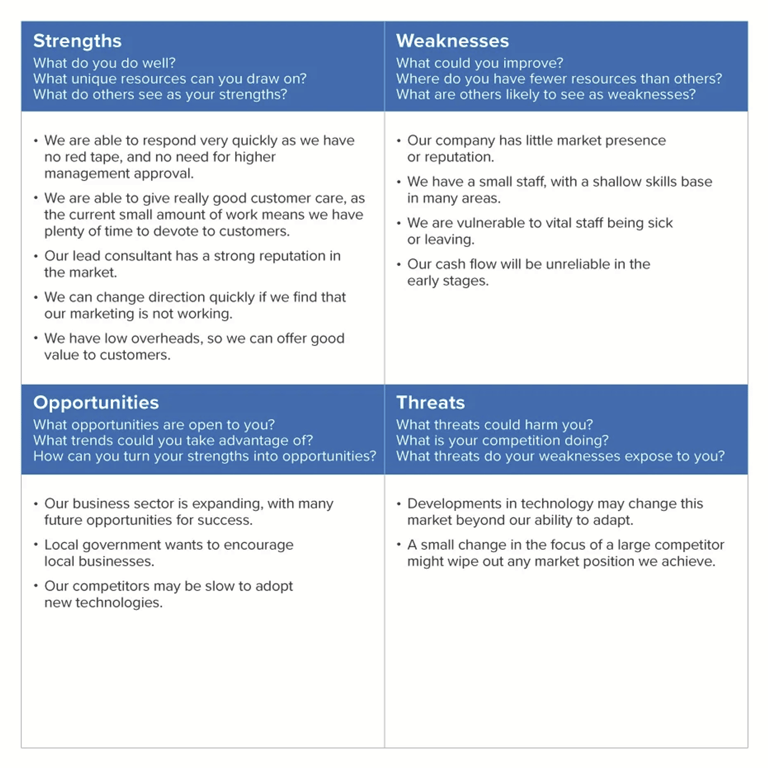
What Is a SWOT Analysis?
SWOT stands for Strengths, Weaknesses, Opportunities, and Threats, and so a SWOT Analysis is a technique for assessing these four aspects of your business.
You can use SWOT Analysis to make the most of what you've got, to your organization's best advantage. And you can reduce the chances of failure, by understanding what you're lacking, and eliminating hazards that would otherwise catch you unawares.
ISO27001 Information Security Management System
ISO27001 Information Security Management System
ISO 27001 is the international standard for Information Security Management Systems (ISMS). It is applicable to any organization where the misuse, corruption, or loss of its business or client information
could result in a major commercial disaster.
could result in a major commercial disaster.
The fundamental aim of ISO 27001 is to protect the information of your organization from security threats such as a viral attack, misuse, theft, vandalism/terrorism, and fire. ISO 27001 helps organizations to treat data security seriously, putting systems and processes in place to guard against the risk of security breaches or misuse of data. The ISMS encourages the identification and classification of the organizations' information assets and a systematic risk assessment of threats and vulnerabilities. ISO 27001 provides a framework to assure an organization that its information security measures are effective.
What are the key benefits to your business?
- Improves and maintains a competitive edge.
- Win more business, particularly where procurement specifications require higher IT security credentials.
- Compliance with legal, statutory, regulatory, and contractual requirements.
- Provide assurance to stakeholders, such as clients and shareholders.
- Business continuity is assured through the management of risk, security issues, and concerns.
Introducing Understanding Organization and Context
Clause 4.1 of the ISO 27001 requirements is about understanding your organization and its context. It marks the entry point into the ISO 27001 standard and underpins the building and management of your Information Security Management System (ISMS). You need to outline how your organization defines:
- What your ISMS does
- When it does it
- How it does it
Whether you’re after independent ISO 27001 certification or just demonstrating compliance with the standard, taking a ‘top down’ approach to information security will help you build an effective, business-led ISMS.
How to identify the internal issues that affect the outcomes of an information security management system
Consider the IPOPS acronym below for identifying the internal issues that might affect the outcomes of an ISMS. This might be a whiteboarding exercise, post-it notes session or simply capturing notes
that you’ll upload later to demonstrate your understanding of the issues. Get the right people in a room or on the phone and start the conversation!
that you’ll upload later to demonstrate your understanding of the issues. Get the right people in a room or on the phone and start the conversation!
Look at the image for a really basic example of what might be done and that can be uploaded as part of the evidence, or written up in more detail and tested further with other stakeholders depending on the nature of the organization. From a UKAS ISO 27001 external auditors' perspective, they will be looking for confidence that the organization has understood the issues that might affect the outcome of the ISMS (and documented them) before using that evidence to go forward. That will then help to identify interested parties, set a scope, document your objectives, build an asset inventory, and do information security risk analysis before developing suitable policies and controls in line with the statement of applicability. It’s all a very logical flow and starts right here with this simple exercise!
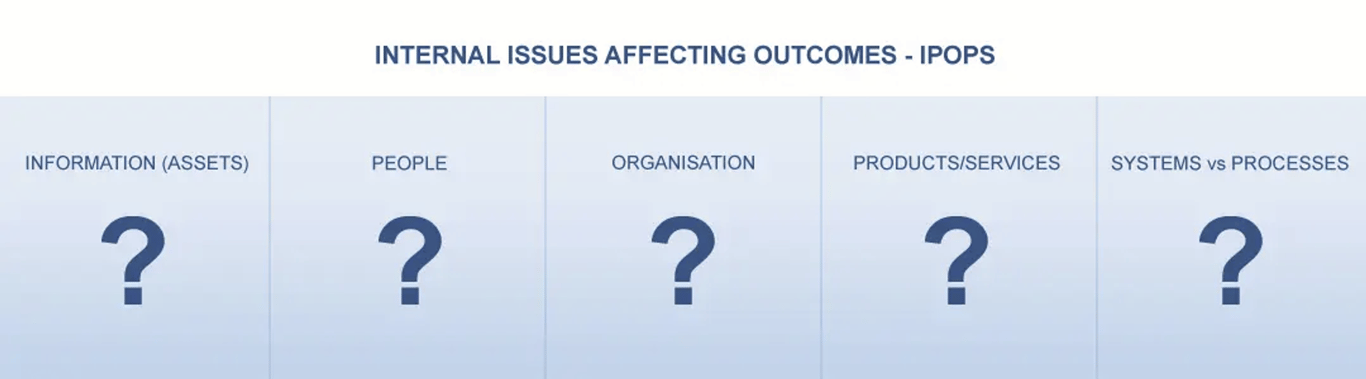
Information as assets that are internal issues affecting ISMS outcomes
What information is created, handled, stored, managed, and of real value for the organization and its interested parties? Personal data, sensitive customer ideas, and IPR, financial information, brand,
codebases, etc? This is right at the heart of the ISMS where the information assets are the foundation for everything else – identifying these assets early on also makes the information asset inventory
management easy. Then consider potential issues around the information itself – in particular confidentiality, integrity, and availability, taking into account the other areas below as you go for triggering ideas of where the issues might be found.
codebases, etc? This is right at the heart of the ISMS where the information assets are the foundation for everything else – identifying these assets early on also makes the information asset inventory
management easy. Then consider potential issues around the information itself – in particular confidentiality, integrity, and availability, taking into account the other areas below as you go for triggering ideas of where the issues might be found.
People related internal issues that might affect the intended outcome of the ISMS
It’s no surprise that human resource security is an important part of the ISMS, is devoted to it, and all the subsequent policies, controls and management is likely to be with people in mind, both internal
employees as well as external resources like suppliers. Therefore consider any existing issues of:
employees as well as external resources like suppliers. Therefore consider any existing issues of:
- recruitment e.g. challenges in hiring competent people, high/low staff turnover
- induction – e.g. do they get training on information security right now, is it working
- in life management e.g. keeping them engaged and showing their compliance to the policies and controls, – do staff actually find information security sexy and exciting, or is it a cultural challenge to get someone to lock their laptop when going to the toilet…
- change of roles and exit e.g. is access to and removal of information assets and services carried out
Organizational internal issues affecting ISMS outcomes
- What are the issues facing the organization that might affect the outcome of the ISMS? As an example, fast-growth brings issues of staff and structure that might affect understanding and knowledge of the policies, or that things change so quickly you can’t easily bottom out detailed and consistent processes. Are there organization leadership and board or shareholder pressures that will cause issues (these can be positive as well as negative)? International operations will have different cultural norms for the people involved.
- Another internal issue associated with people and the organization might be the fact you don’t want any of them employed or struggle to find good ones so rely instead on outsourcing. That brings a need for suppliers (and staff in the suppliers) so that’s an issue to tie in with the interested parties analysis.
Products & Services internal issues that might impact the ISMS outcomes
- What are the products and services delivered by the organization and what sort of issues emerge around that which might cause information risk? For example, if the organization is an innovator and IPR protection is important for product leadership, it’s an issue that needs consideration in the ISMS. If the organization relies on large physical property e.g. as a manufacturer that will probably bring more physical security issues, whereas a small cloud software provider might be much more focused on issues like IPR protection from digital hackers and the issues surrounding dependency of their product success and assurance on hosting suppliers etc.
Systems and Processes as internal issues that affect the intended outcome of the ISMS
- People often think about computers and digital technology when the ‘system’ word is used. However manual and paper-based systems are also key areas for issues to emerge so remember to consider those for issues too. Each of the areas bucketed above will have systems and processes involved in it – that might be implicit (we have always done it that way and never documented it) or could be wrapped up in a mass of documentation that no one could ever follow…….having considered the IPOP areas above, think about the systems and processes internal issues around them – for example, if you are hiring staff regularly but don’t have a formal process and systems that demonstrate evaluation and screening from an information security perspective, you have an issue. An issue is that you might be hiring people that are going to become the enemy within….either through ignorance of information security or because they are a saboteur and you never considered that…….It's the same with all the systems and processes across the organization that are in scope for information assurance – what sort of issues emerge where confidentiality, integrity, or availability of the information might be at threat?
Security Governance & Policy
Security Governance
Security Governance and Policy refer to the set of processes, procedures, and standards that organizations use to manage their information security program. The goal of these policies is to ensure that the confidentiality, integrity, and availability of information assets are protected.
Security Governance involves defining the decision-making process and structure for information security, including the roles and responsibilities of different individuals and groups within the organization. This helps to ensure that the right people have the right level of control over information security, and that there is a clear chain of command for making security-related decisions.
Security Policy, on the other hand, is a set of rules and guidelines that define how the organization will manage its information security program. This includes policies for access control, data protection,
incident management, and other security-related topics. The policy should be based on industry standards, best practices, and the specific needs of the organization.
incident management, and other security-related topics. The policy should be based on industry standards, best practices, and the specific needs of the organization.
Together, Security Governance and Policy help to ensure that an organization has a comprehensive, consistent, and effective approach to managing its information security risks, and that everyone within the organization understands their role in maintaining security.
An organizational information security program is a comprehensive approach to protecting the confidentiality, integrity, and availability of an organization's information assets. An example of an organizational information security program may include the following elements:
- Security Governance: This includes defining the decision-making process for information security and defining the roles and responsibilities of different individuals and groups within the
organization. - Security Policy: This includes a set of policies that define how the organization will manage its information security program. This may include policies for access control, data protection, incident
management, and other security-related topics. - Risk Management: This includes the process of identifying, assessing, and prioritizing information security risks and determining the appropriate control measures to mitigate those risks.
- Access Control: This includes policies and procedures for controlling access to information assets and ensuring that only authorized individuals have access to sensitive information.
- Data Protection: This includes policies and procedures for protecting sensitive information, such as encryption, backup and disaster recovery, and data deletion.
- Incident Management: This includes the process of detecting, responding to, and recovering from security incidents, as well as documenting and reporting on those incidents.
- Security Awareness and Training: This includes programs to educate employees about information security risks and best practices, as well as providing ongoing training to help employees maintain their knowledge of security best practices.
- Regular Audits and Assessments: This includes regularly evaluating the organization's information security program and infrastructure to identify potential vulnerabilities and to ensure that it remains compliant with relevant laws, regulations, and standards.
Overall, an organizational information security program should be regularly reviewed and updated to ensure that it remains effective in protecting the organization's information assets and meeting the
evolving needs of the business.
evolving needs of the business.
Cybersecurity Policies
Cybersecurity policies are a set of rules and guidelines that organizations use to protect their information systems and data from cyber threats. They define how an organization will manage its cybersecurity program, including the technologies and processes that will be used to secure its systems and data. Some common types of cybersecurity policies include:
- Acceptable Use Policy: This policy outlines the acceptable use of an organization's information systems and network, including the use of the Internet and other online services.
- Data Security Policy: This policy outlines the measures that will be taken to protect an organization's sensitive information, such as encryption, data backup, and disaster recovery.
- Incident Response Policy: This policy outlines the process for responding to security incidents, such as data breaches or cyber attacks, including the steps that will be taken to contain the incident, investigate its cause, and recover from its impact.
- Access Control Policy: This policy outlines the procedures for granting and revoking access to information systems and data, including authentication and authorization processes.
- Password Policy: This policy outlines the requirements for creating and managing passwords, such as minimum length, complexity, and frequency of change.
- Network Security Policy: This policy outlines the measures that will be taken to secure an organization's network, including firewalls, intrusion detection and prevention systems, and other security
technologies. - Mobile Device Policy: This policy outlines the requirements for using mobile devices to access an organization's information systems and data, including security measures such as device encryption and remote wiping.
- Cloud Computing Policy: This policy outlines the requirements for using cloud computing services, including security measures such as encryption and access controls.
Cybersecurity policies should be regularly reviewed and updated to ensure that they remain effective in protecting an organization's information systems and data from the ever-evolving threat landscape.
Any enterprise should base their policies on certain fundamental constructs around these principles:
Risk-based, technology agnostic, outcome-oriented and measurable
Flexible and adaptable to encourage innovation
From a government point of view, cybersecurity policies should cover the following strategic focus priority areas, and these will change based on current market and societal needs:
A. Nation State Cyber Threats
The next warfare is in the cyber domain and threatens the human race. Cyber threats can be equated to WMD – without being overly melodramatic.
B. Internet of Things – IOT
Everything is connected to everything and one weak link is enough to bring down the whole chain and cause havoc. Standards are evolving but not fast enough to keep pace with the explosion of devices connecting to the web every day. Government policies and standards might be essential to protect citizens.
C. Encryption
Encryption is being used very effectively as an evasive means by cybercriminals to hide their activities, and government needs to figure out effective policies to deal with the exceptions and national security needs, while ensuring citizens’ right to privacy.
D. Financial Services and Critical Infrastructure
Government constantly re-evaluates risks to critical infrastructure and looks at policy guidelines that enterprises can follow and should comply to.
E. Consumer Privacy – Protection
Policies on certain fundamental constructs around these principles:
1. Risk-based, technology agnostic, outcome-oriented and measurable
2. Flexible and adaptable to encourage innovation
1. Risk-based, technology agnostic, outcome-oriented and measurable
Risk-based, technology agnostic, outcome-oriented and measurable
These four terms describe a modern and effective approach to managing information security risks.
- Risk-based: A risk-based approach to information security focuses on identifying, evaluating, and prioritizing the risks to an organization's information systems and data, and implementing appropriate controls to manage those risks. This approach takes into account the likelihood and impact of potential security threats and helps organizations make informed decisions about which risks to accept, transfer, or mitigate.
- Technology agnostic: A technology agnostic approach to information security is one that is not tied to a specific technology or vendor. This approach allows organizations to choose the best solutions for their needs, regardless of the underlying technology, and provides the flexibility to switch to a different solution if the current one becomes outdated, expensive, or unsupported.
- Outcome-oriented: An outcome-oriented approach to information security focuses on achieving specific business outcomes, such as protecting sensitive data, ensuring business continuity, or improving regulatory compliance. This approach helps organizations align their information security efforts with their broader business objectives, and provides a clear understanding of the value that information security is delivering.
- Measurable: A measurable approach to information security involves setting clear and quantifiable objectives and tracking progress towards those objectives. This approach allows organizations to assess the effectiveness of their information security program and make informed decisions about where to allocate resources to achieve the desired outcomes.
In conclusion, a risk-based, technology agnostic, outcome-oriented and measurable approach to information security is an effective way for organizations to manage their information security risks, align their efforts with their broader business objectives, and measure the value that information security is delivering.
2. Flexible and adaptable to encourage innovation
Flexibility and adaptability are important characteristics of a modern and effective approach to information security.
- Flexibility: A flexible information security program allows organizations to respond to changing risks, threats, and business requirements in a timely and effective manner. This requires the ability to quickly implement new security controls, modify existing ones, and integrate new technologies as needed.
- Adaptability: An adaptable information security program is one that can be modified or extended to meet changing needs, both in terms of technology and business requirements. This approach allows organizations to take advantage of new technologies and innovations, and to evolve their security program as their needs change.
The combination of flexibility and adaptability encourages innovation by allowing organizations to respond to new risks, threats, and business requirements in a timely and effective manner. This helps
organizations stay ahead of the curve in terms of information security, and provides a platform for continuous improvement and innovation.
organizations stay ahead of the curve in terms of information security, and provides a platform for continuous improvement and innovation.
In conclusion, a flexible and adaptable information security program is essential for organizations that want to encourage innovation, respond to changing risks and business requirements, and stay ahead of the curve in terms of information security.
Technology agnostic refers to the approach of not being tied to any specific technology or vendor in making decisions about a particular solution. In the context of information technology, being technology agnostic means that a solution is not tied to a specific technology or product, and that the solution can be implemented using a variety of technologies or products, as long as they meet the required functional and non-functional requirements.
Adopting a technology agnostic approach has several benefits, including:
- Flexibility: A technology agnostic solution provides the flexibility to switch to a different technology or product if the current one becomes outdated, expensive, or unsupported.
- Avoiding vendor lock-in: By not being tied to a specific technology or vendor, an organization can avoid being locked into a single solution, which can limit its ability to adopt new technologies and
innovate. - Cost savings: By not being tied to a specific technology or vendor, an organization can take advantage of cost-effective solutions,regardless of their technology or vendor, and reduce the total cost of ownership.
- Innovation: A technology agnostic approach encourages innovation and encourages organizations to seek out the best solutions for their needs, regardless of the technology used.
However, being technology agnostic also has its challenges, such as the need for a higher level of expertise in a wider range of technologies, and the need for increased testing and integration effort.
In conclusion, technology agnostic is an approach that allows organizations to focus on their business requirements and objectives, rather than the underlying technology, which helps to ensure that the
best solution is chosen to meet the organization's needs.
best solution is chosen to meet the organization's needs.
Functional and non-functional requirements are two types of requirements that are used to specify the desired behavior and characteristics of a system.
Functional requirements describe the specific tasks and functions that the system is expected to perform. They define what the system should do, such as "the system should allow users to log in" or "the system should calculate the total cost of an order".
Non-functional requirements describe the desired characteristics and qualities of the system, such as performance, reliability, security, and usability. They define how the system should behave, such as "the system should respond within 2 seconds" or "the system should be available 99.99% of the time".
Functional and non-functional requirements are both important for ensuring that the system meets the needs of the stakeholders. By clearly defining both types of requirements, organizations can ensure that the final solution meets both the functional requirements (what the system should do) and the non-functional requirements (how the system should behave).
Examples of non-functional requirements include:
- Performance: The desired response time, processing speed, and capacity of the system.
- Reliability: The desired level of system availability and the ability of the system to recover from failures.
- Security: The desired level of protection for sensitive data and the system against unauthorized access, theft, or damage.
- Usability: The desired level of ease of use and accessibility of the system for different types of users.
- Scalability: The ability of the system to accommodate increased usage or load without impacting performance or reliability.
- Maintainability: The ability of the system to be easily modified or updated as business needs change.
Having clear functional and non-functional requirements helps ensure that the system meets the needs of the stakeholders, and that it can be delivered on time, within budget, and with the desired quality.
Analytical Tools
What are some analytical tools?
The goal of any business analytic tool is to analyze data and extract actionable and commercially relevant information that you can use to increase results or performance.
Data analysis is a core practice of modern businesses. Choosing the right data analytics tool is challenging, as no tool fits every need. To help you determine which data analysis tool best fits your
organization, let’s examine the important factors for choosing between them and then look at some of the most popular options on the market today.
organization, let’s examine the important factors for choosing between them and then look at some of the most popular options on the market today.
Business analytics tools are types of application software that retrieve data from one or more business systems and combine it in a repository, such as a data warehouse, to be reviewed and analyzed.
Top 10 Data Analytics Tools
Tools used in data analytics
The Strategic Analysis tools include:
- Gap Analysis.
- VRIO Analysis.
- Four Corners Analysis.
- Value Chain Analysis.
- SWOT Analysis.
- Strategy Evaluation.
- Porter's 5 Forces.
- PESTEL Analysis.
Performance Measurement (metrics)
What is Performance Measurement (metrics)?
In the context of cybersecurity, performance measurements or metrics refer to the various quantitative and qualitative indicators used to evaluate the effectiveness of security controls, processes, and
technologies in protecting an organization's assets against cyber threats. Performance metrics can be used to measure the success or failure of cybersecurity initiatives, identify areas for improvement,
and help organizations make informed decisions about how to allocate their security resources.
technologies in protecting an organization's assets against cyber threats. Performance metrics can be used to measure the success or failure of cybersecurity initiatives, identify areas for improvement,
and help organizations make informed decisions about how to allocate their security resources.
Some common performance metrics in cybersecurity include:
- Vulnerability management metrics: These metrics evaluate the effectiveness of an organization's vulnerability management program in identifying, prioritizing, and addressing vulnerabilities in a timely manner.
- Incident response metrics: These metrics evaluate the effectiveness of an organization's incident response plan in detecting, containing, and mitigating security incidents.
- Compliance metrics: These metrics evaluate an organization's compliance with relevant laws, regulations, and industry standards, such as the General Data Protection Regulation (GDPR) or the Payment Card Industry Data Security Standard (PCI DSS).
- Risk management metrics: These metrics evaluate an organization's risk management program in identifying and prioritizing risks, implementing controls to mitigate those risks, and monitoring risk
levels over time. - Security awareness metrics: These metrics evaluate the effectiveness of an organization's security awareness training programs in educating employees about cybersecurity best practices and reducing the likelihood of human error leading to a security incident.
It's important to note that selecting the right performance metrics for an organization depends on its unique cybersecurity goals, risk profile, and industry sector. Organizations should regularly review
their performance metrics to ensure they remain relevant and effective in achieving their cybersecurity objectives.
their performance metrics to ensure they remain relevant and effective in achieving their cybersecurity objectives.
Examples of vulnerability management metrics:
- Vulnerability discovery rate: This metric measures how quickly new vulnerabilities are discovered in an organization's systems and applications. It can help identify areas where additional scanning or
testing is needed. - Vulnerability severity distribution: This metric categorizes vulnerabilities by their severity level (e.g., critical, high, medium, low) and helps prioritize remediation efforts based on the most critical vulnerabilities.
- Patching effectiveness: This metric measures how quickly and effectively vulnerabilities are patched after they are discovered. It can help identify areas where patch management processes need
improvement. - Time to remediate: This metric measures the time it takes for vulnerabilities to be remediated after they are discovered. A shorter time to remediate indicates a more effective vulnerability management program.
- False positive rate: This metric measures the number of vulnerabilities identified that are not actually exploitable or do not require remediation. A high false positive rate can waste valuable
resources and distract from more critical vulnerabilities. - Vulnerability reoccurrence rate: This metric measures the rate at which previously remediated vulnerabilities reappear in an organization's systems. It can help identify areas where additional
controls or processes are needed to prevent the same vulnerabilities from reoccurring.
By tracking and analyzing these vulnerability management metrics, organizations can identify areas for improvement and measure the effectiveness of their vulnerability management programs over time.
Incident response metrics are used to measure the effectiveness and efficiency of incident response processes in an organization. Here are some examples of incident response metrics:
- Mean time to detect (MTTD): This metric measures the time it takes to detect an incident from the moment it occurs. A lower MTTD indicates a more efficient incident detection process.
- Mean time to respond (MTTR): This metric measures the time it takes to respond to an incident once it has been detected. A lower MTTR indicates a more efficient incident response process.
- Number of incidents per week/month/quarter: This metric measures the frequency of incidents that occur over a certain period. A higher number of incidents may indicate the need for improvements in the incident response process.
- Incident resolution time: This metric measures the time it takes to resolve an incident once it has been detected. A lower incident resolution time indicates a more efficient incident response process.
- Incident severity: This metric measures the severity of incidents based on their impact on the organization. It can help prioritize incidents and allocate resources accordingly.
- False positives: This metric measures the number of incidents that were detected but turned out to be false alarms. A high number of false positives may indicate the need for improvements in the incident detection process.
- Escalation rate: This metric measures the rate at which incidents are escalated to higher levels of management or response teams. A high escalation rate may indicate a need for better incident triage and handling processes.
Compliance metrics are used to measure an organization's adherence to regulatory requirements, standards, policies, and procedures. Here are some examples of compliance metrics:
- Number of compliance incidents: This metric measures the number of compliance incidents that have occurred within a given time frame.
- Compliance audit findings: This metric measures the number of audit findings related to compliance issues.
- Compliance training completion rate: This metric measures the percentage of employees who have completed mandatory compliance training.
- Compliance program effectiveness: This metric measures the effectiveness of an organization's compliance program based on the number of incidents, fines, or penalties.
- Compliance risk assessment score: This metric measures an organization's risk level based on the likelihood and impact of compliance violations.
- Compliance policy adherence: This metric measures the percentage of employees who are adhering to compliance policies and procedures.
- Compliance resolution time: This metric measures the time it takes to resolve compliance issues or incidents.
- Third-party compliance assessment: This metric measures the compliance level of third-party vendors, suppliers, or partners.
- Data protection compliance: This metric measures an organization's compliance with data protection regulations, such as GDPR or CCPA.
- Compliance budget utilization: This metric measures the percentage of the compliance budget utilized for compliance-related activities.
Patching effectiveness refers to the ability of software patches to successfully address and fix vulnerabilities in a system. When a software vulnerability is discovered, the vendor or developer may release a patch to fix the issue. The effectiveness of the patch can be measured by how well it mitigates the vulnerability and prevents potential attacks.
The effectiveness of patching can be influenced by several factors, including the severity of the vulnerability, the complexity of the software, the speed with which the patch is released, and the ability of
users to apply the patch correctly. In general, a patch that is quickly released, easy to apply, and effectively mitigates the vulnerability is considered more effective than a patch that is delayed, difficult to
apply, or only partially mitigates the vulnerability.
users to apply the patch correctly. In general, a patch that is quickly released, easy to apply, and effectively mitigates the vulnerability is considered more effective than a patch that is delayed, difficult to
apply, or only partially mitigates the vulnerability.
Patching effectiveness is an important aspect of overall system security, as vulnerabilities that are not properly patched can be exploited by attackers to gain unauthorized access or steal sensitive
data. Organizations should prioritize patching vulnerabilities in a timely manner and ensure that their patch management processes are effective to minimize the risk of cyber attacks.
data. Organizations should prioritize patching vulnerabilities in a timely manner and ensure that their patch management processes are effective to minimize the risk of cyber attacks.
Time to remediate refers to the amount of time it takes to detect and resolve a security issue or vulnerability. An example of time to remediate could be as follows:
Let's say a company's IT department discovers a critical security vulnerability in their software system during routine maintenance checks. The vulnerability could potentially allow hackers to gain access
to sensitive data and cause significant damage to the company's reputation and finances.
to sensitive data and cause significant damage to the company's reputation and finances.
The IT department quickly reports the vulnerability to the security team, who assess the severity and scope of the issue. After identifying the root cause of the vulnerability, the security team implements a fix and deploys it to the affected system.
The time it took to detect the vulnerability and resolve it is the time to remediate. In this example, if the time it took to detect and resolve the vulnerability was one week, then the time to remediate would be one week.
Risk management metrics are tools used to quantify and measure risks that may impact a business or project. Here are some examples of risk management metrics:
- Risk Exposure: This metric measures the total amount of financial loss that a business may suffer if a specific risk event occurs.
- Risk Velocity: This metric measures the speed at which a risk can cause damage to a business.
- Risk Severity: This metric measures the potential impact of a risk event on a business or project.
- Risk Probability: This metric measures the likelihood of a risk event occurring.
- Risk Mitigation Effectiveness: This metric measures how well a business's risk mitigation strategies are working.
- Risk Response Time: This metric measures how quickly a business can respond to a risk event.
- Risk Monitoring Frequency: This metric measures how frequently a business is monitoring its risks.
- Risk Identification Time: This metric measures how quickly a business can identify a potential risk.
- Risk Response Time: This metric measures how quickly a business can respond to a risk event.
- Risk Impact Assessment: This metric measures the potential impact of a risk on a business or project.
Security Intelligence
Security Intelligence
The term Security Intelligence describes the practice of collecting, standardizing, and analyzing data that is generated by networks, applications, and other IT infrastructure in real-time, and the use of
that information to assess and improve an organization's security posture. The discipline of Security Intelligence includes the deployment of software assets and personnel with the objective of discovering actionable and useful insights that drive threat mitigation and risk reduction for the organization.
that information to assess and improve an organization's security posture. The discipline of Security Intelligence includes the deployment of software assets and personnel with the objective of discovering actionable and useful insights that drive threat mitigation and risk reduction for the organization.
Key Elements of Security Intelligence
The concept of security intelligence can be further clarified with a developed understanding of the key elements of the discipline. Organizations collect many kinds of information throughout their IT
security and operational tasks, but how is it known whether a piece of information counts as "security intelligence"? What characteristics are shared by security intelligence processes in IT organizations across industry verticals? By reviewing the key elements of security intelligence, we can address both of these questions.
security and operational tasks, but how is it known whether a piece of information counts as "security intelligence"? What characteristics are shared by security intelligence processes in IT organizations across industry verticals? By reviewing the key elements of security intelligence, we can address both of these questions.
Security Intelligence Takes Place in Real Time
Real-time monitoring is a crucial aspect of security intelligence gathering for today's technologically advanced IT organizations. In the past, viewing historical log data manually was the pain-staking work of security analysts who would engage their expertise to correlate event logs from throughout the network to better understand potential security risks. Today, IT organizations use technological tools such as SIEM software to gather security intelligence in real-time.
Security Intelligence Requires Data Collection, Standardization, and Analysis
Simply aggregating data from the IT infrastructure in the form of network, event, and application logs are insufficient for developing security intelligence. IT organizations today use complex machine learning, pattern recognition, and big data analysis to sift through millions of logs from across applications, translate the aggregated data into a standardized format that is human-readable, and analyze the data to detect attacks or vulnerabilities that a human analyst could easily miss.
Security Intelligence Must Be Actionable
Genuine security intelligence must be actionable for the organization. The goal of security intelligence is not simply to collect and store additional data and information but to generate actionable data that drives the informed and targeted implementation of security controls and countermeasures.
Security Intelligence Must Be Useful
Can security intelligence be actionable without being useful? As you will learn in the next section, IT organizations are capable of collecting security intelligence that does not correspond to a known vulnerability. For a piece of security intelligence to be useful, it should correspond meaningfully to a vulnerability that can be secured through the introduction of new security policies or controls.
Security Intelligence Acronyms: CIA, CIO, APT, IoC & TTP
The discipline of security intelligence is full of complex jargon, including acronyms that can prove confusing to the uninitiated. Reviewing these common terms will enhance your understanding of key
issues surrounding security intelligence.
issues surrounding security intelligence.
CIA - The CIA triad is a model used to guide the development of policies for information security within an IT organization. In this context, CIA stands for Confidentiality, Integrity and Availability. IT organizations must maintain a system of IT security that ensures data privacy, prevents unauthorized changes to data, and permits only authorized users to access protected or sensitive information.
CIO - The acronym CIO represents the three requirements for a security threat to exist: Intent, Capability and Opportunity. A cyber threat exists when there is a malicious actor who wants to harm your organization (intent), who has access to the tools necessary to do so (capability) and when there is a potential vulnerability that can be exploited (opportunity).
APT - An Advanced Persistent Threat is a cyber attack initiated by an organization whose goal is to secure long-term access to an IT organization's internal networks and data. APT attacks are highly
targeted towards a specific organization and typically have a goal of compromising the target and maintaining access to it for an extended period. This enables the attack to infect the entire network while covering its tracks and ultimately to steal well-protected and valuable data.
targeted towards a specific organization and typically have a goal of compromising the target and maintaining access to it for an extended period. This enables the attack to infect the entire network while covering its tracks and ultimately to steal well-protected and valuable data.
IoC - The term IoC stands for Indicators of Compromise. An IoC is a piece of forensic data whose characteristics indicate or identify malicious activity or an attack on the network. SIEM software tools can be configured to send alerts to security analysts when an IoC is detected, supporting timely responses to cyber threats.
TTP - The acronym TTP is short for "techniques, tactics and procedures". While an IoC refers to the data signature of a cyber attack, TTP is a direct reference to the methodology that cyber attacks used to execute the attack against the network. Security analysts must understand the techniques, tactics and procedures used by hackers in order to implement adequate security controls that prevent data breaches.
What are the Benefits of Security Intelligence?
IT organizations adopt security information and event management (SIEM) tools to bolster their security intelligence gathering efforts. Here are just three ways that IT organizations can benefit from gathering security intelligence more quickly and efficiently.
Improved Regulatory and Standards Compliance
Regulatory compliance is a key driver of IT security initiatives for organizations covered by HIPAA, PCI DDS or who seek compliance with the ISO 27001 standard. Tools that collect, standardize and analyze log data can help IT organizations demonstrate their compliance with a specified security standard.
Enhanced Threat Detection and Remediation
Detecting security threats is a core function of SIEM tools. Today's best tools use machine learning and big data to correlate events that are buried in millions of log files from across the network. That translates into faster threat detection and better response times when IoCs are detected.
Simplified Security Operations
IT organizations today can automate many different types of security intelligence gathering tasks through cutting-edge SIEM tools, simplifying their operations and reducing the cost of gathering
actionable and useful security intelligence.
actionable and useful security intelligence.
Review Notes on Performance Measurement
Review Notes Performance Measurement
- Performance metrics evaluate the effectiveness of security controls, processes, and technologies in protecting an organization's assets against cyber threats.
- Common performance metrics in cybersecurity include vulnerability management metrics, incident response metrics, compliance metrics, risk management metrics, and security awareness metrics.
- Selecting the right performance metrics for an organization depends on its unique cybersecurity goals, risk profile, and industry sector.
- Examples of vulnerability management metrics include vulnerability discovery rate, vulnerability severity distribution, patching effectiveness, time to remediate, false positive rate, and vulnerability reoccurrence rate.
- Incident response metrics include mean time to detect (MTTD), mean time to respond (MTTR), number of incidents per week/month/quarter, incident resolution time, incident severity, false positives, and escalation rate.
- Compliance metrics include the number of compliance incidents, compliance audit findings, compliance training completion rate, compliance program effectiveness, compliance risk assessment score, compliance policy adherence, compliance resolution time, third-party compliance assessment, data protection compliance, and compliance budget utilization.
- Patching effectiveness refers to the ability of software patches to successfully address and fix vulnerabilities in a system. The effectiveness of the patch can be measured by how well it mitigates the
vulnerability and prevents potential attacks. - Organizations should regularly review their performance metrics to ensure they remain relevant and effective in achieving their cybersecurity objectives.
Topic: Risk management metrics
Review notes:
- Risk management metrics are tools used to measure and quantify risks that may impact a business or project.
- These metrics help organizations to identify potential risks and develop strategies to manage and mitigate them.
- There are different types of risk management metrics, including risk exposure, risk velocity, risk severity, risk probability, risk mitigation effectiveness, risk response time, risk monitoring frequency, risk identification time, and risk impact assessment.
- Risk exposure is a metric that measures the total amount of financial loss that a business may suffer if a specific risk event occurs.
- Risk velocity measures the speed at which a risk can cause damage to a business.
- Risk severity measures the potential impact of a risk event on a business or project.
- Risk probability measures the likelihood of a risk event occurring.
- Risk mitigation effectiveness measures how well a business's risk mitigation strategies are working.
- Risk response time measures how quickly a business can respond to a risk event.
- Risk monitoring frequency measures how frequently a business is monitoring its risks.
- Risk identification time measures how quickly a business can identify a potential risk.
- Risk impact assessment measures the potential impact of a risk on a business or project.
Understanding these risk management metrics is crucial for organizations to manage risks effectively and minimize the potential impact of risk events on their operations and projects.
Security Metrics
Security Metrics
The process being described here is commonly known as security metrics. Security metrics is a systematic approach to measuring and assessing the effectiveness of an organization's security program. This process involves the design, implementation, and management of specific measurements that are used to determine the overall effectiveness of a security program.
Metrics are detailed statistical analysis techniques that are used to measure the performance of a security program. The use of metrics is an important component of security management because it allows security professionals to identify areas where improvements are needed and to track progress over time.
Common security metrics include measurements related to the number and severity of security incidents, the time it takes to detect and respond to incidents, and the level of compliance with security policies and procedures. These metrics can be used to evaluate the effectiveness of specific security controls, as well as the overall security program.
In summary, the process of designing, implementing, and managing specific measurements to determine the effectiveness of a security program is called security metrics. Metrics are statistical analysis
techniques used to measure the performance of the security program, and they are used to identify areas for improvement and track progress over time.
techniques used to measure the performance of the security program, and they are used to identify areas for improvement and track progress over time.
Security metrics that organizations may use to measure their security posture:
- Number of security incidents: This metric measures the number of security incidents (such as data breaches or malware infections) that occur within a given period of time.
- Mean time to detect (MTTD): This metric measures how long it takes to detect a security incident. A shorter MTTD can help minimize the damage caused by an incident.
- Mean time to respond (MTTR): This metric measures how long it takes to respond to a security incident once it has been detected. A shorter MTTR can help minimize the impact of an incident.
- Vulnerability scans: This metric measures the number of vulnerability scans conducted on systems and networks.
- Patching effectiveness: This metric measures how quickly vulnerabilities are patched after they have been identified.
- Phishing campaign success rate: This metric measures the percentage of employees who fall for a simulated phishing attack.
- Access control effectiveness: This metric measures how well access controls are enforced and how frequently they are reviewed.
- Compliance with security policies: This metric measures how well employees adhere to security policies, such as password complexity requirements and data handling procedures.
Review Notes
Topic: Security metrics that organizations may use to measure their security posture
Review Notes
Security metrics are essential tools that organizations can use to measure their security posture and determine the effectiveness of their security strategies. Here are some key metrics that organizations can use:
- Number of security incidents: This metric measures the number of security incidents, such as data breaches or malware infections, that occur within a given period of time. A high number of security incidents can indicate that an organization's security measures are inadequate.
- Mean time to detect (MTTD): This metric measures how long it takes to detect a security incident. A shorter MTTD can help minimize the damage caused by an incident.
- Mean time to respond (MTTR): This metric measures how long it takes to respond to a security incident once it has been detected. A shorter MTTR can help minimize the impact of an incident.
- Vulnerability scans: This metric measures the number of vulnerability scans conducted on systems and networks. Regular vulnerability scans can help identify and address vulnerabilities before they are exploited.
- Patching effectiveness: This metric measures how quickly vulnerabilities are patched after they have been identified. An organization with a high patching effectiveness can reduce the risk of
exploitation of vulnerabilities. - Phishing campaign success rate: This metric measures the percentage of employees who fall for a simulated phishing attack. A high success rate indicates a need for more employee training on identifying and avoiding phishing attacks.
- Access control effectiveness: This metric measures how well access controls are enforced and how frequently they are reviewed. Strong access controls can prevent unauthorized access to systems and data.
- Compliance with security policies: This metric measures how well employees adhere to security policies, such as password complexity requirements and data handling procedures. Compliance with security policies can reduce the risk of security incidents.
By regularly monitoring and analyzing these security metrics, organizations can identify areas of weakness and make informed decisions about their security strategies.
System Administration
What is System Administration?
A system administrator, or sysadmin, is a person who is responsible for the upkeep, configuration, and reliable operation of computer systems; especially multi-user computers,
such as servers. The system administrator seeks to ensure that the uptime, performance, resources, and security of the computers they manage meet the needs of the users, without exceeding a set budget when doing so.
such as servers. The system administrator seeks to ensure that the uptime, performance, resources, and security of the computers they manage meet the needs of the users, without exceeding a set budget when doing so.
To meet these needs, a system administrator may acquire, install, or upgrade computer components and software; provide routine automation; maintain security policies; troubleshoot; train or supervise staff; or offer technical support for projects.
Duties of a system administrator
The duties of a system administrator are wide-ranging, and vary widely from one organization to another. Sysadmins are usually charged with installing, supporting, and maintaining servers or other computer systems, and planning for and responding to service outages and other problems. Other duties may include scripting or light programming, project management for systems-related projects.
The system administrator is responsible for the following things:
- User administration (setup and maintaining account)
- Maintaining system
- Verify that peripherals are working properly
- Quickly arrange the repair for hardware in the occasion of hardware failure
- Monitor system performance
- Create file systems
- Install software
- Create a backup and recovery policy
- Monitor network communication
- Update system as soon as a new version of OS and application software comes out
- Implement the policies for the use of the computer system and network
- Setup security policies for users. A sysadmin must have a strong grasp of computer security (e.g. firewalls and intrusion detection systems)
- Documentation in form of internal wiki
- Password and identity management
Cloud computing and sysadmin
Cloud computing is nothing but a large number of computers connected through the Internet/Wan. Cloud computing is now part of technology and sysadmin must lean:
- Automation software such as puppet, chef, etc.
- Cloud infrastructure such as AWS, Openstack etc.
- Network services in cloud such as Content delivery networks (Akamai, CloudFront etc) and DNS servers.
- Source control
- Designing best practices for backups, and whole infrastructure.
What is so special about the system administrator account?
The root account has full (unrestricted) access, so he/she can do anything with system. For example, root can remove critical system files. In addition, there is no way you can recover file except using tape backup or disk based backup systems.
Many tasks for system administration can be automated using Perl/Python or shell scripts. For example:
- Create new users
- Resetting user passwords
- Lock/unlock user accounts
- Monitor server security
- Monitor special services etc.
Many organization's staff offer jobs related to system administration. In a larger company, these may all be separate positions within a computer support or Information Services (IS) department. In a smaller group, they may be shared by a few sysadmins or even a single person.
- A database administrator (DBA) maintains a database system and is responsible for the integrity of the data and the efficiency and performance of the system.
- A network administrator maintains network infrastructure such as switches and routers and diagnoses problems with these or with the behavior of network-attached computers.
- A security administrator is a specialist in computer and network security, including the administration of security devices such as firewalls, as well as consulting on general security measures.
- A web administrator maintains web server services (such as Apache or IIS) that allow for internal or external access to websites. Tasks include managing multiple sites, administering security, and configuring necessary components and software. Responsibilities may also include software change management.
- A computer operator performs routine maintenance and upkeep, such as changing backup tapes or replacing failed drives in a redundant array of independent disks (RAID). Such tasks usually require a physical presence in the room with the computer, and while less skilled than sysadmin tasks, may require a similar level of trust, since the operator has access to possibly sensitive data.
- An SRE Site Reliability Engineer - takes a software engineering or programmatic approach to managing systems.
The System Administrator’s Code of Ethics Professionalism
- I will maintain professional conduct in the workplace and will not allow personal feelings or beliefs to cause me to treat people unfairly or unprofessionally.
Personal Integrity
- I will be honest in my professional dealings and forthcoming about my competence and the impact of my mistakes. I will seek assistance from others when required.
- I will avoid conflicts of interest and biases whenever possible. When my advice is sought, if I have a conflict of interest or bias, I will declare it if appropriate, and recuse myself if necessary.
Privacy
- I will access private information on computer systems only when it is necessary in the course of my technical duties. I will maintain and protect the confidentiality of any information to which I may have access, regardless of the method by which I came into knowledge of it.
Laws and Policies
- I will educate myself and others on relevant laws, regulations, and policies regarding the performance of my duties.
Communication
- I will communicate with management, users, and colleagues about computer matters of mutual interest.
- I will strive to listen to and understand the needs of all parties.
System Integrity
- I will strive to ensure the necessary integrity, reliability, and availability of the systems for which I am responsible.
- I will design and maintain each system in a manner to support the purpose of the system to the organization.
Education
- I will continue to update and enhance my technical knowledge and other work-related skills.
- I will share my knowledge and experience with others.
Responsibility to Computing Community
- I will cooperate with the larger computing community to maintain the integrity of the network and computing resources.
Social Responsibility
- As an informed professional, I will encourage the writing and adoption of relevant policies and laws consistent with these ethical principles.
Ethical Responsibility
- I will strive to build and maintain a safe, healthy, and productive workplace.
- I will do my best to make decisions consistent with the safety, privacy, and well-being of my community and the public, and to disclose promptly factors that might pose unexamined risks or dangers.
- I will accept and offer honest criticism of technical work as appropriate and will credit properly the contributions of others.
- I will lead by example, maintaining a high ethical standard and degree of professionalism in the performance of all my duties. I will support colleagues and co-workers in following this code of ethics.
Tom’s Three Rules of Privileged Access
(1) Be careful. (2) Respect privacy. (3) If you mess up, tell me right away.
Rule 1: Be careful.
You can do a lot of damage when you are root/Administrator, database admin, etc, so be careful. Make backups. Pause before you press ENTER. Make backups. Test wildcards before you use them. Make backups. Pay attention to what you are doing. Make backups. Don’t drink and compute. Make backups.
Rule 2: Respect privacy.
Don’t look at anything that isn’t required for a task. Don’t “browse.” Don’t look at something if you wouldn’t want someone looking at yours.
Rule 3: If you mess up, tell me right away.
You will make mistakes. That’s OK. You will never be punished for an honest mistake if you tell me as soon as you realize it’s beyond what you can fix. It’s most likely my job to fix your mistake, and you will have to watch as I do so. The sooner you tell me, the happier I will be because the less I will have to fix. However, if you hide a mistake and I have to fix it without knowing that the mistake was made, I will figure out what the mistake was, who made it, and there will be negative consequences.
Security Assessment
The first question to ask is what needs to be done to provide appropriate security for the agency's network? The total network is only as secure as its weakest link, and, as mentioned, most security
breaches occur from people who work inside the agency itself. For this reason, the implementation of very simple security measures, many of which are free or are inexpensive, can provide significant protection for the total network.
breaches occur from people who work inside the agency itself. For this reason, the implementation of very simple security measures, many of which are free or are inexpensive, can provide significant protection for the total network.
The first step is to perform a security assessment. If multiple agencies are connected to a larger intranet (a private network that provides users access within the agency and to the public Internet), the
security assessment is ideally performed collaboratively. Common security strategies should be employed throughout this intranet and for all components of the network.
security assessment is ideally performed collaboratively. Common security strategies should be employed throughout this intranet and for all components of the network.
In performing a security assessment, the agency should address each of the topics discussed in this chapter. In assessing the level of security, agency staff should:
- identify each point of potential failure in the system and assess how each failure would affect the agency;
- prioritize the points at greatest risk or those that would cause the biggest problems for the agency; and
- ascertain one or more solutions to secure those points and determine the costs associated with each solution.
A security plan should be written under the auspices of the district technology director, but should involve other agency representatives. When developing the plan, the agency should consider the following issues:
- The plan should be drafted for adoption by the governing body.
- The plan should take into consideration the information gained during the assessment phase.
- System users should be educated about the plan and its importance to the agency.
- System users should be consistently informed of changes to security procedures.
- The agency should regularly appraise security protocol and should revise or update the plan as needed.
Securing Hardware
Hardware security includes the physical protection of equipment (e.g., computers, printers, monitors, etc.) from both theft and damage. Different types of hardware require different types of protection.
Servers and related equipment should be placed in a secure room with limited access. The room should have proper environmental conditioning and fire protection equipment.* (i.e., fire extinguishing systems should be used in areas where water cannot be used).
Servers and related equipment should be placed in a secure room with limited access. The room should have proper environmental conditioning and fire protection equipment.* (i.e., fire extinguishing systems should be used in areas where water cannot be used).
While this may seem obvious, an asset (inventory) control system will assist with the agency's technology planning efforts. Without an asset control system, the agency will be unable to determine what hardware exists or where it is. This system is also important so that the agency can determine which computers, or other systems, need to be replaced as they become obsolete.
Along with the obvious fact that proper security deters theft of property, effective hardware security bars unauthorized access to the server. Proper security prevents people from tampering with server
settings, corrupting data, or gaining access to unauthorized programs and confidential information. Measures for securing hardware systems include the following:
settings, corrupting data, or gaining access to unauthorized programs and confidential information. Measures for securing hardware systems include the following:
- allocate dedicated building space to house centralized hardware;
- maintain controlled entry (e.g., card, key, combination lock access);
- make certain that a proper fire protection system exists;
- maintain proper temperature and humidity controls;
- evaluate the need for adequate electrical power, including power for air conditioning;
- provide emergency sources of power (e.g., UPS battery backup, alternative electrical generator);
- arrange equipment placement within equipment racks and on the floor in a way that allows adequate ventilation;
- monitor the room environment and electrical systems; and
- use network monitoring and packet-sniffing (see below) utilities that display and log data traffic to detect the installation of unauthorized hardware and/or software applications (i.e., monitor for
protocol violations, bandwidth-intensive applications, etc.).
Securing Operating Systems
The operating system (OS) is the underlying computer system on which application programs run. Choosing an OS is a critical decision that directly affects the security measures an agency must take. Some OSs are easy to use but less secure. Others are more complicated to maintain but when properly configured are virtually impenetrable. Whatever the choice, the system must be "hardened," or secured, by removing unneeded functions, restricting access, and tracking changes and processes.
If, for example, a port (i.e., a doorway into a system) is left open unintentionally, it can become the door through which an intruder can enter the network. Conversely, if the system is secure, intruders will
have a much more difficult time entering the system.
have a much more difficult time entering the system.
Many OS options are available, from "UNIX-like" freeware (public domain software offered at no cost) to various Microsoft and Apple products, which vary in acquisition and maintenance costs. Acquisition cost does not necessarily indicate the power of any particular OS. The agency should ensure that the hardware and OS combination is robust enough for the intended purpose. The OS must have the ability to be configured to meet both the service and security requirements of the agency.
The criteria for the OS selection should be based on the agency's needs assessment. The agency should take into account the resources necessary to support the OS. If the agency chooses to run a mixed environment (a combination of hardware and software utilizing more than one OS), it should be sure the support resources required to maintain this configuration are available. A mixed computing environment requires additional expertise and resources in order to maintain proper security.
OS security consists of limiting access to network resources, such as centralized applications, files and directories, network printers, and other such components. Personnel should have network access only for the specific tasks related to their work. An appropriate policy for OS security is a baseline denial of access to all components by all personnel, with explicit access privileges granted on a case-by-case basis. User login credentials identifying the role(s) and profile of the user should "describe" the user's access parameters to the OS. The extent of access to network resources granted to the user should be based on the individual's authorized role/profile.
Different operating systems regulate user access in different ways; however, each provides similar functionality by assigning Read, Write, and Execute permissions on directories, files, network printers, etc., to groups of users or individual users as required. Some access-related security measures that should be implemented are as follows:
- disable guest accounts;
- change default passwords;
- force frequent user password changes;
- allow only non-dictionary passwords, that is, a combination of alpha and numeric characters;
- deny access by default;
- restrict off-hour access unless the user requires 24/7 access;
- for ease of administration, control access based on groups, profiles, and policies;
- assign users into the smallest possible groups to eliminate unneeded access;
- designate a system administrator backup to adequately cover leave times;
- require administrator access through a different login mechanism, not through the normal user login;
- allow only needed services to run on the network (e.g., Telnet, web, RSH, FTP, NTP, etc.);
- allow only authorized administrators to install software;
- allow only needed protocols to run on the network (e.g., IPX/SPX, Appletalk, NetBEUI, TCP/IP, DLC, SNMP, etc.);
- integrate TACACS+ or RADIUS authentication into the agency's firewall to avoid unauthorized Internet access; and
- enable firewall, virus, intruder detection, and network monitoring software
Securing Software (Applications)
As noted earlier, software programs are applications that run "on top" of the operating system. The most common applications are information systems, word processors, spreadsheets, e-mail programs, and web browsers. There are literally thousands of applications available. The purpose of this section is to provide education agencies with recommendations for securing software applications. Security in this area will limit (not eliminate) copyright infringements, assist in the proper licensing of software, and attempt to ensure that only authorized persons have access to software installation media.
Software installation media should be stored in a centralized location with proper documentation of the number of licenses and number of installations. These media should be protected from harsh environmental conditions, such as excessive heat, moisture, and electrical and magnetic fields (EMF).
All software media should be backed up regularly to ensure that no data are lost. Periodic backups stored in a secure off-site location will make it possible to recover quickly from a catastrophe on site. The agency should take into account regional peculiarities when storing backups off site. For example, in areas prone to earthquakes, media should not be stored in high-rise buildings; in areas prone to flooding, media should be stored in a facility away from the flood plain.
Some recommendations for software security are as follows:
- store software media in a locked cabinet within a proper environment;
- retain off-site storage for backups of installation media;
- test the process for restoring software;
- retain off-site storage of licensing and application documentation;
- maintain and back up licensing management and related documentation;
- allow access to applications through the use of network security settings to only those groups/users that require access;
- implement a software-auditing package to ensure license compliance and to ensure that no unauthorized software has been installed on the agency's system;
- standardize applications across the agency;
- use virus-scanning software with frequent definition updates (network-attached appliances are available for e-mail virus scanning); and
- use spamming prevention or filtering software to prevent unauthorized entry of email (e.g., do not allow web-based e-mail programs, such as Hotmail?). Unauthorized e-mail entry is a serious vulnerability that can lead to the entry of viruses into the network through a "back door."
Securing the Network
The same security procedures in place for server hardware apply to equipment that supports the network, including switches, hubs, routers, firewalls, access points, cabling, etc. Network equipment should be installed in an environment with proper ventilation and power requirements and should be protected from unauthorized access. The agency should place the equipment in dedicated building spaces. Access should be limited to staff that have a key, combination lock, key card, or other security device. Some basic precautions for securing network equipment are as follows:
- limit access to network equipment to authorized individuals;
- do not allow users to install unauthorized network equipment;
- use secure, encrypted passwords for "root" access (access to the "root" enables users to control entire systems or servers); and
- ensure proper cabling and cable protection by
- running cabling under a false floor,
- avoiding running cable over fluorescent lighting fixtures, and
- staying within cable/fiber length requirements.
A fundamental action the agency can take toward maintaining a secure and reliable network is to hire a qualified individual to serve as the network administrator. Network administration is not a task for the average high school teacher/technology coordinator. Many agencies, however, cannot afford to hire an experienced network administrator for each school and often do rely on faculty for this position. If a teacher/coordinator is to be responsible for a school network, the agency must recognize training and professional development as priorities.
Agency network policies and procedures should be clearly defined. These policies should be made readily available to anyone responsible for maintaining the network. Listed below are some items to consider for agencies managing their own networks. The responsibilities of a network administrator are, for the most part, very technical in nature. This reinforces the point that training is critical for anyone with the responsibility of running a network. Agencies should:
- assign one individual to be responsible for network administration (and one individual as his/her backup);
- limit access to network equipment console screens by login credentials(either on the piece of network equipment or using an authentication server);
- limit access to Telnet sessions on network equipment through access lists and/or authorized workstations where only authorized users have access;
- limit protocols running on the network equipment;
- configure login banners to warn intruders of possible prosecution;
- use firewalls to prevent unauthorized access between external and internal systems;
- use unroutable IP addressing schemes within the internal network [Class A - 10.0.0.0-10.255.255.255 (10/8 prefix), Class B -172.16.0.0-172.31.255.255 (172.16/12 prefix), Class C - 192.168.0.0-192.168.255.255 (192.168/16 prefix)];
- utilize intrusion detection systems (IDS);
- inspect, analyze, and maintain router audit logs;
- provide ingress and egress access control list (ACL) filtering to prevent IP spoofing; and
- eliminate unauthorized network resource use by
- monitoring network traffic and bandwidth usage and protocols to ensure adequate bandwidth for applications;
- removing the ability to download unauthorized files;
- restricting remote access to network resources to authorized individuals with types of remote access including dial-up connections, virtual private networks (VPN), and Point-to-Point Protocol (PPP);
- implementing a multiple-authentication policy for authorized users or integrating into an authentication server;
- eliminating any "back-door" types of equipment (e.g., user modems installed on desktops);
- maintaining proper encryption of remote connections to ensure confidentiality; and
- using VPN technology with proper encryption to gain connectivity through the public networks such as the Internet.
Wireless Networks
Wireless communication is a rapidly evolving technology that is becoming increasingly prevalent in everyday life. The built-in security for wireless computer networks, however, is relatively weak. Technology coordinators need to pay particular attention to secure these networks properly, and the network administrator must keep up to date on emerging methods for securing wireless networks. Some security measures to consider when planning a wireless network are as follows:
- shut off Service Set Identifier (SSID) broadcasting and use an SSID that does not identify the agency by name;
- select a hardware vendor and software revision that has fixed the problem of randomization of initialization vectors (IVs);
- utilize applications like AirSnort or BSD-AirTools, which will be less likely to crack the agency's Wired Equivalent Privacy (WEP) keys;
- use 128-bit WEP and change WEP keys regularly. Select a vendor that provides a tool to rotate the agency's WEP keys;
- disallow access to resources at the first router hop other than the agency's VPN server, which ensures that the only host available to the wireless segment is the VPN server until a tunnel is established;
- place wireless access points on a dedicated virtual local area network (VLAN). Do not mix wired and wireless clients on the same LAN segment;
- implement a policy that limits the amount of connectivity a wireless client has to the agency's network. Assess whether students/faculty/staff need more access than TCP/80, TCP/443, etc.;
- utilize personal firewalls on the agency's workstations; and
- disable automatic IP address assignment (DCHP).
If hackers are able to guess or crack the agency's WEP keys, they will not be able to access the remainder of the internal network because VPN and VLAN architecture with access lists will allow only authorized VPN clients to be routed to the network from a wireless VLAN segment. Hackers will be able to attack clients on the same subnet, however, and if one VPN connection is left up, it could be abused to access the rest of the internal network.
Network Reliability
Reliability of the network is a key to daily business operations and to an effective instructional program. Everyone in the school hears about the times a teacher has scheduled a web-dependent lesson only to be unable to access the network. It is imperative that "mission-critical" applications (e.g., financial systems, student information systems) always be available to those who depend on the systems.
Network architecture designed for redundancy, with built-in backups for primary resources, minimizes the incidence of network downtime. When considering this issue, the agency should take into account the extent of redundancy needed.
Where it is possible, consider redundancy in both LAN and wide area network (WAN) architectures during the design phase. The agency should select redundant service providers that use separate infrastructures. Some specific redundancies that can be built into the network apply to the local loop for WAN connectivity;
- switch management modules with redundant connections;
- power sources for network equipment backed up by monitored UPS systems;
- power supplies in network equipment;
- network management (supervisor) modules in network equipment;
- cabling, as required; and
- redundant cabling in redundant conduits, ducts, or poles. Having a second cable running through the same conduit as the first provides little protection. For example, a conduit could be dug up by an "uncaring" backhoe destroying both primary and redundant cables.
Another measure to maximize network reliability is the implementation of intrusion detection systems. Intrusion detection systems are host-based or network-based software that monitors attempts to break into and gain access to the network. These systems watch data packets as they transit the network outside the firewall. They monitor attempted port scans, distributed denial of service (DoS) attacks, and other intrusion attempts. Intrusion detection protocol should include the following tasks:
- install and configure an intrusion detection system;
- enable port monitoring outside the agency's firewall;
- review intrusion detection system log files daily;
- configure blocking on the router (e.g., "black hole routing" of unwanted data) to head off severe hacking attempts; and
- contact the organization that owns the address of the attacking IP address.
Tools such as nslookup, tracerroute,or the following web sites can helpidentify the owners of the IP address space from which an attackoriginated:
Data Security
Data drive the engine of each educational organization. From payroll records to "data-driven decisions" about instructional programs to student information systems, human resources files, transportation information, and student portfolios-data integrity is critical.
Keeping data secure is the primary mission of those in charge of technology. Protecting the agency's data by implementing robust architectures and comprehensive backup and recovery plans is extremely important. The agency must take every precaution to prevent unauthorized users from changing data, deliberately or inadvertently, by way of a "hole" in security procedures. Security holes can occur from outside through the web or internally from within the LAN.
The following recommendations for maintaining data security are based on using Redundant Array of Independent Disks (RAID). This allows the same data to be stored in different places on multiple hard drives. When using RAID, the following steps should be taken:
- Data files should be stored on separate logical drives consisting of a RAID-5 (stripped set) array of physical devices.
- Transaction logs should be stored on, at least, a RAID-1 array (mirrored).
- Applications should be installed on either a mirror set (RAID-1) or stripped set (RAID-5) and should be backed up when installed, changed, or updated.
- Operating systems (OS) should be installed on, at least, a RAID-1 array and be backed up when they are changed.
- OS, applications, and data should be stored on separate physical and logical drives (e.g., mirror set 0 to contain the system, mirror or stripped set 1 to contain applications, stripped set 2 to contain data).
- Consistent backups of data off site should be maintained.
- Robust network-attached storage (RAID-5) or storage area networks to maintain online or backup data should be used.
- Clustered server architecture should be considered if the information stored is "mission critical.
Backing up Data
The reasons for backing up data are obvious. However, many agencies (both inside and outside the education community) do not take this task seriously until they lose data. When the payroll information cannot be found or when all the student information entered into the system during the day is lost, people will pay attention to backing up data. It is better to pay attention before a disaster strikes.
For years, personal computer users have been told to back up their data files. With a personal computer, backing up data and storing the backed-up data are relatively simple processes—that is, when people remember to do it. The potential consequences for failing to back up education agency data are magnified when dealing with a network of multiple users and applications that could affect the lives of those users.
A comprehensive procedure for backing up agency data is imperative. Of equal importance, staff must follow the procedure. When designing its disaster recovery plan, the agency should consider the frequency of backups (e.g., full, incremental), as well as available hardware, the system configuration, and the amount of data (and its importance) to be backed up.
Agencies located in areas where there might be earthquakes, hurricanes, or other natural disasters will understand the need for developing a backup procedure that uses removable media that can be
transported off site. All agencies are vulnerable to some type of disaster. The solution is to have a backup plan and an off-site storage facility. Any of the following media are appropriate to use for
archiving data:
transported off site. All agencies are vulnerable to some type of disaster. The solution is to have a backup plan and an off-site storage facility. Any of the following media are appropriate to use for
archiving data:
- removable storage,
- magnetic tapes,
- CD or DVD devices, or
- network-attached storage.
Some backed-up data should be available at all times. For example, while it may be critical to have payroll system backups available on hand, the same degree of urgency may not apply to student portfolio information. Creating a clustered server (i.e., a group of servers clustered together and used to back up the data in various ways) environment increases the likelihood that necessary data will be
available when they are needed. The following architecture options are available for clustered environments:
available when they are needed. The following architecture options are available for clustered environments:
- Load-balancing environments are clusters of servers arranged to share the load of user requests.
- Hot standby environments require an identical server attached directly to the primary network server (for monitoring) to immediately take over filling user requests in the event of a primary server
failure. - Cold-standby environments also consist of a secondary server to which data are frequently updated. In this case, the secondary server must be manually put into operation upon a failure of the primary server. One advantage of this option is that it removes the need to maintain identical servers with interlocking hardware.
Cloud Computing
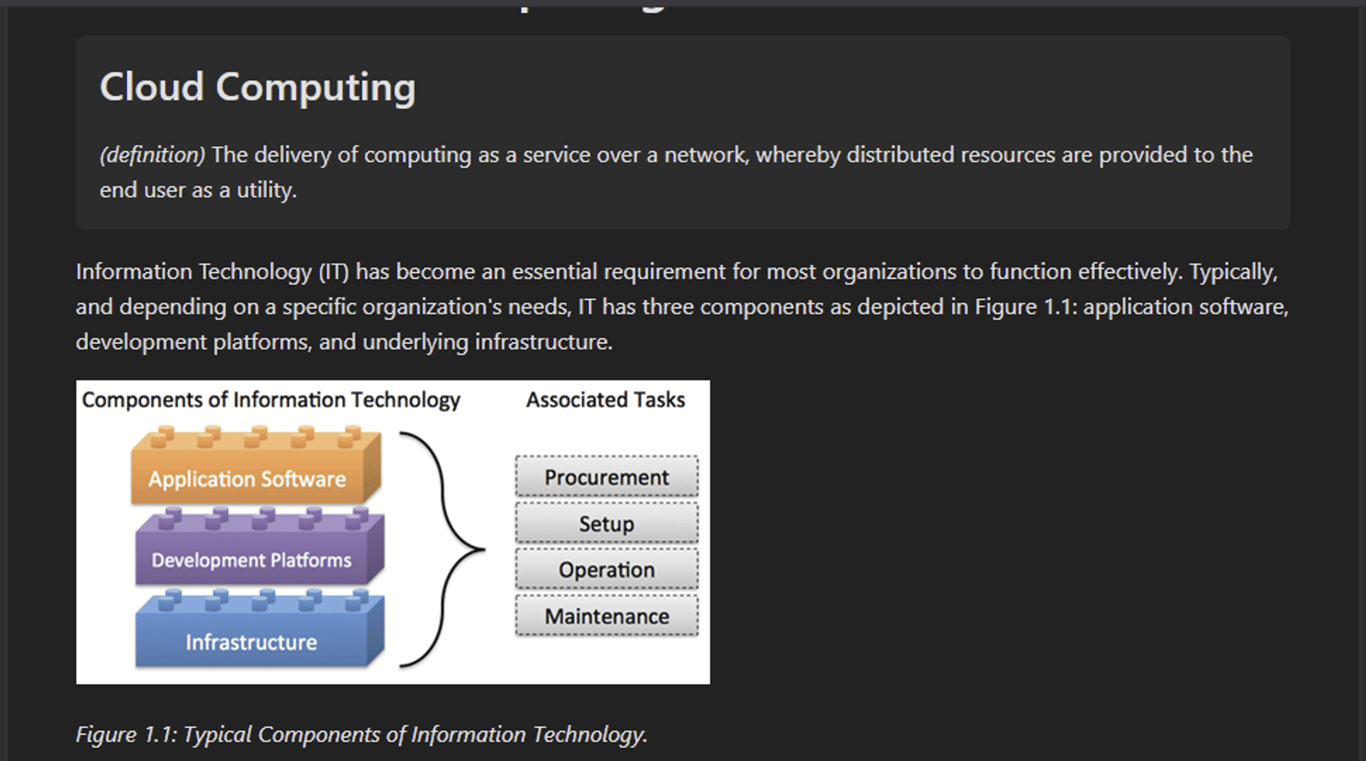
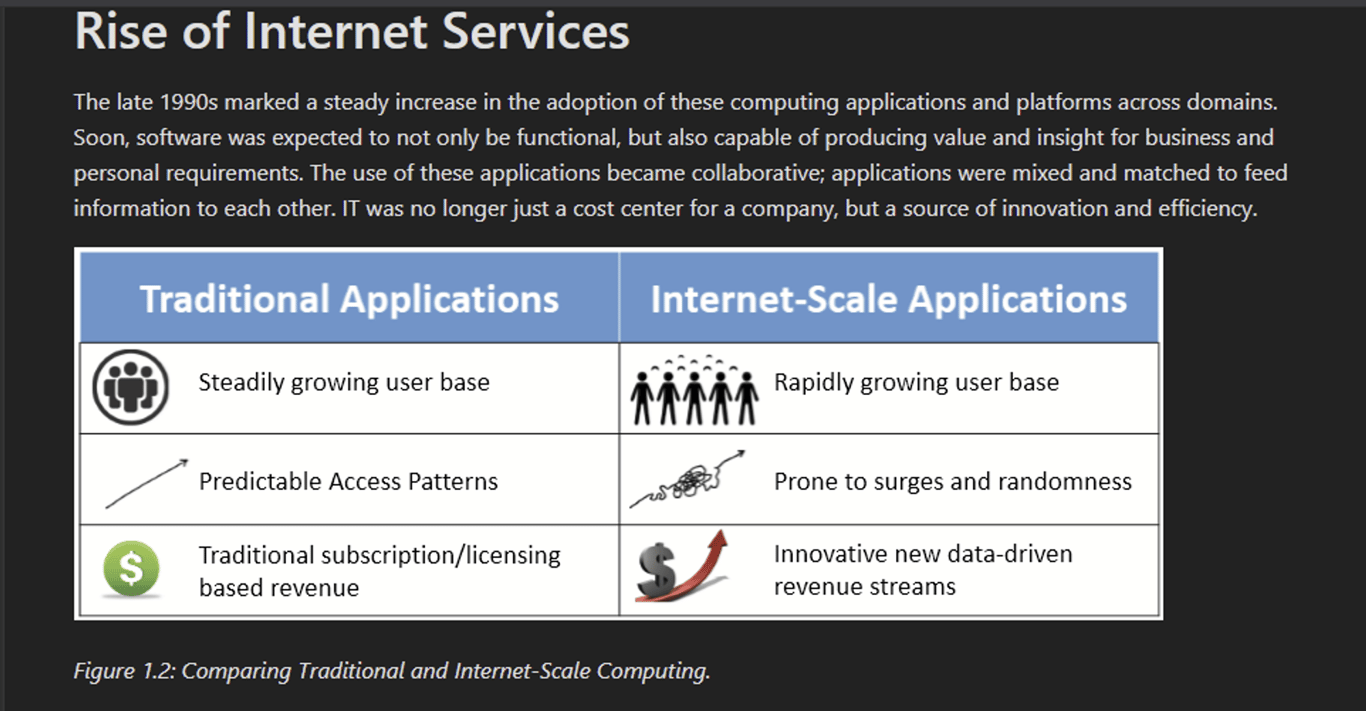
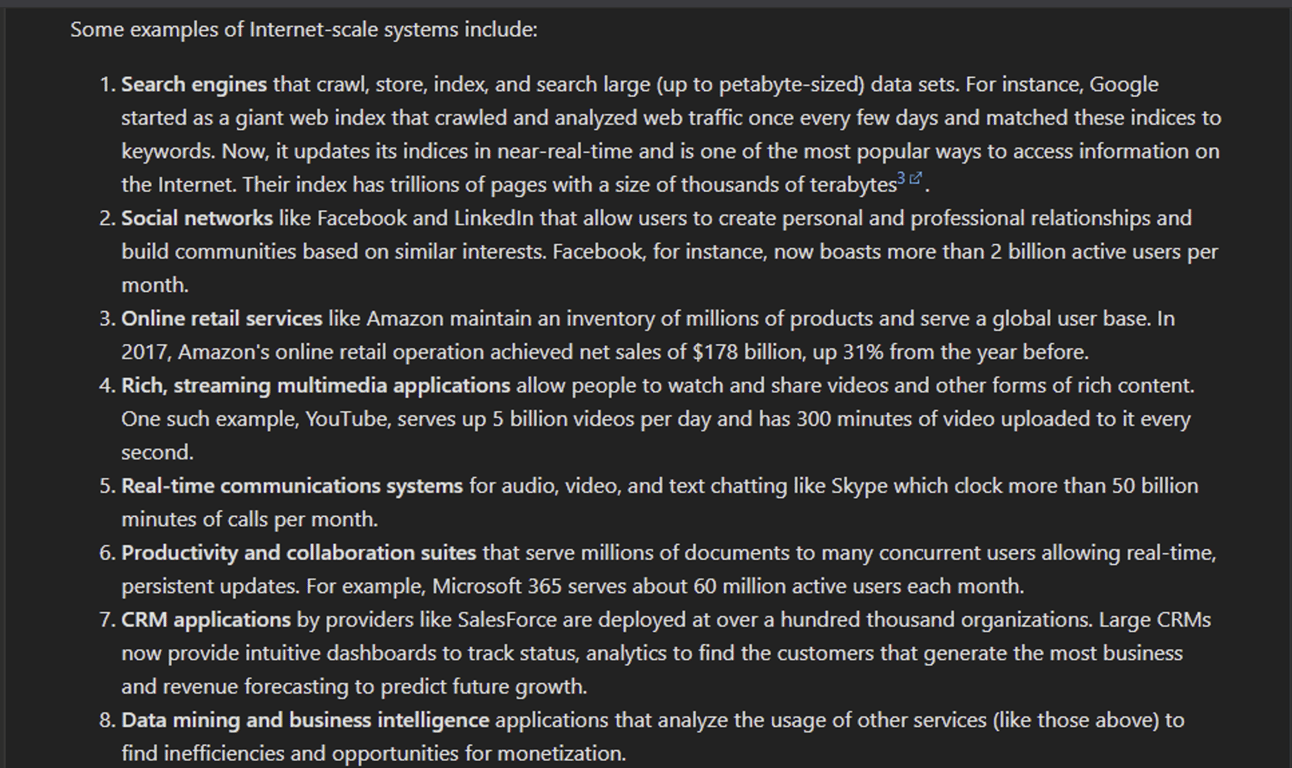
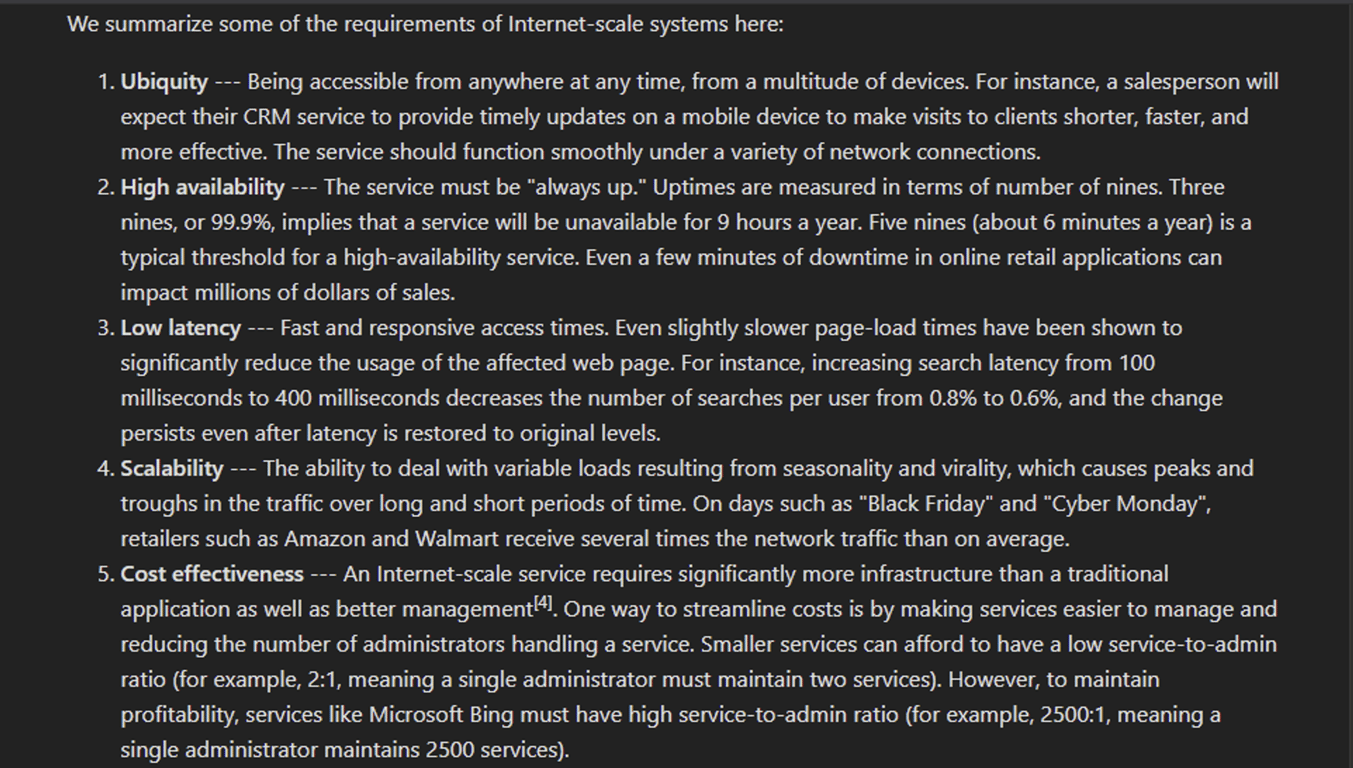
Cyber Planning
Cyber Security Planning and Strategy
A cyber security plan is an organization’s written guide to follow and improve its overall risk management and defenses against the ongoing threat of cybercrime - and some might say the most significant threat they face.
Building Your Cyber Security Strategy: A Step-By-Step Guide
Step 1: Lay the foundation for a sound security strategy.
First, determine what you have to protect.
Gain an understanding of the assets your company has to protect. While you cannot protect everything 100%, you can focus on what you absolutely need to protect first. Start with reviewing your business processes and understanding how revenue is generated by the company as well as what systems would have the ability to disrupt that by being unavailable or having their data stolen. You should also identify the data and other IT assets such as applications, devices, servers, and users that are critical to your business.
Identify what you’re legally required to protect.
While compliance and security aren’t the same thing, most organizations put the responsibility of maintaining compliance or security compliance frameworks on the CISO. Incompliance is costly and damaging to your business. Ensuring you design your strategic cyber security plan with required compliance frameworks in mind while help ensure your plan prioritizes legal requirements.
Understand your company’s risk appetite.
Before you begin developing a cyber security strategy, understand your organization’s risk appetite, or the total risk your organization is prepared to accept in pursuit of its strategic objectives. Risk appetites differ depending on your company’s financial strength, industry, objectives being pursued, and more. The cyber security strategic plan that works for a startup likely won’t work for a large,
established corporation. By understanding your company’s risk appetite, you can ensure you’re not over- or under-protecting your business.
established corporation. By understanding your company’s risk appetite, you can ensure you’re not over- or under-protecting your business.
Step 2: Get to know the threat landscape.
Once you know what you need to protect, you need to analyze the threat landscape. To do that, you’ll need to first understand the environment in which your company operates. Who are your customers? What are you selling? Who would benefit from disrupting your business? The answers to these questions help you become more familiar with the general environment.
You’ll also want to look at what is happening with your competitors. What threats do they face? Has their security been breached in the past? The threats your competitors are facing are almost always the same threats that may impact your business.
Finally, understand the types of threats that your business needs to protect itself against. What types of resources do potential attackers have? What are their motivations for shutting you down? Knowing these answers will give you the upper hand in defending your business against these threats.
Step 3: Build your strategic cyber security plan.
Pick a framework, identify the current state of your security environment, and establish a timeline.
To build your plan, you need to pick a framework to use. Options include CIS Controls, ISO, and NIST. It’s important to choose a framework so you can effectively track progress while prioritizing the most important steps. For instance, the CIS Controls provide you with a set of prioritized actions to protect your organization and the order in which you should take these actions. This allows you to track progress so that you know where you are in the process and what you still have to do.
When you know what needs to be protected from a processes and risk management point of view, evaluate the effectiveness of your current security measures. Are you protecting the right assets? Do you currently have the right processes in place for compliance?
You’ll also need to decide on a timeline, which will depend on the current state of your security. Things will change over time, requiring occasional updates to the timeline. However, it’s important to have a target timeline in mind to get to what your organization considers an acceptable level of risk. With a two- or three-year plan, you’ll need to spend the first year focused on IT hygiene while addressing the greatest or most-likely-to-be-exploited risks.
Evaluate your company’s security maturity level.
Using either in-house staff or an outside consultant, evaluate your organization’s security maturity level. The concept of security maturity refers to a company’s adherence to security best practices and
processes; measuring it helps you identify gaps and areas for improvement. Whether you do this analysis yourself or hire a consultant, make sure the process is repeatable. That way, when you check your security maturity in the future, you’ll have a benchmark with which to compare the results.
processes; measuring it helps you identify gaps and areas for improvement. Whether you do this analysis yourself or hire a consultant, make sure the process is repeatable. That way, when you check your security maturity in the future, you’ll have a benchmark with which to compare the results.
Evaluate your technology stack.
Then, look at the technology you currently have in place and identify tools you aren’t currently using to their full benefit. Underutilized software or other tools are only costing you money, time, and increasing your attack surface. Find out if the solutions you’ve identified here are fulfilling their original purposes, and if there is any way to get better use of them. If not, consider getting rid of it.
You can also use the Cyber Defense Matrix to identify any gaps you may have in security. There are a lot of cyber security solutions on the market, and making sure that all aspects of your company are protected can be challenging. The Cyber Defense Matrix helps you understand what you need so when you start looking at security solutions, you can quickly understand which products solve what problems.
Identify foundational items and quick wins.
While building your cyber security strategy, identify the foundational items, quick wins, and high risk items that need to be addressed in the beginning. Identify what is fundamental to the future steps of your plan, and prioritize these actions first. Quick wins are things that are easy to fix or require few resources. In the first year of implementation, make sure you have a combination of both foundational
tasks and quick wins.
tasks and quick wins.
Step 4: Evaluate your organization’s ability to execute the plan.
The final step in the process of developing a cyber security strategy is assessing your organization’s ability to get the necessary security work done. You’ll need to take a look at your current IT and security teams to understand their skill sets and bandwidth. If you don’t have the resources you need, you may need to plan to hire additional team members or outsource some of your security work in order to execute your strategic cyber security plan.
During this step, it’s also important to think about what the future holds for your business or the IT team.
- Does your company have any big product launches coming up, or a possible merger or acquisition on the horizon?
- Will your IT team be handling any large scale, company-wide projects in the foreseeable future?
- Is your IT team working on a major workstation upgrade program for next year? This could be the perfect time to harden them, as applications will need to be tested for compatibility with the new operating system anyway!
1. Understand Threats
To understand the basics of cybersecurity, you need to be aware of the different dangerous elements of the digital world. One of them is malware (malicious software), which is specifically designed to cause harm to computers, networks, and the people who use them.
Malware can come with extra issues, including viruses. These threats can spread from one device to another, especially connected ones. Another one is ransomware, which criminals use to infect and restrict access to gadgets to get paid a ransom.
Digital infections can also come in the form of phishing, which collects information by sneaking into your emails. Phishing emails can appear legitimate and often encourage recipients to click on links or
attachments to get data.
attachments to get data.
2. Determine Risks
Your ability to develop cybersecurity methods will depend on how aware you are of your company's risk of encountering cyber attacks. That's why we recommend holding assessments to maintain or improve your security.
Whatever service you use to ensure cybersecurity should come with a planning tool. This will help you create a to-do list for addressing issues. You can also determine which needs are more important and address them first.
Your assessments can also come in the form of reviews that show your system's performance in dealing with certain cyber attacks. With resilience reviews, you can figure out which areas need improvement and save money in areas that are performing well.
We also recommend using vulnerability scanning to check for weak areas in your system. You can arrange your scans every week so that you don't miss any potential threats.
3. Use Experts
The best cybersecurity techniques depend on the knowledge of the people applying them. In order to preserve your data, your team needs to have professionals who can handle cybersecurity on a regular basis.
You can put out job postings for people who have experience in IT management and other aspects of digital technology. Make sure that prospects show examples of their progress with handling cyber threats.
If you want to save money, you can train your current team to deal with viruses and ransomware. They must know how to browse carefully and avoid suspicious emails, links, and downloads.
Another option is outsourcing to professionals who can spot a criminal online. This can also save you money on repairs and replacements that may happen by using employees who aren't as
experienced.
experienced.
4. Apply Regular Maintenance
Understanding cybersecurity requires time if your business is new to the digital world. However, you can adjust to safety techniques properly by keeping an eye on your security system.
One way to keep your devices safe on a regular basis is with constant updates to your antivirus software and antispyware. Find a vendor that allows you to update your software automatically so that you don't worry about if you forgot to update it yourself.
Another way that you can improve cybersecurity is by keeping your passwords strong. You can use random letters, numbers, and special characters to keep passwords unique. Different passwords for different accounts can limit criminals' access to your information.
You also need to pay attention to your Internet connection, which can be solved by hiding and encrypting information in your network. Businesses who use Wi-Fi networks can set up wireless points and routers so that the network name stays hidden.
5. Constant Training
Some of you may use your own team to take care of cybersecurity. In this case, provide regular training sessions to keep them on their toes.
Video calls can help employees stay on track with potential threats in case they work from home on certain days. You can also have weekly meetings with your security team to see how their skills have improved or if they've noticed any suspicious activity.
We also recommend finding services that hold training events for preserving data among a variety of organizations. You can attend these events in person or in a virtual form via video conferences from home, and this is a chance for your team to develop new skills.
6. Preserve and Back Up Data
You can keep documents, spreadsheets, financial forms, human resource files, and account information safe by backing up your data. This is another practice that you can do automatically to save time and concern.
Another way to keep calm in the cybersecurity process is by restricting access to computers and other equipment. Create a separate user account for each employee to improve security. After locking up devices, only consider giving keys to trusted individuals.
Banks and card processors can also improve your cybersecurity strategy. All you need from them are validating and anti-fraud tools. Review the payment systems before sticking with them, and avoid using the computer for less secure programs.
Operational and Tactical Management
Definition of Strategic, Tactical and Operational Planning
Strategic planning is an organization’s process of defining its strategy, or direction, and making decisions on allocating its resources to pursue this strategy. Generally, strategic planning deals, on the
whole business, rather than just an isolated unit, with at least one of following three key questions:
whole business, rather than just an isolated unit, with at least one of following three key questions:
- What do we do?
- For whom do we do it?
- How do we excel?
For example, the first and third questions are those that motivate an acquisition. Acquisitions are thus strategic choices. Typically strategic choices look at 3 to 5 years, although some extend their
vision to 20 years (long term). Because of the time horizon and the nature of the questions dealt, mishaps potentially occurring during the execution of a strategic plan are afflicted by significant uncertainties and may lie very remotely out of the control of management (war, geopolitical shocks, etc.). Those mishaps, in conjunction to their potential consequences are called “strategic risks”. Untapped opportunities can also be seen as strategic risks, but in this post we will not analyze those upward-risks aspects.
vision to 20 years (long term). Because of the time horizon and the nature of the questions dealt, mishaps potentially occurring during the execution of a strategic plan are afflicted by significant uncertainties and may lie very remotely out of the control of management (war, geopolitical shocks, etc.). Those mishaps, in conjunction to their potential consequences are called “strategic risks”. Untapped opportunities can also be seen as strategic risks, but in this post we will not analyze those upward-risks aspects.
Tactical planning is short range planning emphasizing the current operations of various parts of the organization. Short Range is generally defined as a period of time extending about one year or less in the future. Managers use tactical planning to outline what the various parts of the organization must do for the organization to be successful at some point one year or less into the future. Tactical
plans are usually developed in the areas of production, marketing, personnel, finance and plant facilities. Because of the time horizon and the nature of the questions dealt, mishaps potentially occurring during the execution of a tactical plan should be covered by moderate uncertainties and may lie closer to the control of management (next year shipping prices, energy consumption, but not a catastrophic black-out, etc.) than strategic ones. Those mishaps, in conjunction to their potential consequences are called “tactical risks”.
plans are usually developed in the areas of production, marketing, personnel, finance and plant facilities. Because of the time horizon and the nature of the questions dealt, mishaps potentially occurring during the execution of a tactical plan should be covered by moderate uncertainties and may lie closer to the control of management (next year shipping prices, energy consumption, but not a catastrophic black-out, etc.) than strategic ones. Those mishaps, in conjunction to their potential consequences are called “tactical risks”.
Operational planning is the process of linking strategic goals and objectives to tactical goals and objectives. It describes milestones, conditions for success and explains how, or what portion of, a strategic plan will be put into operation during a given operational period.
An operational plan addresses four questions:
Where are we now?
Where do we want to be?
How do we get there?
How do we measure our progress?
Operational risks are those arising from the people, systems and processes through which a company operates and can include other classes of risk, such as fraud, legal risks, physical or environmental risks. Operational risk are those resulting from inadequate or failed internal processes, people and systems, or from external events (man-made or natural hazards). A tailings dam failure, an open pit slide, a black-out (man-made or natural external hazard), and explosion in a processing plant are all operational hazards generating operational risks.
Since upper Management generally have a better understanding of the organization as a whole than lower level managers do, upper Management generally develops strategic plans. Because lower level managers generally have better understanding of the day-to- day organizational operations, generally they develop tactical and operational plans. Because strategic plans are generally longer term and are surrounded by more uncertainties in terms of their occurrence and consequences (one exception example: tailings management planned until closure, and after closure) strategic plans are generally less detailed than tactical plans. Thus the following can be inferred for a list of “top hazards” discussed in a report we reviewed recently:
Business Continuity, Disaster Recovery, and Incident Response Management
Business Impact Analysis Concepts
Business Impact Analysis (BIA) is a process that identifies and evaluates the potential impact of an interruption or disruption of critical business functions and processes¹. In cybersecurity context, BIA can be used to identify critical assets and their dependencies, assess the potential impact of cyber threats on these assets, and prioritize risk mitigation efforts². For example, a BIA can help identify which systems and applications are most critical to business operations and what the potential impact would be if they were unavailable due to a cyber attack³. Another example is
that BIA can help identify the potential financial losses that could result from a cyber attack¹.
that BIA can help identify the potential financial losses that could result from a cyber attack¹.
There are several cybersecurity risk management techniques that organizations can use to manage their cyber risks. One such technique is to develop a cybersecurity risk management plan that identifies and assesses cybersecurity risks and outlines strategies for mitigating those risks¹. Another technique is to fully embed cybersecurity in the enterprise-risk-management framework². This approach involves identifying threat actors and their capabilities and defining the organization's threat landscape². A third technique is to use a methodology for digital risk management that is based on Cyber Threat Intelligence and the latest attack techniques³.
Digital risk management solutions can include process automation, decision automation, digitized monitoring, and early warning systems². These solutions can provide in-depth analytics to help organizations better monitor their compliance status and current threat level for all risk factors².
Mission Essential Functions (MEFs) are those functions that enable an organization to continue its essential operations during and after a disaster. MEFs are identified during the Business Impact Analysis (BIA) process. The BIA process identifies the Maximum Tolerable Downtime (MTD), Recovery Time Objective (RTO), Work Recovery Time (WRT), and Recovery Point Objective (RPO). MTD is the maximum amount of time that an organization can tolerate being without a particular function. RTO is the time within which an organization must recover its critical functions after a disruption. WRT is the time within which an organization must recover its non-critical functions after a disruption. RPO is the maximum amount of data loss that an organization can tolerate.
A business impact analysis (BIA) is a process that identifies and evaluates the potential effects of disruptions on critical business operations. The purpose of a BIA is to help an organization prepare for and recover from any events that could compromise its ability to function normally. A BIA typically involves the following steps:
- Identifying the key business processes and functions that are essential for the organization's survival and success.
- Assessing the potential impacts of various types of disruptions on these processes and functions, such as loss of revenue, customer satisfaction, reputation, legal compliance, etc.
- Estimating the maximum acceptable downtime (MAD) and recovery time objective (RTO) for each process and function, which are the maximum amount of time that they can be unavailable or degraded without causing unacceptable consequences.
- Prioritizing the processes and functions based on their importance and urgency for restoration.
- Developing strategies and plans to mitigate the risks and ensure continuity and resilience of the critical processes and functions.
A BIA is an important component of business continuity management (BCM), which is a holistic approach to protect an organization from various threats and ensure its long-term viability. A BIA provides valuable information for developing and testing business continuity plans (BCPs), which are documents that outline the actions and resources needed to resume normal operations after a disruption. A BIA also helps to align the organization's objectives, policies, procedures, and resources with its risk appetite and tolerance levels.
Security Program Management
Physical Security Control
Physical Security Controls
Physical control is the implementation of security measures in a defined structure used to deter or prevent unauthorized access to sensitive material.
Physical access controls are security measures that restrict and monitor access to specific physical areas or assets.
In the built environment, we often think of physical security control examples like locks, gates, and guards. While these are effective, there are many additional and often forgotten layers to physical security for offices that can help keep all your assets protected. A comprehensive physical security plan combines both technology and specialized hardware, and should include countermeasures
against intrusion such as:
against intrusion such as:
- Site design and layout
- Environmental components
- Emergency response readiness
- Training
- Access control
- Intrusion detection
- Power and fire protection
Components of physical security controls
The four main security technology components are:
1. Deterrence – These are the physical security measures that keep people out or away from the space. Deterrent security components can be a physical barrier, such as a wall, door, or turnstyle. Technology can also fall into this category. Access control systems and video security cameras deter unauthorized individuals from attempting to access the building, too.
2. Detection – Just because you have deterrents in place, doesn’t mean you’re fully protected. Detection components of your physical security system help identify a potential security event or intruder. Sensors, alarms, and automatic notifications are all examples of physical security detection.
3. Delay – There are certain security systems that are designed to slow intruders down as they attempt to enter a facility or building. Access control, such as requiring a key card or mobile
credential, is one method of delay. Smart physical security strategies have multiple ways to delay intruders, which makes it easier to mitigate a breach before too much damage is caused.
credential, is one method of delay. Smart physical security strategies have multiple ways to delay intruders, which makes it easier to mitigate a breach before too much damage is caused.
4. Response – These are the components that are in place once a breach or intrusion occurs. Examples of physical security response include communication systems, building lockdowns, and contacting emergency services or first responders.
Take a look at these physical security examples to see how the right policies can prevent common threats and vulnerabilities in your organization.
- Restrict access to IT and server rooms, and anywhere laptops or computers are left unattended
- Use highly secure access credentials that are difficult to clone, fully trackable, and unique to each individual
- Require multi-factor authentication (MFA) to unlock a door or access the building
- Structure permissions to employ least-privilege access throughout the physical infrastructure
- Eliminate redundancies across teams and processes for faster incident response
- Integrate all building and security systems for a more complete view of security and data trends
- Set up automated security alerts to monitor and identify suspicious activity in real-time
Most common threats to physical security
While your security systems should protect you from the unique risks of your space or building, there are also common physical security threats and vulnerabilities to consider. The top 5 most common
threats your physical security system should protect against are:
threats your physical security system should protect against are:
- Theft and burglary
- Vandalism
- Natural disasters
- Terrorism or sabotage
- Violence in the workplace
Depending on where your building is located, and what type of industry you’re in, some of these threats may be more important for you to consider. For example, if your building or workplace is in a busy public area, vandalism and theft are more likely to occur. If your building houses a government agency or large data storage servers, terrorism may be higher on your list of concerns.
The above common physical security threats are often thought of as outside risks. However, internal risks are equally important. Human error is actually the leading cause of security breaches,
accounting for approximately 88% of incidents, according to a Stanford University study. Some of the factors that lead to internal vulnerabilities and physical security failures include:
accounting for approximately 88% of incidents, according to a Stanford University study. Some of the factors that lead to internal vulnerabilities and physical security failures include:
- Employees sharing their credentials with others
- Accidental release or sharing of confidential data and information
- Tailgating incidents with unauthorized individuals
- Easily hacked authentication processes
- Slow and limited response to security incidents
Security Awareness Training
What Is Security Awareness Training?
In broad terms, you could think of security awareness training as making sure that individuals understand and follow certain practices to help ensure the security of an organization. From this perspective, security awareness training has been around practically forever, especially when you consider the need for security in military applications.
Today, security awareness training emphasizes information security, and especially cybersecurity. Rapid advances in information technology — and parallel innovations by cybercriminals — mean that employees and other end users need regular, specific training on how to stay safe online and protect their information and that of their employers.
Why Do Organizations Conduct Security Awareness Training?
Cybersecurity awareness training has a critical role to play in minimizing the serious cybersecurity threats posed to end users by phishing attacks and social engineering. Key training topics typically include password management, privacy, email/phishing security, web/internet security, and physical and office security.
There’s also a business case to be made for security awareness training, as explored in the Aberdeen Group’s report, Security Awareness Training: Small Investment, Large Reduction in Risk. The researchers conducted a workshop with enterprise security leaders to find out why they invest in security awareness and training. They found that:
- 91% use security awareness to reduce cybersecurity risk related to user behavior.
- 64% use it to change user behavior.
- 61% use it to address regulatory requirements.
- 55% use it to comply with internal policies.
Tools for Training End Users
Today, infosec professionals use a variety of tools to train end users, as can be seen in our State of the Phish™ Report. The dominant tool — and one that continues to grow in popularity — is computer-based awareness training.
- 79% use computer-based awareness training.
- 68% use phishing simulation exercises.
- 46% use awareness campaigns (videos and posters).
- 45% use in-person security awareness training.
- 38% use monthly notifications or newsletters.
Well-designed training programs often make use of several of these tools. Equally important is to deploy these tools in a systematic, methodical way that
allows you to track and measure progress over time.What Are Security Awareness Best Practices?
allows you to track and measure progress over time.What Are Security Awareness Best Practices?
If you read enough business-oriented articles, you’ll eventually come across the phrase “best practices.” It’s a nice bit of jargon, but what exactly does it mean? In generic terms, “best practices” is defined as procedures shown by experience and research to produce optimal results. These procedures get accepted as a standard for widespread adoption.
Much of cyber security can be broken down into seven main topics:
- Data breaches
- Secure passwords
- Malware
- Privacy
- Safe computing
- Mobile protection
- Online scams
The most commonly referenced security awareness best practices include:
- Getting into compliance - Different cities, states, and nations have different rules and regulations to follow. Everyone must become aware of these rules because ignorance of the law is not an adequate defense.
- Including everyone, even managers - It’s all or nothing. Anyone not participating in the new security measures constitutes a possible weak link. If everyone isn’t fully engaged, it’s all for nothing. This
particular practice also assumes that all departments (e.g., HR, Legal, Security) must buy-in and help make it a reality. - Establishing the basics, which include:
- Anti-phishing tactics - Employees need to be suspicious of emails from unrecognizable sources. Phishing scams use emails to gain access to systems and wreak havoc. Employees must be educated on things like suspicious links, attachments, and untrustworthy sources.
- Password security - There’s no excuse for having the word “password” as your password. They should be at least eight characters long, with both upper and lower case letters, numbers, and a minimum of one unique character. Avoid mistakes such as writing the password on a post-it note and attaching it to your computer.
- Physical security - This includes everything from physical access to your company’s IT department to keeping your company-issued mobile devices and laptops locked and within sight at all times.
- Social engineering - It’s crucial to raise everyone’s awareness of hazards, such as attempts at manipulating employees into granting system access or divulging confidential company information.
- Clearly communicating your security awareness program - This practice is especially important for middle and upper management. The higher-ups need to be kept in the loop, apprised of the current progress, and, in rare instances, report if any individual or department isn’t compliant.
- Making the training engaging and even entertaining - Company meetings and seminars are often dull affairs that everyone does their best to avoid. Keep people engaged by showing a humorous (yet topical) video or sharing odd and quirky security-related anecdotes. Just don’t overdo it.
- Reinforcing important messages with reviews and repetition - People often make the mistake of thinking that if they do something once, they don’t have to do it again. Cyber security is an ongoing thing and should include occasional tests and checks, scheduled at regular intervals throughout the year.
- Creating an environment of reinforcement and motivation - Promote constant vigilance and learning by creating a security culture that runs through every organizational level, down the entire chain of command. While it’s not necessary to continually harp on the subject With employees and end-users, cyber security should be a very relevant, everyday topic.
Security Hiring Process
Understand the hiring process - There are 6 phases to the hiring process: planning, sourcing, screening, selection, onboarding, and retention.
- Planning - Recruitment plan refers to a prearranged strategy for hiring employees. It acts as a timeline for companies to find qualified applicants without causing downtime for the company. Recruitment plan identifies the goals for a particular position.
- Sourcing - The proactive searching for qualified job candidates for current or planned open positions; it is not the reactive function of reviewing resumes and applications sent to the company in response to a job posting or pre-screening candidates.
- Screening - Screening is a process used to determine a job applicant's qualifications and potential job fit for a position to which they have applied. The screening process may include a variety of elements such as: job screening questions within the employment application.
- Selection - Selection is the process of identifying an individual from a pool of job applicants with the requisite qualifications and competencies to fill jobs in the organization. This is an HR process that helps differentiate between qualified and unqualified applicants by applying various techniques.
- Onboarding - "Onboarding" refers to the processes in which new hires are integrated into the organization. It includes activities that allow new employees to complete an initial new-hire orientation process, as well as learn about the organization and its structure, culture, vision, mission and values.
6. Retention - Employee retention is another important function of HR and describes the number of employees you retain year over year (or any other specific period of time). Jobs with a higher retention rate often point to happier and more satisfied employees.
The Difference Between Recruitment and Selection
The difference between recruitment and selection can be understood by comparing the two processes against the same characteristics or factors. See the chart below.
Comparison | Recruitment | Selection |
Meaning | An activity of searching for potential candidates and encouraging them to apply. | A process of selecting the best candidates and offering them the job. |
Approach | Positive – seeking out an increase in the applicant pool. | Negative – seeking out ways to reduce the applicant pool until one ideal candidate is identified. |
Objective | Inviting more candidates to apply for a vacant position. | Choosing the most suitable candidate and rejecting the rest. |
Key Factor | Advertising the job. | Appointing the candidate. |
Sequence | First. | Second. |
Process | Vacancies are notified by the organization through various sources, then an application form is made available to candidates. | The organization makes an applicant go through various levels (submitting a form, writing a test, undergoing an interview, etc.) to deem whether they’re an appropriate fit. |
Specifications | The recruitment policy specifies the objectives of recruitment, providing rules and regulations for the implementation of the recruitment program. | The selection policy consists of a series of methods/steps/stages by which the evaluation of the candidate will be done. |
Contractual Relation | Recruitment only implies communication of vacancies and open positions – therefore, no contractual relation is established. | Selection involves the creation of a contractual agreement between the employer and employee. |
Method | Economical. | Expensive. |
Key Differences
The process of recruitment involves the development of suitable techniques for attracting more candidates to a position vacancy, while the process of selection involves identifying the most suitable candidate for the vacancy. Recruitment precedes the selection process, and the selection process is only completed when a job offer is created and given to the selected candidate by appointment letter.
In order to thoroughly understand the difference between recruitment and selection, there are certain points to keep in mind.
- Recruitment is the process of finding candidates for the vacant position and encouraging them to apply for it. Selection means choosing the best candidate from the pool of applicants and offering them the job.
- Recruitment is a positive process aimed at attracting more and more job seekers to apply. Selection is a negative process, rejecting unfit candidates from the list.
- Of the two, recruitment is relatively simpler. Recruitment has the recruiter paying less attention to scrutinizing individual candidates, whereas selection involves a more thorough examination of candidates where recruiters aim to learn every minute detail about each candidate, so they can choose the perfect match for the job.
- Recruitment is less time-consuming and less economically demanding, as it only involves identifying the needs of the job and encouraging candidates to apply for them. Selection involves a wide range of activities, which can be both time-consuming and expensive.
- In recruitment, communication of vacancy is done so through various sources such as the internet, newspaper, magazines, etc., and distributes forms easily so candidates can apply. During the selection process, assessment is done so through various evaluation stages, such as form submission, written exams, interviews, etc.
Incident Response and Disaster Recovery
Incident Response and Disaster Recovery are two related but distinct processes that are critical for businesses to effectively handle security incidents and reduce downtime and minimize damage.
Incident Response is the methodology an organization uses to respond to and manage a cyberattack. An attack or data breach can wreak havoc potentially affecting customers, intellectual property company time and resources, and brand value. An incident response aims to reduce this damage and recover as quickly as possible
An effective Incident Response Plan can help cybersecurity teams detect and contain cyber threats and restore affected systems faster, and reduce the lost revenue, regulatory fines and other costs associated with these threats.
Disaster Recovery (DR) consists of IT technologies and best practices designed to prevent or minimize data loss and business disruption resulting from catastrophic events—everything from equipment failures and localized power outages to cyberattacks, civil emergencies, criminal or military attacks, and natural disasters. Disaster Recovery is an organization’s method of regaining access and functionality to its IT infrastructure after events like a natural disaster, cyber attack, or even business disruptions related to the COVID-19 pandemic. A variety of disaster recovery (DR) methods can be part of a disaster recovery plan.
An Incident Response Plan is a set of procedures that a business will follow in the event of a security breach. The goal of the plan is to effectively and efficiently detect, manage, and recover from a cyberattack, therefore reducing the potential damages and consequences to the business.
A Disaster Recovery Plan, on the other hand, addresses how the business will recover and resume normal work operations after a security breach. Disaster recovery plans focus on the enterprise as a whole, paying close attention to how the business can respond immediately to a security breach and minimize the overall damage.
Third Party Security
Third-party security refers to the measures taken to protect an organization's systems, data, and assets from risks associated with third-party vendors, contractors, and other external parties who have access to or control over the organization's resources. Third-party security risks can arise in various forms, such as cyber attacks, data breaches, intellectual property theft, and unauthorized access. These risks can result in significant financial losses, reputational damage, and legal liabilities for organizations.
To mitigate third-party security risks, organizations need to establish comprehensive security policies, conduct thorough risk assessments, and implement appropriate controls and monitoring mechanisms to ensure that third-party vendors and contractors comply with security standards and best practices. This includes ensuring that third-party vendors and contractors have adequate security measures in place, regularly monitoring their activities, and providing training and awareness programs for employees and contractors on how to identify and prevent security threats.
There are many security measures that organizations can implement to protect their systems and data from third-party security risks. Some of these measures include:
- Vendor Risk Management: Establishing a vendor risk management program to evaluate and assess the security posture of third-party vendors before engaging in business with them.
- Contractual Security Provisions: Including security requirements and provisions in contracts with third-party vendors to ensure that they adhere to the organization's security standards and practices.
- Data Encryption: Implementing encryption technologies to protect sensitive data from unauthorized access and theft.
- Access Controls: Implementing access controls to restrict access to sensitive systems and data based on the principle of least privilege, ensuring that only authorized personnel have access.
- Regular Security Audits: Conducting regular security audits to identify vulnerabilities and assess the effectiveness of security controls.
- Incident Response Planning: Establishing an incident response plan to detect, respond to, and recover from security incidents involving third-party vendors.
- Training and Awareness Programs: Providing training and awareness programs for employees and third-party vendors to educate them on security risks and how to prevent and respond to them.
- Compliance with Regulations and Standards: Ensuring compliance with regulations and standards such as the GDPR, CCPA, and ISO 27001 to protect sensitive data and systems from third-party security risks.
Implementing these security measures can help organizations to protect their systems and data from third-party security risks and mitigate the potential impact of security incidents.
 Made with Bullet