
Information
Information can be defined as meaningfully interpreted data. If we give you a number 1-212-290-4700, it does not make any sense on its own. It is just a raw data. However if we say Tel: +1-212-290-4700, it starts making sense. It becomes a telephone number. If I gather some more data and record it meaningfully like so:
Address: 350 Fifth Avenue, 34th floor
New York, NY 10118-3299 USA
Tel: +1-212-290-4700
Fax: +1-212-736-1300
New York, NY 10118-3299 USA
Tel: +1-212-290-4700
Fax: +1-212-736-1300
It becomes a very useful information -- the address of New York office of Human Rights Watch, a non-profit, non-governmental human rights organization.
So, from a system analyst's point of view, information is a sequence of symbols that can be construed to a useful message.
An Information System is a system that gathers data and disseminates information with the sole purpose of providing information to its users.
The main objective of an information system is to provide information to its users. Information systems vary according to the type of users who use the system.
A Management Information System is an information system that evaluates, analyzes, and processes an organization's data to produce meaningful and useful information based on which the management can take right decisions to ensure future growth of the organization.
Information Definition
"Information can be recorded as signs, or transmitted as signals. Information is any kind of event that affects the state of a dynamic system that can interpret the information.
Conceptually, information is the message (utterance or expression) being conveyed. Therefore, in a general sense, information is "Knowledge communicated or received, concerning a particular fact or circumstance". Information cannot be predicted and resolves uncertainty."
Information Vs Data
Data can be described as unprocessed facts and figures. Plain collected data as raw facts cannot help in decision-making. However, data is the raw material that is organized, structured, and interpreted to create useful information systems.
Data is defined as 'groups of non-random symbols in the form of text, images, voice representing quantities, action and objects'.
Information is interpreted data; created from organized, structured, and processed data in a particular context.
According to Davis and Olson:
"Information is a data that has been processed into a form that is meaningful to recipient and is of real or perceived value in the current or the prospective action or decision of recipient."
Data — Processing — Information
Information, Knowledge and Business Intelligence
Professor Ray R. Larson of the School of Information at the University of California, Berkeley, provides an Information Hierarchy, which is:
- Data − The raw material of information.
- Information − Data organized and presented by someone.
- Knowledge − Information read, heard, or seen, and understood.
- Wisdom − Distilled and integrated knowledge and understanding.
Scott Andrews' explains Information Continuum as follows:
- Data − A Fact or a piece of information, or a series thereof.
- Information − Knowledge discerned from data.
- Business Intelligence − Information Management pertaining to an organization's policy or decision-making, particularly when tied to strategic or operational objectives.
Information/Data Collection Techniques
The most popular data collection techniques include:
- Surveys − A questionnaires is prepared to collect the data from the field.
- Secondary data sources or archival data: Data is collected through old records, magazines, company website etc.
- Objective measures or tests − An experimental test is conducted on the subject and the data is collected.
- Interviews − Data is collected by the system analyst by following a rigid procedure and collecting the answers to a set of pre-conceived questions through personal interviews.
Classification of Information
Information can be classified in a number of ways and in this chapter, you will learn two of the most important ways to classify information.
Classification by Characteristic
Based on Anthony's classification of Management, information used in business for decision-making is generally categorized into three types:
- Strategic Information − Strategic information is concerned with long term policy decisions that defines the objectives of a business and checks how well these objectives are met. For example, acquiring a new plant, a new product, diversification of business etc, comes under strategic information.
- Tactical Information − Tactical information is concerned with the information needed for exercising control over business resources, like budgeting, quality control, service level, inventory level, productivity level etc.
- Operational Information − Operational information is concerned with plant/business level information and is used to ensure proper conduction of specific operational tasks as planned/intended. Various operator specific, machine specific and shift specific jobs for quality control checks comes under this category.
Classification by Application
In terms of applications, information can be categorized as:
- Planning Information − These are the information needed for establishing standard norms and specifications in an organization. This information is used in strategic, tactical, and operation planning of any activity. Examples of such information are time standards, design standards.
- Control Information − This information is needed for establishing control over all business activities through feedback mechanism. This information is used for controlling attainment, nature and utilization of important processes in a system. When such information reflects a deviation from the established standards, the system should induce a decision or an action leading to control.
- Knowledge Information − Knowledge is defined as "information about information". Knowledge information is acquired through experience and learning, and collected from archival data and research studies.
- Organizational Information − Organizational information deals with an organization's environment, culture in the light of its objectives. Karl Weick's Organizational Information Theory emphasizes that an organization reduces its equivocality or uncertainty by collecting, managing and using these information prudently. This information is used by everybody in the organization; examples of such information are employee and payroll information.
- Functional/Operational Information − This is operation specific information. For example, daily schedules in a manufacturing plant that refers to the detailed assignment of jobs to machines or machines to operators. In a service oriented business, it would be the duty roster of various personnel. This information is mostly internal to the organization.
- Database Information − Database information construes large quantities of information that has multiple usage and application. Such information is stored, retrieved and managed to create databases. For example, material specification or supplier information is stored for multiple users.
Quality of Information
Information is a vital resource for the success of any organization. Future of an organization lies in using and disseminating information wisely. Good quality information placed in right context in right time tells us about opportunities and problems well in advance.
Good quality information − Quality is a value that would vary according to the users and uses of the information.
According to Wang and Strong, the following are the dimensions or elements of Information Quality:
- Intrinsic − Accuracy, Objectivity, Believability, Reputation
- Contextual − Relevancy, Value-Added, Timeliness, Completeness, Amount of information
- Representational − Interpretability, Format, Coherence, Compatibility
- Accessibility − Accessibility, Access security
Various authors propose various lists of metrics for assessing the quality of information. Let us generate a list of the most essential characteristic features for information quality:
- Reliability − It should be verifiable and dependable.
- Timely − It must be current and it must reach the users well in time, so that important decisions can be made in time.
- Relevant − It should be current and valid information and it should reduce uncertainties.
- Accurate − It should be free of errors and mistakes, true, and not deceptive.
- Sufficient − It should be adequate in quantity, so that decisions can be made on its basis.
- Unambiguous − It should be expressed in clear terms. In other words, in should be comprehensive.
- Complete − It should meet all the needs in the current context.
- Unbiased − It should be impartial, free from any bias. In other words, it should have integrity.
- Explicit − It should not need any further explanation.
- Comparable − It should be of uniform collection, analysis, content, and format.
- Reproducible − It could be used by documented methods on the same data set to achieve a consistent result.
Information Need & Objective
Information processing beyond doubt is the dominant industry of the present century. Following factors states few common factors that reflect on the needs and objectives of the information processing:
- Increasing impact of information processing for organizational decision making.
- Dependency of services sector including banking, financial organization, health care, entertainment, tourism and travel, education and numerous others on information.
- Changing employment scene world over, shifting base from manual agricultural to machine-based manufacturing and other industry related jobs.
- Information revolution and the overall development scenario.
- Growth of IT industry and its strategic importance.
- Strong growth of information services fueled by increasing competition and reduced product life cycle.
- Need for sustainable development and quality life.
- Improvement in communication and transportation brought in by use of information processing.
- Use of information processing in reduction of energy consumption, reduction in pollution and a better ecological balance in future.
- Use of information processing in land record managements, legal delivery system, educational institutions, natural resource planning, customer relation management and so on.
In a nutshell:
- Information is needed to survive in the modern competitive world.
- Information is needed to create strong information systems and keep these systems up to date.
Implications of Information in Business
Information processing has transformed our society in numerous ways. From a business perspective, there has been a huge shift towards increasingly automated business processes and communication. Access to information and capability of information processing has helped in achieving greater efficiency in accounting and other business processes.
A complete business information system, accomplishes the following functionalities:
- Collection and storage of data.
- Transform these data into business information useful for decision making.
- Provide controls to safeguard data.
- Automate and streamline reporting.
The following list summarizes the five main uses of information by businesses and other organizations:
- Planning − At the planning stage, information is the most important ingredient in decision making. Information at planning stage includes that of business resources, assets, liabilities, plants and machinery, properties, suppliers, customers, competitors, market and market dynamics, fiscal policy changes of the Government, emerging technologies, etc.
- Recording − Business processing these days involves recording information about each transaction or event. This information collected, stored and updated regularly at the operational level.
- Controlling − A business need to set up an information filter, so that only filtered data is presented to the middle and top management. This ensures efficiency at the operational level and effectiveness at the tactical and strategic level.
- Measuring − A business measures its performance metrics by collecting and analyzing sales data, cost of manufacturing, and profit earned.
- Decision-making − MIS is primarily concerned with managerial decision-making, theory of organizational behavior, and underlying human behavior in organizational context. Decision-making information includes the socio-economic impact of competition, globalization, democratization, and the effects of all these factors on an organizational structure.
MIS Need for Information Systems
Managers make decisions. Decision-making generally takes a four-fold path:
- Understanding the need for decision or the opportunity,
- Preparing alternative course of actions,
- Evaluating all alternative course of actions,
- Deciding the right path for implementation.
MIS is an information system that provides information in the form of standardized reports and displays for the managers. MIS is a broad class of information systems designed to provide information needed for effective decision making.
Data and information created from an accounting information system and the reports generated thereon are used to provide accurate, timely and relevant information needed for effective decision making by managers.
Management information systems provide information to support management decision making, with the following goals −
- Pre-specified and preplanned reporting to managers.
- Interactive and ad-hoc support for decision making.
- Critical information for top management.
MIS is of vital importance to any organization, because:
- It emphasizes on the management decision making, not only processing of data generated by business operations.
- It emphasizes on the systems framework that should be used for organizing information systems applications.
Major Enterprise Applications
Enterprise applications are specifically designed for the sole purpose of promoting the needs and objectives of the organizations.
Enterprise applications provide business-oriented tools supporting electronic commerce, enterprise communication and collaboration, and web-enabled business processes both within a networked enterprise and with its customers and business partners.
Services Provided by Enterprise Applications
Some of the services provided by an enterprise application includes:
- Online shopping, billing and payment processing
- Interactive product catalog
- Content management
- Customer relationship management
- Manufacturing and other business processes integration
- IT services management
- Enterprise resource management
- Human resource management
- Business intelligence management
- Business collaboration and security
- Form automation
Basically these applications intend to model the business processes, i.e., how the entire organization works. These tools work by displaying, manipulating and storing large amounts of data and automating the business processes with these data.
Most Commonly Used Enterprise Applications
A multitude of applications comes under the definition of Enterprise Applications. In this section, a few are briefly mentioned:
- Management information system (MIS)
- Enterprise Resource Planning (ERP)
- Customer Relationship Management (CRM)
- Decision Support System (DSS)
- Knowledge Management Systems (KMS)
- Content Management System (CMS)
- Executive Support System (ESS)
- Business Intelligence System (BIS)
- Enterprise Application Integration (EAI)
- Business Continuity Planning (BCP)
- Supply Chain Management (SCM)
Management Information Systems
To the managers, a Management Information System is an implementation of the organizational systems and procedures. To a programmer it is nothing but file structures and file processing. However, it involves much more complexity.
The three components of MIS provide a more complete and focused definition, where System suggests integration and holistic view, Information stands for processed data, and Management is the ultimate user, the decision makers.
Management information system can thus be analyzed as follows:
Management
Management covers the planning, control, and administration of the operations of a concern. The top management handles planning; the middle management concentrates on controlling; and the lower management is concerned with actual administration.
Information
Information, in MIS, means the processed data that helps the management in planning, controlling and operations. Data means all the facts arising out of the operations of the concern. Data is processed i.e. recorded, summarized, compared and finally presented to the management in the form of MIS report.
System
Data is processed into information with the help of a system. A system is made up of inputs, processing, output and feedback or control.
Thus MIS means a system for processing data in order to give proper information to the management for performing its functions.
Definition
Management Information System or 'MIS' is a planned system of collecting, storing, and disseminating data in the form of information needed to carry out the functions of management.
Objectives of MIS
The goals of an MIS are to implement the organizational structure and dynamics of the enterprise for the purpose of managing the organization in a better way and capturing the potential of the information system for competitive advantage.
Following are the basic objectives of an MIS:
- Capturing Data − Capturing contextual data, or operational information that will contribute in decision making from various internal and external sources of organization.
- Processing Data − The captured data is processed into information needed for planning, organizing, coordinating, directing and controlling functionalities at strategic, tactical and operational level. Processing data means:
- making calculations with the data
- sorting data
- classifying data and
- summarizing data
- Information Storage − Information or processed data need to be stored for future use.
- Information Retrieval − The system should be able to retrieve this information from the storage as and when required by various users.
- Information Propagation − Information or the finished product of the MIS should be circulated to its users periodically using the organizational network.
Characteristics of MIS
The following are the characteristics of an MIS:
- It should be based on a long-term planning.
- It should provide a holistic view of the dynamics and the structure of the organization.
- It should work as a complete and comprehensive system covering all interconnecting sub-systems within the organization.
- It should be planned in a top-down way, as the decision makers or the management should actively take part and provide clear direction at the development stage of the MIS.
- It should be based on need of strategic, operational and tactical information of managers of an organization.
- It should also take care of exceptional situations by reporting such situations.
- It should be able to make forecasts and estimates, and generate advanced information, thus providing a competitive advantage. Decision makers can take actions on the basis of such predictions.
- It should create linkage between all sub-systems within the organization, so that the decision makers can take the right decision based on an integrated view.
- It should allow easy flow of information through various sub-systems, thus avoiding redundancy and duplicity of data. It should simplify the operations with as much practicability as possible.
- Although the MIS is an integrated, complete system, it should be made in such a flexible way that it could be easily split into smaller sub-systems as and when required.
- A central database is the backbone of a well-built MIS.
Characteristics of Computerized MIS
The following are the characteristics of a well-designed computerized MIS:
- It should be able to process data accurately and with high speed, using various techniques like operations research, simulation, heuristics, etc.
- It should be able to collect, organize, manipulate, and update large amount of raw data of both related and unrelated nature, coming from various internal and external sources at different periods of time.
- It should provide real time information on ongoing events without any delay.
- It should support various output formats and follow latest rules and regulations in practice.
- It should provide organized and relevant information for all levels of management: strategic, operational, and tactical.
- It should aim at extreme flexibility in data storage and retrieval.
MIS and its Role
In business, management information systems (or information management systems) are tools used to support processes, operations, intelligence, and IT. MIS tools move data and manage information. They are the core of the information management discipline and are often considered the first systems of the information age.
MIS produce data-driven reports that help businesses make the right decisions at the right time. While MIS overlaps with other business disciplines, there are some differences:
- Enterprise Resource Planning (ERP): This discipline ensures that all departmental systems are integrated. MIS uses those connected systems to access data to create reports.
- IT Management: This department oversees the installation and maintenance of hardware and software that are parts of the MIS. The distinction between the two has always been fuzzy.
- E-commerce: E-commerce activity provides data that the MIS uses. In turn, the MIS reports based on this data affect e-commerce processes.
The concept includes what computers can do in this field, how people process information, and how best to make it accessible and up-to-date.
"The right information in the right place at the right time is what we are striving for."
- Maeve Cummings, Professor of Accounting & Computer Information Systems at Pittsburg State University in Pittsburg, Kansas.
History of MIS
The technology and tools used in MIS have evolved over time. Kenneth and Aldrich Estel, who are widely cited on the topic, have identified six eras in the field.
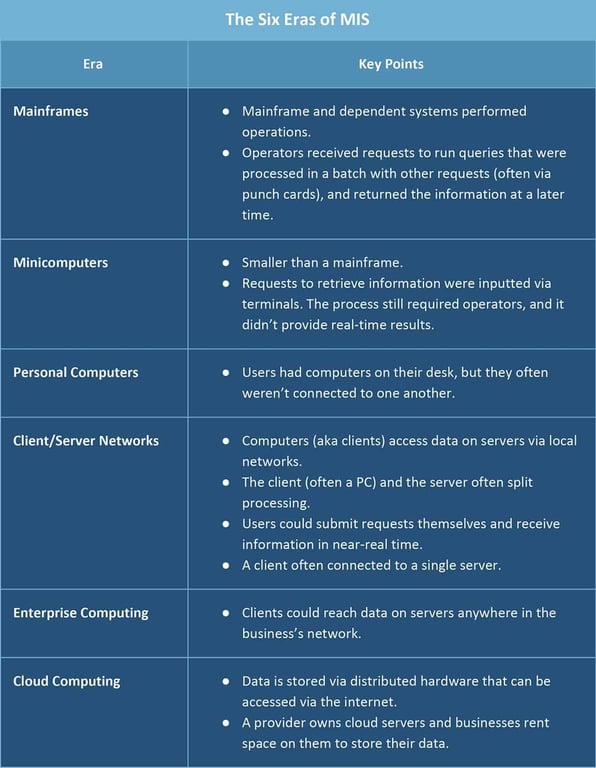
Categories of Management Information Systems
Management information system is a broad term that incorporates many specialized systems. The major types of systems include the following:
- Executive Information System (EIS): Senior management use an EIS to make decisions that affect the entire organization. Executives need high-level data with the ability to drill down as necessary.
- Marketing Information System (MkIS): Marketing teams use MkIS to report on the effectiveness of past and current campaigns and use the lessons learned to plan future campaigns.
- Business Intelligence System (BIS): Operations use a BIS to make business decisions based on the collection, integration, and analysis of the collected data and information. This system is similar to EIS, but both lower level managers and executives use it.
- Customer Relationship Management System (CRM): A CRM system stores key information about customers, including previous sales, contact information, and sales opportunities. Marketing, customer service, sales, and business development teams often use CRM.
- Sales Force Automation System (SFA): A specialized component of a CRM system that automates many tasks that a sales team performs. It can include contact management, lead tracking and generation, and order management.
- Transaction Processing System (TPS): An MIS that completes a sale and manages related details. On a basic level, a TPS could be a point of sale (POS) system, or a system that allows a traveller to search for a hotel and include room options, such as price range, the type and number of beds, or a swimming pool, and then select and book it. Employees can use the data created to report on usage trends and track sales over time.
- Knowledge Management System (KMS): Customer service can use a KM system to answer questions and troubleshoot problems.Financial Accounting System (FAS): This MIS is specific to departments dealing with finances and accounting, such as accounts payable (AP) and accounts receivable (AR).
- Human Resource Management System (HRMS): This system tracks employee performance records and payroll data. Supply Chain Management System (SCM): Manufacturing companies use SCM to track the flow of resources, materials, and services from purchase until final products are shipped.
Types of MIS Reports
At their core, management information systems exist to store data and create reports that business pros can use to analyze and make decisions. There are three basic kinds of reports:
- Scheduled: Created on a regular basis, these reports use rules the requestor has provided to pull and organize the data. Scheduled reports allow businesses to analyze data over time (e.g. an airline can see the percentage of lost luggage by month), location (e.g. a retail chain can compare sales figures from different stores), or other parameters.
- Ad-hoc: These are one-off reports that a user creates to answer a question. If the reports are useful, you can turn ad-hoc reports into scheduled reports.
- Real-time: This type of MIS report allows someone to monitor changes as they occur. For example, a call center manager may see an unexpected spike in call volume, and find a way to increase productivity or send some of the calls elsewhere.
Benefits of Using Management Information Systems
Beyond the need to stay competitive, there are some key advantages of effective use of management information systems:
- Management can get an overview of their entire operation.
- Managers have the ability to get feedback about their performance.
- Organizations can maximize benefits from their investments by seeing what is working and what isn’t.
- Managers can compare results to planned performance by identifying strengths and weakness in both the plan and the performance.
- Companies can drive workflow improvements that result in better alignment of business processes to customer needs.
- Many business decisions are moved out of upper management to levels of the organization that is closer to where the knowledge and experience lie.
Databases
A Database is a collection of related data. Data is a collection of facts and figures that can be processed to produce information.
Most data represents recordable facts. Data aids in producing information, which is based on facts. For example, if we have data about marks obtained by all students, we can then conclude about topnotchers and average marks.
A Database Management System stores data in such a way that it becomes easier to retrieve, manipulate, and produce information.
Characteristics
Traditionally, data was organized in file formats. DBMS was a new concept then, and all the research was done to make it overcome the deficiencies in traditional style of data management. A modern DBMS has the following characteristics −
- Real-world entity − A modern DBMS is more realistic and uses real-world entities to design its architecture. It uses the behavior and attributes too. For example, a school database may use students as an entity and their age as an attribute.
- Relation-based tables − DBMS allows entities and relations among them to form tables. A user can understand the architecture of a database just by looking at the table names.
- Isolation of data and application − A database system is entirely different than its data. A database is an active entity, whereas data is said to be passive, on which the database works and organizes. DBMS also stores metadata, which is data about data, to ease its own process.
- Less redundancy − DBMS follows the rules of normalization, which splits a relation when any of its attributes is having redundancy in values. Normalization is a mathematically rich and scientific process that reduces data redundancy.
- Consistency − Consistency is a state where every relation in a database remains consistent. There exist methods and techniques, which can detect attempt of leaving database in inconsistent state. A DBMS can provide greater consistency as compared to earlier forms of data storing applications like file-processing systems.
- Query Language − DBMS is equipped with query language, which makes it more efficient to retrieve and manipulate data. A user can apply as many and as different filtering options as required to retrieve a set of data. Traditionally it was not possible where file-processing system was used.
- ACID Properties − DBMS follows the concepts of Atomicity, Consistency, Isolation, and Durability (normally shortened as ACID). These concepts are applied on transactions, which manipulate data in a database. ACID properties help the database stay healthy in multi-transactional environments and in case of failure.
- Multiuser and Concurrent Access − DBMS supports multi-user environment and allows them to access and manipulate data in parallel. Though there are restrictions on transactions when users attempt to handle the same data item, but users are always unaware of them.
- Multiple views − DBMS offers multiple views for different users. A user who is in the Sales department will have a different view of database than a person working in the Production department. This feature enables the users to have a concentrate view of the database according to their requirements.
- Security − Features like multiple views offer security to some extent where users are unable to access data of other users and departments. DBMS offers methods to impose constraints while entering data into the database and retrieving the same at a later stage. DBMS offers many different levels of security features, which enables multiple users to have different views with different features. For example, a user in the Sales department cannot see the data that belongs to the Purchase department. Additionally, it can also be managed how much data of the Sales department should be displayed to the user. Since a DBMS is not saved on the disk as traditional file systems, it is very hard for miscreants to break the code.
Users
A typical DBMS has users with different rights and permissions who use it for different purposes. Some users retrieve data and some back it up. The users of a DBMS can be broadly categorized as follows:
- Administrators − Administrators maintain the DBMS and are responsible for administrating the database. They are responsible to look after its usage and by whom it should be used. They create access profiles for users and apply limitations to maintain isolation and force security. Administrators also look after DBMS resources like system license, required tools, and other software and hardware related maintenance.
- Designers − Designers are the group of people who actually work on the designing part of the database. They keep a close watch on what data should be kept and in what format. They identify and design the whole set of entities, relations, constraints, and views.
- End Users − End users are those who actually reap the benefits of having a DBMS. End users can range from simple viewers who pay attention to the logs or market rates to sophisticated users such as business analysts.
Relational DBMS
What is RDBMS?
RDBMS stands for Relational Database Management System. RDBMS is the basis for SQL, and for all modern database systems like MS SQL Server, IBM DB2, Oracle, MySQL, and Microsoft Access.
A Relational database management system (RDBMS) is a database management system (DBMS) that is based on the relational model as introduced by E. F. Codd.
What is a table?
The data in an RDBMS is stored in database objects which are called as tables. This table is basically a collection of related data entries and it consists of numerous columns and rows.
Remember, a table is the most common and simplest form of data storage in a relational database. An example of a CUSTOMERS table is seen below.
ID | Name | Address | Email | Purchases |
1 | Tristan Gray | Purple Lane, London | tgray@gmail.com | 2000 |
2 | Frank Darabont | 14th Monk Road, New York | frankmird@iname.com | 10000 |
3 | Mila Kunis | North Drive, Bacolod City | milakunis@yahoo.com | 5000 |
4 | Gavin Rossdale | Visayas Avenue, Quezon City | gavinross@csab.edu.ph | 12000 |
What is a field?
Every table is broken up into smaller entities called fields. The fields in the CUSTOMERS table consist of ID, NAME, ADDRESS, EMAIL and PURCHASES.
A field is a column in a table that is designed to maintain specific information about every record in the table.
What is a Record or a Row?
A record is also called as a row of data is each individual entry that exists in a table. For example, there are 4 records in the above CUSTOMERS table. The following is a single row of data or record in the CUSTOMERS table:
A record is a horizontal entity in a table.
What is a column?
A column is a vertical entity in a table that contains all information associated with a specific field in a table.
For example, a column in the CUSTOMERS table is ADDRESS, which represents location description and would be as shown below:
Address
Purple Lane, London
14th Monk Road, New York
North Drive, Bacolod City
Visayas Avenue, Quezon City
What is a NULL value?
A NULL value in a table is a value in a field that appears to be blank, which means a field with a NULL value is a field with no value.
It is very important to understand that a NULL value is different than a zero value or a field that contains spaces. A field with a NULL value is the one that has been left blank during a record creation.
Entity-Relationship Diagram
The Entity-Relationship Model is a technique used in database design that helps describe the relationship between various entities of an organization. The ER model defines the conceptual view of a database. It works around real-world entities and the associations among them. At overview level, the ER model is considered a good option for designing databases.
Terms used in E-R model
- ENTITY − It specifies distinct real world items in an application. For example: vendor, item, student, course, teachers, etc.
- RELATIONSHIP − They are the meaningful dependencies between entities. For example, vendor supplies items, teacher teaches courses, then supplies and course are relationship.
- ATTRIBUTES − It specifies the properties of relationships. For example, vendor code, student name.
Entity
An entity can be a real-world object, either animate or inanimate, that can be easily identifiable. For example, in a school database, students, teachers, classes, and courses offered can be considered as entities. All these entities have some attributes or properties that give them their identity.
An entity set is a collection of similar types of entities. An entity set may contain entities with attribute sharing similar values. For example, a Students set may contain all the students of a school; likewise a Teachers set may contain all the teachers of a school from all faculties. Entity sets need not be disjoint.
Attributes
Entities are represented by means of their properties, called attributes. All attributes have values. For example, a student entity may have name, class, and age as attributes.
There exists a domain or range of values that can be assigned to attributes. For example, a student's name cannot be a numeric value. It has to be alphabetic. A student's age cannot be negative, etc.
Types of Attributes
- Simple attribute − Simple attributes are atomic values, which cannot be divided further. For example, a student's phone number is an atomic value of 10 digits.
- Composite attribute − Composite attributes are made of more than one simple attribute. For example, a student's complete name may have first_name and last_name.
- Derived attribute − Derived attributes are the attributes that do not exist in the physical database, but their values are derived from other attributes present in the database. For example, average_salary in a department should not be saved directly in the database, instead it can be derived. For another example, age can be derived from data_of_birth.
- Single-value attribute − Single-value attributes contain single value. For example − Social_Security_Number.
- Multi-value attribute − Multi-value attributes may contain more than one values. For example, a person can have more than one phone number, email_address, etc.
Entity-Set and Keys
A key is an attribute or collection of attributes that uniquely identifies an entity among entity set. For example, the roll_number of a student makes him/her identifiable among students.
- Super Key − A set of attributes (one or more) that collectively identifies an entity in an entity set.
- Candidate Key − A minimal super key is called a candidate key. An entity set may have more than one candidate key.
- Primary Key − A primary key is one of the candidate keys chosen by the database designer to uniquely identify the entity set.
Relationship
The association among entities is called a relationship. For example, an employee works_at a department, a student enrolls in a course. Here, Works_at and Enrolls are called relationships.
Cardinality
Cardinality defines the number of entities in one entity set, which can be associated with the number of entities of other set via relationship set.
- One-to-one − One entity from entity set A can be associated with at most one entity of entity set B and vice versa. For example, a Student may have only one ID Number, and any given ID Number may have only one Student associated with it. This is therefore a one-to-one relationship.
- One-to-many − One entity from entity set A can be associated with more than one entities of entity set B however an entity from entity set B, can be associated with at most one entity. For example, a Student may have enrolled in one or more Classes, or a Professor may have one or more Students.
- Many-to-one − More than one entities from entity set A can be associated with at most one entity of entity set B, however an entity from entity set B can be associated with more than one entity from entity set A. For example, one or more Students may be enrolled in a particular Class, or many Students may be under the supervision of one Professor in a particular Class.
- Many-to-many − One entity from A can be associated with more than one entity from B and vice versa. For example, one or more Students may have one or more Accounts Payable with the school.
Symbols used in the E-R model
The symbology used in the E-R model is primarily derived from the database design work of Peter Chen in 1976. Three types of relationships can exist between two sets of data: one-to-one, one-to-many, and many-to-many.
Follow the link in the resources section below for more detailed examples of ER diagrams.
Sample ER Diagram Problem with Solution
Problem
A company database needs to store information about employees (identified by ssn, with salary and phone as attributes), departments (identified by dno, with dname and budget as attributes), and children of employees (with name and age as attributes).
Employees work in departments; each department is managed by an employee; a child must be identified uniquely by name when the parent (who is an employee; assume that only one parent works for the company) is known. We are not interested in information about a child once the parent leaves the company.
Requirement
Draw an ER diagram that captures this information.
Solution
Given below is a detailed illustration of the solution to this sample problem.
Entities and Relationships
First, we design the entities and relationships.
- “Employees work in departments…”This entails two entities, 1) Employees with its attributes - "employees (identified by ssn, with salary and phone as attributes)" with ssn as primary key, and 2) Departments with its attributes - "departments (identified by dno, with dname and budget as attributes)" with dno as primary key,last 3) Child with its attributes - "children of employees (with name and age as attributes)" with name as primary key.
- “Employees work in departments… and …each department is managed by an employee…”This entails two relationships between Employee and Department.“Employees work in departments"and "...each department is managed by an employee…"
- “…a child must be identified uniquely by name when the parent (who is an employee; assume that only one parent works for the company) is known.”A child is a dependent of a parent, who is an employee of the company.
Relationship Cardinality
Next, we identify the cardinality of the relationships.
- “…each department is managed by an employee…” - this denotes singularity for both department and employee (each and an); the relationship is therefore one-to-one. In addition, we also assume that each employee can only work for a single department; again, the relationship is one-to-one.
- “…a child must be identified uniquely by name when the parent (who is an employee; assume that only one parent works for the company) is known. “ We assume that each parent (who is an employee of the company) may have one or more children, and conversely, one or more children are associated with each parent/employee. The relationship is therefore one-to-many.
- The final solution is therefore represented in the image below.
Different Types of RDBMS Keys
There are seven main types of keys in DBMS and each key has a different functionality:
- Super Key - A super key is a group of single or multiple keys which identifies rows in a table.
- Primary Key - is a column or group of columns in a table that uniquely identify every row in that table.
- Candidate Key - is a set of attributes that uniquely identify tuples in a table. A Candidate Key is a super key with no repeated attributes.
- Alternate Key - is a column or group of columns in a table that uniquely identify every row in that table.
- Foreign Key - is a column that creates a relationship between two tables. The purpose of Foreign keys is to maintain data integrity and allow navigation between two different instances of an entity.
- Compound / Composite Key - has two or more attributes that allow you to uniquely recognize a specific record. It is possible that each column may not be unique by itself within the database.
- Surrogate Key - An artificial key which aims to uniquely identify each record is called a surrogate key. This kind of key are unique because they are created when you don't have any natural primary key.
Intro to MS Access
A database is a collection of related information. MS Access allows you to manage your information in one database file. Within Access there are four major objects: Tables, Queries, Forms and Reports.
- Tables store your data in your database
- Queries ask questions about information stored in your tables
- Forms allow you to view data stored in your tables
- Reports allow you to print data based on queries/tables that you have created
Before MS Access 2007, the file extension was
*.mdb, but starting MS Access 2007 the extension has been changed to the *.accdb.Early versions of Access can't read
.accdb extension, but MS Access 2007 and latter versions can read and modify earlier versions of MS Access databases.The Navigation Pane
After creating or opening a database, you will be able to see the four major MS Access objects. The Navigation Pane is a list containing every object in your database. For easier viewing, the objects are organized into groups by type. You can open, rename, and delete objects using the Navigation Pane.
Understanding Views
There are multiple ways to view a database object.
- Design View is used to set the data types, insert or delete fields, and set the Primary Key
- Form View and Layout View can be used to enter and view the data for the records
Tables
A table is a collection of data about a specific topic, such as employee information, products or customers. The first step in creating a table is entering the fields and data types. It is recommended to set up the table in Design View.
Understanding Fields and Their Data Types
- Field - an element of a table that contains a specific item of information, such as a last name.
- Field’s Data Type - determines what kind of data the field can store.
Some Common Data Types
- Text - Short, alphanumeric values, such as a last name or a street address.
- Memo - Long blocks of text. A typical use of a Memo field would be a detailed product description.
- Number - Numeric values, such as distances. Note that there is a separate data type for currency.
- Date/Time - Date and time values for the years 100 through 9999.
- Currency - Monetary values.
- AutoNumber - Unique value generated by Access for each new record.
- Yes/No - Yes and No values and fields that contain only one of two values.
- OLE - Object Pictures, graphs, or other ActiveX objects from another Windows-based application.
- Hyperlink - Text or combinations of text and numbers stored as text and used as a hyperlink address.
- Attachment - Images, spreadsheet files, documents, charts, and other types of supported files attached to the records in your database, similar to attaching files to e-mail messages.
- Calculated - Results of a calculation. The calculation must refer to other fields in the same table.
Introduction to Database Normalization
What is Database Normalization?
If a database's design is not perfect, it may contain anomalies, which are like a bad dream for any database administrator. Managing a database with anomalies is next to impossible. There are three basic types of anomalies:
- Update anomalies − If data items are scattered and are not linked to each other properly, then it could lead to strange situations. For example, when we try to update one data item having its copies scattered over several places, a few instances may get updated properly while a few others are left with the old values. Such instances leave the database in an inconsistent state.
- Deletion anomalies − We tried to delete a record, but parts of it were left un-deleted due to oversight, that data is also saved somewhere else. This again, causes inconsistencies.
- Insert anomalies − We tried to insert data into a record that does not exist at all.
Normalization is a method that removes all these anomalies and bring the database to a consistent state.
Database Normal Forms
First Normal Form
First Normal Form is defined in the definition of relations (tables) itself. This rule defines that all the attributes in a relation must have atomic domains. The values in an atomic domain are indivisible units.
Each attribute must contain only a single value from its pre-defined domain.
Second Normal Form
Before we learn about the second normal form, we need to understand the following:
- Prime attribute − An attribute, which is a part of the candidate-key, is known as a prime attribute.
- Non-prime attribute − An attribute, which is not a part of the prime-key, is said to be a non-prime attribute.
If we follow second normal form, then every non-prime attribute should be fully functionally dependent on prime key attribute. That is, if X → A holds, then there should not be any proper subset Y of X, for which Y → A also holds true.
Third Normal Form
For a relation to be in Third Normal Form, it must be in Second Normal form and the following must satisfy:
- No non-prime attribute is transitively dependent on prime key attribute.
- For any non-trivial functional dependency, X → A, then either:
- X is a superkey or,
- A is prime attribute.
In most practical applications, normalization achieves its best in 3rd Normal Form.
 Made with Bullet