Network Security
What is threats and vulnerabilities in computer networks?
Threats and vulnerabilities in computer networks refer to the potential dangers and weaknesses that can compromise the security of a network. A network threat is when an attacker targets a computer network or the computers and devices connected to it. Network threats can cause significant damage to data, systems, and networks and lead to downtime or even complete system failure. Some common network threats include Denial-of-Service (DoS) Attacks, Distributed Denial-of-Service (DDoS) Attacks, Malware, and Phishing.
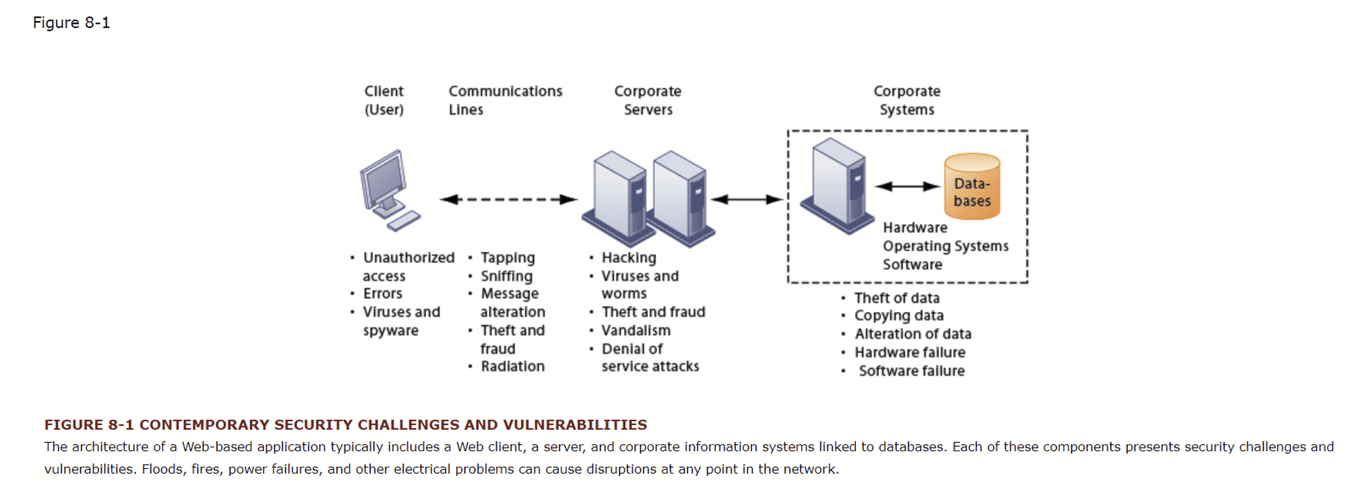
Network vulnerabilities are weaknesses in a computer network that malicious actors can exploit to gain unauthorized access, launch DoS attacks, or spread malware. Common types of network vulnerabilities include unpatched software flaws, weak passwords, and open ports1. To protect a network from attack, it is important to regularly scan for vulnerabilities and take steps to remediate them.
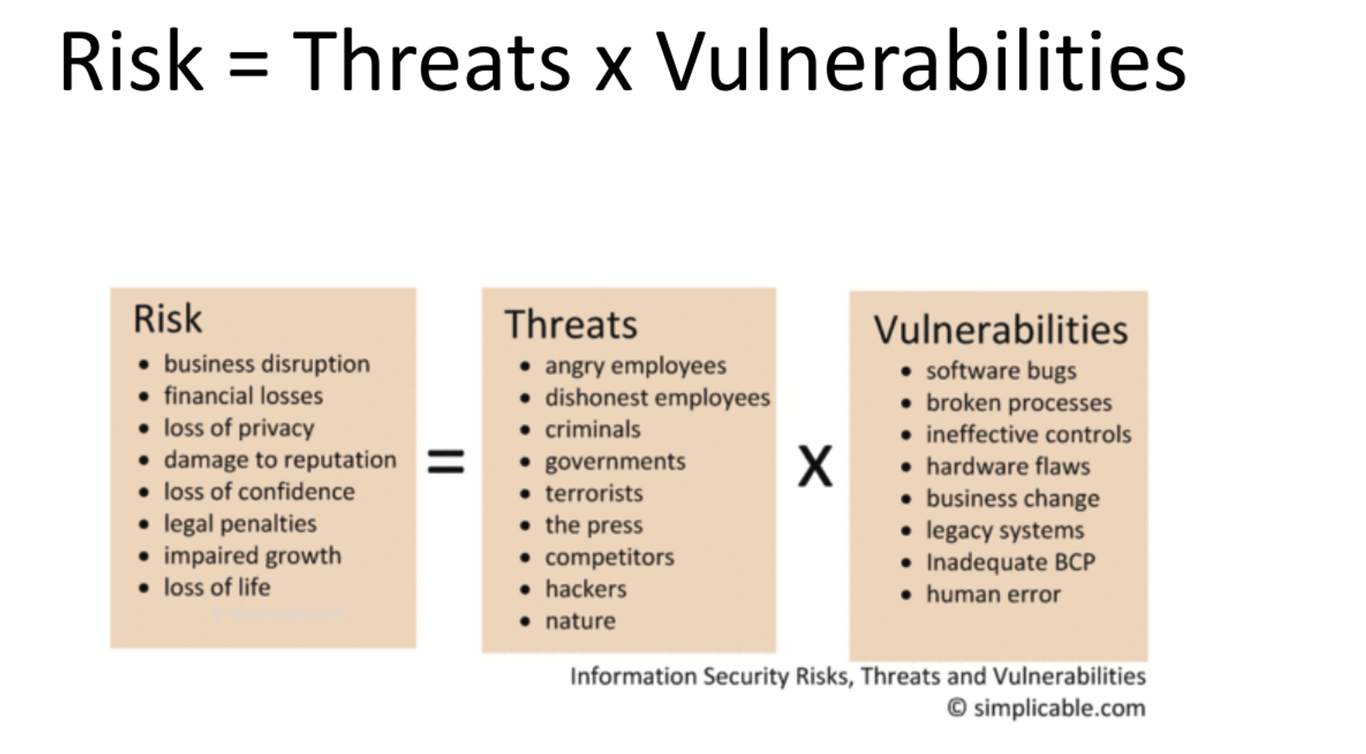
Types of Attacks in Network Security Threats
While there are many different types of attacks in network security threats out there, some of the most dangerous ones include:
- Viruses and Malware: Viruses and malware are malicious software programs that can infect your computer or network and cause serious damage. They can
delete important files, steal confidential information, or even shut down your entire system. - SQL Injection Attacks: SQL injection attacks exploit vulnerabilities in web applications that use Structured Query Language (SQL) to communicate with databases. By injecting malicious SQL code into these vulnerable applications, attackers can gain access to sensitive data or even take control of the entire database.
- OnPath Attacks: OnPath attacks occur when an attacker intercepts communication between two parties and impersonates each party to the other. This allows the attacker to eavesdrop on the conversation or modify the data
being exchanged. - Password Attacks: Password attacks are common types of network attacks because they are very effective. There are many types of password attacks, but
some of the most common include brute force attacks, dictionary attacks, and rainbow table attacks (EasyDmarc, 2022).
What Are the Main Types of Security Vulnerability?
In computer security, a vulnerability is a weakness that can be exploited by a threat actor, usually for malicious purposes. Vulnerabilities can be found in many different areas of a system, including hardware, software, networks, and even people.
Four Main Types of Security Vulnerabilities
- Misconfigurations: Incorrectly configured systems and applications are often the weakest links in an organization’s security posture. A poorly configured firewall in cybersecurity, weak passwords, and leaving default accounts active are all examples of common misconfigurations that can lead to serious security vulnerabilities.
- Unsecured APIs: Many modern applications rely on application programming
interfaces (APIs) to function properly. However, if APIs are not properly secured, they can be a serious security vulnerability. Attackers can exploit unsecured APIs to gain access to sensitive data or even take control of entire systems. - Outdated or Unpatched Software: Software vulnerabilities are often the root cause of major security breaches. Outdated software is especially vulnerable, as attackers can exploit known weaknesses that have already been patched in newer versions. Unpatched software is also a major security risk, as many organizations fail to apply critical security updates in a timely manner.
- Zero-Day Vulnerabilities: A zero-day vulnerability is a previously unknown security flaw exploited by attackers before the vendor has patched it. These types of vulnerabilities are extremely dangerous, as there is usually no way to defend against them until after they have been exploited (CrowdStrike, 2022).
Network Intrusion Detection and Prevention Systems
Intrusion detection and prevention systems (IDPS) are designed to protect an organization from ongoing cyber threats. They monitor network traffic for suspicious activity and take steps to prevent it. Here are some examples of IDPS:
- Check Point IPS: Checkpoint intrusion prevention systems offer organizations essential security features to protect against evading and sophisticated attackers
- Palo Alto Networks: Palo Alto Networks is a leading provider of cybersecurity solutions
- CISCO Secure IPS (NGIPS): Cisco Secure IPS (NGIPS) is a next-generation intrusion prevention system that provides advanced threat protection against attacks
- Fidelis Network: Fidelis Network is an intrusion detection and prevention system that provides real-time visibility into network traffic
- Trend Micro Tipping Point IPS: Trend Micro Tipping Point IPS is an intrusion prevention system that provides advanced threat protection against attacks
What Is an Intrusion Detection and Prevention System?
An intrusion detection and prevention system (IDPS) monitors a network for possible threats to alert the administrator, thereby preventing potential attacks.
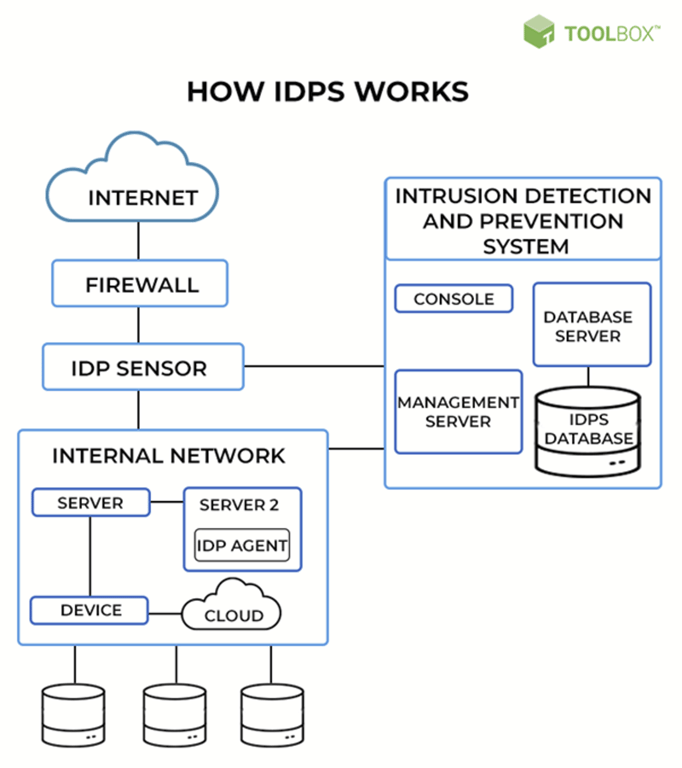
A firewall is a go-to solution to prevent unwanted and suspicious traffic from flowing into a system. It is tempting to think that firewalls are 100% foolproof and no malicious traffic can seep into the network. Cybercriminals, however, are constantly evolving their techniques to bypass all security measures. This is where an intrusion detection and prevention system comes to the rescue. While a firewall regulates what gets in, the IDPS regulates what flows through the system. It often sits right behind firewalls, working in tandem.
An intrusion detection and prevention system is like the baggage and security check at airports. A ticket or a boarding pass is required to enter an airport, and once inside, passengers are not allowed to board their flights until the necessary security checks have been made. Similarly, an intrusion detection system (IDS) only monitors and alerts bad traffic or policy violations. It is the predecessor of the intrusion prevention system (IPS), also known as an intrusion detection and prevention system. Besides monitoring and alerting, the IPS also works to prevent possible incidents with automated courses of action.
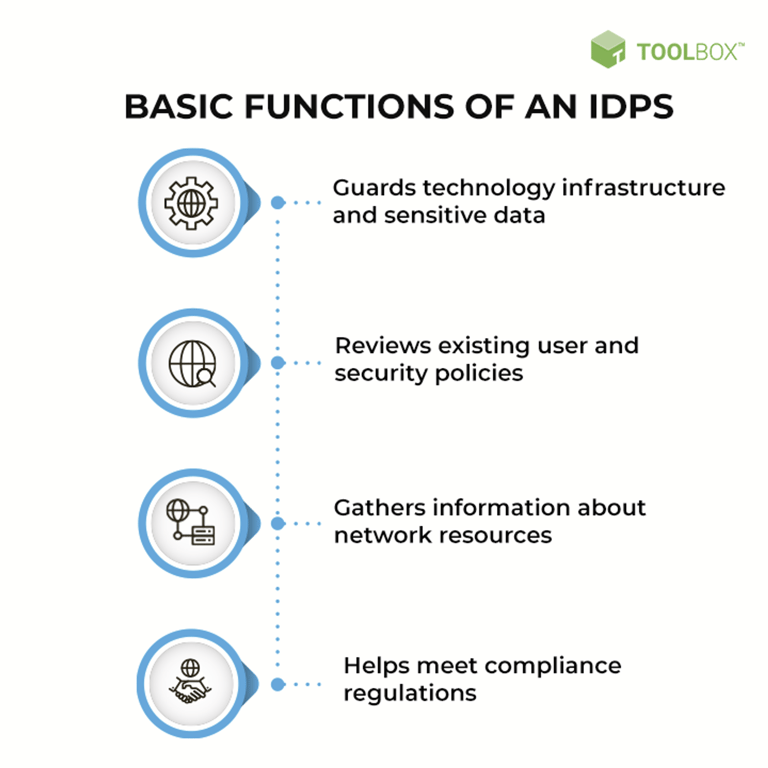
Basic Functions of an IDPS
An intrusion detection and prevention system offers the following features:
- Guards technology infrastructure and sensitive data: No system can exist in a silo, particularly in the current era of data-driven businesses. Data is constantly flowing through the network, so the easiest way to attack or gain access to a system is to hide within the actual data. The IDS part of the system is reactive, alerting security experts of such possible incidents. The IPS part of the system is proactive, allowing security teams to mitigate these attacks that may cause financial and reputational damage.
- Reviews existing user and security policies: Every security-driven organization has its own set of user policies and access-related policies for its applications and systems. These policies considerably reduce the attack surface by providing access to critical resources to only a few trusted user groups and systems. Continuous monitoring by intrusion detection and prevention systems ensures that administrators spot any holes in these policy frameworks right away. It
also allows admins to tweak policies to test for maximum security and efficiency. - Gathers information about network resources: An IDS-IPS also gives the security team a bird’s-eye view of the traffic flowing through its networks. This helps them keep track of network resources, allowing them to modify a system in case of traffic overload or under-usage of servers.
- Helps meet compliance regulations: All businesses, no matter the industry vertical, are being increasingly regulated to ensure consumer data privacy and security. Predominantly, the first step toward fulfilling these mandates is to deploy an intrusion detection and prevention system.
An IDPS works by scanning processes for harmful patterns, comparing system files, and monitoring user behavior and system patterns. IPS uses web application firewalls and traffic filtering solutions to achieve incident prevention.
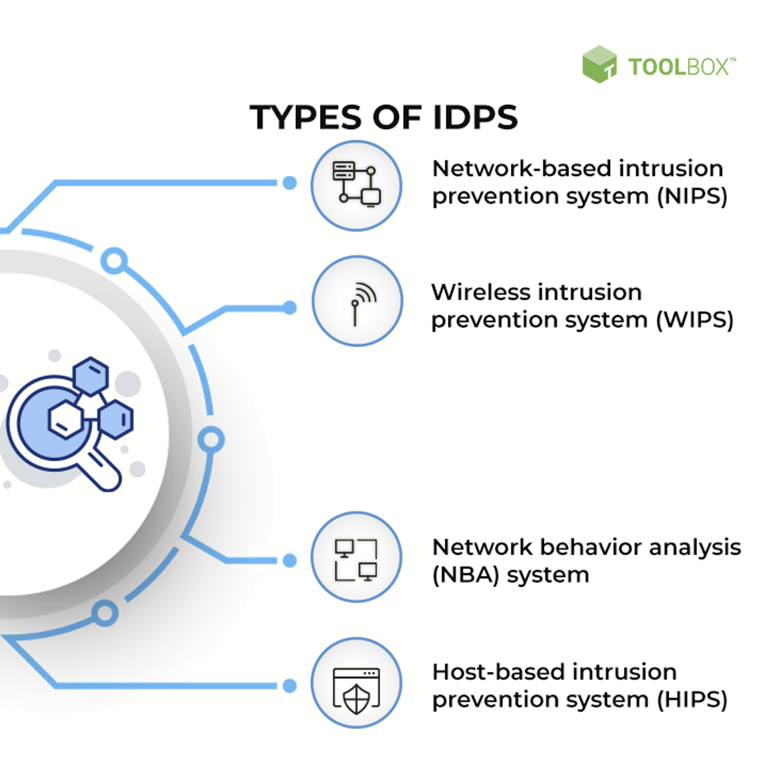
Types of IDPS
- Network-based intrusion prevention system (NIPS): Network-based intrusion prevention systems monitor entire networks or network segments for malicious traffic. This is usually done by analyzing protocol activity. If the protocol activity matches against a database of known attacks, the corresponding information isn’t allowed to get through. NIPS are usually deployed at network boundaries, behind firewalls, routers, and remote access servers.
- Wireless intrusion prevention system (WIPS): Wireless intrusion prevention systems monitor wireless networks by analyzing wireless networking specific protocols. While WIPS are valuable within the range of an organization’s wireless network, these systems don’t analyze higher network protocols such as transmission control protocol (TCP). Wireless intrusion prevention systems are deployed within the wireless network and in areas that are susceptible to unauthorized wireless networking.
- Network behavior analysis (NBA) system: While NIPS analyze deviations in protocol activity, network behavior analysis systems identify threats by checking for unusual traffic patterns. Such patterns are generally a result of policy violations, malware-generated attacks, or distributed denial of service (DDoS) attacks. NBA systems are deployed in an organization’s internal networks and at points where traffic flows between internal and external networks.
- Host-based intrusion prevention system (HIPS): Host-based intrusion prevention systems differ from the rest in that they’re deployed in a single host. These hosts are critical servers with important data or publicly accessible servers that can become gateways to internal systems. The HIPS monitors the traffic flowing in and out of that particular host by monitoring running processes, network activity, system logs, application activity, and configuration changes.
The type of IDP system required by an organization depends on its existing infrastructure and how its plans to scale up in the future. The techniques used by intrusion detection and prevention solutions are also an important consideration.
IDPS Type | Deployed In | Types of Activity Detected |
Network-based | Network boundaries, behind firewalls and routers and remote access servers | Network, transport, and application TCP/IP layer activity |
Wireless | Within the wireless network | Wireless protocol activity, unauthorized WLAN use |
NBA | Internal networks and at points where traffic flows between internal and external networks | Network, transport, and application TCP/IP layer activity with protocol-level anomalies |
Intrusion Detection and Prevention System Techniques with Examples
IDP systems have two levels of broad functionalities — detection and prevention. At each level, most solutions offer some basic approaches.
Detection–level functionalities of IDPS
- Threshold monitoring
- Profiling
- User profiling involves monitoring if a user with a particular role or user group only generates traffic that is allowed. For example, only a DevOps user can have access to the cloud server hosting applications. A programmer can only access data in a sandbox server environment. Short-term user profile monitoring allows administrators to view recent work patterns while long-term profiling provides an extended view of resource usage. This comes in handy while creating a baseline for normal behavior and for creating a user role itself.
- Resource profiling measures how each system, host, and application consumes and generates data. An application with a suddenly increased workflow might indicate malicious behavior.
- Executable profiling tells administrators what kind of programs are usually installed and run by individual users, applications, and systems. For example, a host can be running an application that accesses only certain files. Any other file or a rogue database request indicates foul play. This kind of profiling makes it easy to trace malware, ransomware, or Trojan downloaded by mistake.
The first step of threshold monitoring consists of setting accepted levels associated with each user, application, and system behavior. Examples of metrics that are used during threshold monitoring include the number of failed login attempts, the number of downloads from a particular source, or even something slightly more complicated such as the accepted time of access to a specific resource.
The monitoring system alerts admins and sometimes triggers automated responses when a threshold is crossed. Only having threshold monitoring instead of intrusion detection comes
with its own set of problems. More often than not, the complex infrastructure underlying an organization’s operations and offerings cannot be filtered down to a few metrics. These threshold values also tend to vary as the company’s customer base and services grow. Very stringent implementation of threshold monitoring, in these cases, can cause a lot of false positives. A false positive, in the context of IDP solutions, is when benign activity is identified as suspicious.
with its own set of problems. More often than not, the complex infrastructure underlying an organization’s operations and offerings cannot be filtered down to a few metrics. These threshold values also tend to vary as the company’s customer base and services grow. Very stringent implementation of threshold monitoring, in these cases, can cause a lot of false positives. A false positive, in the context of IDP solutions, is when benign activity is identified as suspicious.
Intrusion detection and prevention systems offer two types of profiling: user profiling and resource profiling.
Sometimes, profiling may make it difficult to interpret overall network traffic and the bumps that come along with it. The sweet spot for profiling lies between profiles that are too broad and allow bad actors and those too narrow, which hinder productivity.
Prevention–level functionalities of IDPS
- Stopping the attack
- Security environment changes
- Attack content modification
Otherwise known as ‘banishment vigilance’, intrusion prevention
systems prevent incidents before they occur. This is done by blocking
users or traffic originating from a particular IP address. It also
involves terminating or resetting a network connection. For example,
when a particular user is scanning data too frequently, it makes sense
to revoke access until these requests have been investigated.
systems prevent incidents before they occur. This is done by blocking
users or traffic originating from a particular IP address. It also
involves terminating or resetting a network connection. For example,
when a particular user is scanning data too frequently, it makes sense
to revoke access until these requests have been investigated.
This involves changing security configurations to prevent attacks. An
example is the IPS reconfiguring the firewall settings to block a
particular IP address.
example is the IPS reconfiguring the firewall settings to block a
particular IP address.
Malicious content can be introduced into a system in various forms.
One way of making this content more benign is to remove the offending
segments. A basic example is removing suspicious-looking attachments in
emails. A more intricate example is repackaging incoming payloads to a
common and pre-designed lot, such as removing unnecessary header
information.
One way of making this content more benign is to remove the offending
segments. A basic example is removing suspicious-looking attachments in
emails. A more intricate example is repackaging incoming payloads to a
common and pre-designed lot, such as removing unnecessary header
information.
Techniques of IDPS
- Signature-based detection
- Anomaly-based detection
- Stateful protocol analysis
A signature is a specific pattern in the payload. This specific pattern can be anything from the sequence of 1s and 0s to the number of bytes. Most malware and cyberattacks come with their own identifiable signature. Another example of a signature is something as simple as the name of the attachment in a malicious email.
The IDP system maintains a database of known malware signatures with signature-based detection. Each time new malware is encountered, this database is updated. The detection system works by checking the traffic payload against this database and alerting when there’s a match.
Signature-based detection obviously cannot work if the malware isn’t previously known. It does not check for the payload’s nature and cannot give administrators information such as the preceding request to a malicious response.
Anomaly detection works on threshold monitoring and profiling. The ‘normal’ behavior of all users, hosts, systems, and applications is configured. Any deviation from this norm is considered an anomaly and alerted for. For example, if an email ID generates hundreds of emails within a few hours, the chances of that email account being hacked are high.
Anomaly detection is better than signature-based detection when considering new attacks that aren’t in the signature database. Creating these baseline profiles takes a lot of time (also known as the ‘training period’). Even then, the rates of false positives may be high, especially in dynamic environments.
Anomaly detection uses host- or network-specific profiles to determine suspicious activity. Stateful protocol analysis goes one step further and uses the predefined standards of each protocol state to check for deviations.
For example, file transfer protocol (FTP) only allows logins when unauthenticated. Once a session is authenticated, users can view, create, or modify files based on their permissions. This information is part of the FTP protocol definition. The intrusion detection system analyzes if these norms are met. This kind of stateful protocol analysis makes it easy to keep track of the authenticator in each session and subsequent activity associated with this request.
Stateful protocol analysis relies heavily on vendor-driven protocol definitions. The granular nature means that it is also resource-intensive, taking up precious bandwidth while tracking simultaneous sessions. Each of these techniques either ensures the prevention of incoming attacks or helps administrators spot security vulnerabilities in their systems. Most IDP solutions offer a combination of more than one approach.
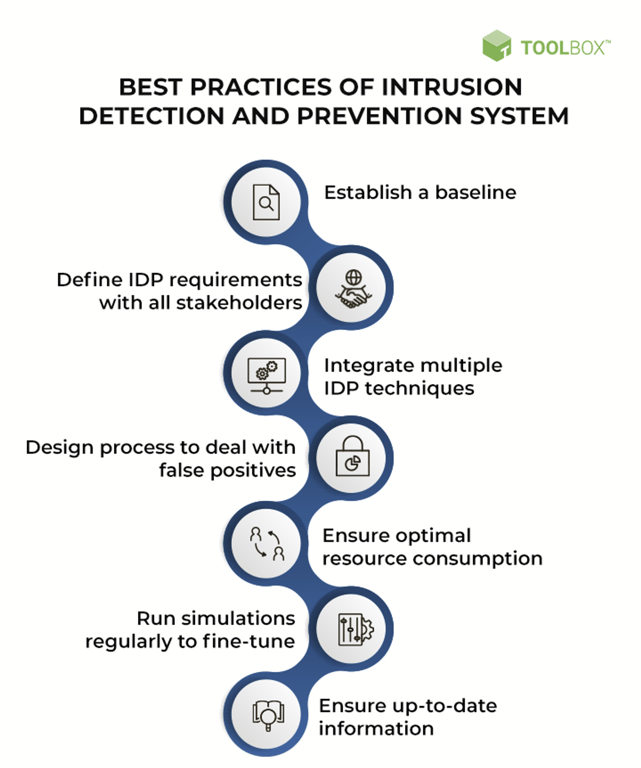
Best Practices of Intrusion Detection and Prevention System
- Establish a baseline
The premise of an intrusion prevention system is normal behavior vs. unusual activity. So, what constitutes ‘normal’ needs to be discussed, documented, and configured. Establishing a baseline improves accuracy and usability. It can make or break the efficiency of the system. The baseline includes acceptable thresholds, profiles, report settings, and alert settings.
- Define IDP requirements with all stakeholders
As with any other new system, the first step toward implementing an IDP system is to figure out the requirements, and ultimately, the final goals of the system.
- Is the intrusion prevention system a cornerstone of the security setup, or are there a host of other tools such as SIEM and content filtering that can take up some of these responsibilities?
- Is the primary objective of the system to comply with industry regulations?
- Which segments of networks and which hosts must be covered by the system?
These are some of the questions that must be answered before designing the IDP solution.
- Integrate multiple IDP techniques
Each IDP technique has its benefits and drawbacks. Relying on just one to secure network traffic isn’t enough. A truly effective intrusion detection and prevention system uses a mix of these techniques. Based on the requirement, an organization may need a combination of network-based and host-based deployments. Each of these may further need to use a combination of signature, anomaly, and protocol-based detection techniques.
This may require multiple IDPS solutions to be integrated. In such a scenario, the integration model also needs to be decided upon. Some IDP solutions directly feed information into other solutions, while others feed information into a central software such as a security information and event management (SIEM) solution.
- Design process to deal with false positives
No matter how much analysis goes into tuning the system, there is always room for false positives in a system like IDP. The solution must be configured so that false positives do not bring operations to a halt.
The most effective mechanism is to alert the administrator of suspicious activity and wait for them to take appropriate action. This may end up becoming tedious for the admins. Prevention systems can be configured to switch to a different network or server until the problem is manually addressed.
- Ensure optimal resource consumption
The intrusion detection and prevention system is an in-line security component. All resources consumed by the system reduce resource availability for the other operations-related components.
While designing or choosing an IDP system, organizations must check for the maximum volume of traffic, number of packets monitored per second, number of events per second, or the number of hosts that can be profiled. Remember, the more complex the solution, the more bandwidth it will require.
The IDP solution can be deployed in the same network while using a virtual management network with a virtual LAN. It can also be deployed on a separate network with additional management networks, servers, interfaces, and consoles. The trade-off between cost, efficiency, and resource consumption is a critical decision that must be taken before implementing the system.
- Run simulations regularly to fine-tune
Testing an intrusion detection and penetration system is difficult given its nature. This is why some third-party vendors offer a learning or simulation mode that allows admins to turn on the software’s detection and penetration layers. This allows them to change and fine-tune their existing settings and profiles. Regular fine-tuning drastically reduces false-positive rates.
- Ensure up-to-date information
Signature detection relies on an updated and evolving database of known malware. Stateful protocol analysis relies on up-to-date standards from the corresponding vendor. Protocols are regularly revised and re-implemented by vendors. The protocol models and databases must be updated to reflect these changes. Patch management is also crucial in this context.
- Create backups
Finely tuned IDP systems are painstaking to achieve. This is why configuration settings must be backed up periodically. Settings and profiles also need to be backed up before applying updates to the system or making significant infrastructure changes.
- Design a reliable and available system
Designing an intrusion prevention system isn’t just about deciding where to place the components. It is also about identifying which network segments are critical and creating a fail-proof IDP implementation there. For example, multiple sensors can be used to monitor the same activity, or even multiple management servers with backed-up configurations can be used.
Usability, redundancy, and load balancing need to be considered. Since the IDPS usually resides within the network, critical components of the system may go down along with the network. This is where deployment options need to be considered.
- Secure all IDP components
Cybercriminals often attack IDPS components themselves since they house configurations and known vulnerabilities. The security of these components must be part of the overall security agenda. All components must be up to date, with a patch management system running. IDP system users and administrators need separate accounts. Network and access restrictions must be placed on each component, and vulnerability assessments need to be scheduled.
Web Application Security
Web application security is the practice of protecting websites, applications, and APIs from attacks. Its ultimate aims are keeping web applications functioning smoothly and protecting businesses from cyber vandalism, data theft, unethical competition, and other negative consequences.
Web application security (also known as Web AppSec) is the idea of building websites to function as expected, even when they are under attack. The concept involves a collection of security controls engineered into a Web application to protect its assets from potentially malicious agents. Web applications, like all software, inevitably contain defects. Some of these defects constitute actual vulnerabilities that can be exploited, introducing risks to organizations. Web application security defends against such defects. It involves leveraging secure development practices and implementing security measures throughout the software development life cycle (SDLC), ensuring that design-level flaws and implementation-level bugs are addressed.
Why is web security testing important?
Web security testing aims to find security vulnerabilities in Web applications and their configuration. The primary target is the application layer (i.e., what is running on the HTTP protocol). Testing the security of a Web application often involves sending different types of input to provoke errors and make the system behave in unexpected ways. These so called “negative tests” examine whether the system is doing something it isn’t designed to do.
It is also important to understand that Web security testing is not only about testing the security features (e.g., authentication and authorization) that may be implemented in the application. It is equally important to test that other features are implemented in a secure way (e.g., business logic and the use of proper input validation and output encoding). The goal is to ensure that the functions exposed in the Web application are secure.
Different Types of Security Tests
- Dynamic Application Security Test (DAST). This automated application security test is best for internally facing, low-risk applications that must comply with regulatory security assessments. For medium-risk applications and critical applications undergoing minor changes, combining DAST with some manual web security testing for common vulnerabilities is the best solution.
- Static Application Security Test (SAST). This application security approach offers automated and manual testing techniques. It is best for identifying bugs without the need to execute applications in a production environment. It also enables developers to scan source code and systematically find and eliminate software security vulnerabilities.
- Penetration Test. This manual application security test is best for critical applications, especially those undergoing major changes. The assessment involves business logic and adversary-based testing to discover advanced attack scenarios.
- Runtime Application Self Protection (RASP). This evolving application security approach encompasses a number of technological techniques to instrument an application so that attacks can be monitored as they execute and, ideally, blocked in real time.
Majority of Web Application Attacks | Attack Results |
SQL Injection | Access to restricted content |
XSS (Cross Site Scripting) | Compromised user accounts |
Remote Command Execution | Installation of malicious code |
Path Traversal | Lost sales revenue |
ㅤ | Loss of trust with customers |
ㅤ | Damaged brand reputation |
A Web application in today’s environment can be affected by a wide range of issues. The diagram above demonstrates several of the top attacks used by attackers, which can result in serious damage to an individual application or the overall organization. Knowing the different attacks that make an application vulnerable, in addition to the potential outcomes of an attack, allow your firm to preemptively address the vulnerabilities and accurately test for them.
By identifying the root cause of the vulnerabilities, mitigating controls can be implemented during the early stages of the SDLC to prevent any issues. Additionally, knowledge of how these attacks work can be leveraged to target known points of interest during a Web application security test.
Recognizing the impact of an attack is also key to managing your firm’s risk, as the effects of a successful attack can be used to gauge the vulnerability’s total severity. If issues are identified during a security test, defining their severity allows your firm to efficiently prioritize the remediation efforts. Start with critical severity issues and work towards lower impact issues to minimize risk to your firm.
Prior to an issue being identified, evaluating the potential impact against each application within your firm’s application library can facilitate the prioritization of application security testing. With an established list of high profile applications, web security testing can be scheduled to target your firm’s critical applications first with more targeted testing to lower the risk against the business.
What features should be reviewed during a web application security test?
The following non-exhaustive list of features should be reviewed during Web application security testing. An inappropriate implementation of each could result in vulnerabilities, creating serious risk for your organization.
- Application and server configuration. Potential defects are related to encryption/cryptographic configurations, Web server configurations, etc.
- Input validation and error handling. SQL injection, cross-site scripting (XSS), and other common injection vulnerabilities are the result of poor input and output handling.
- Authentication and session management. Vulnerabilities potentially resulting in user impersonation. Credential strength and protection should also be considered.
- Authorization. Testing the ability of the application to protect against vertical and horizontal privilege escalations.
- Business logic. These are important to most applications that provide business functionality.
- Client-side logic. With modern, JavaScript-heavy webpages, in addition to webpages using other types of client-side technologies (e.g., Silverlight, Flash, Java applets), this type of feature is becoming more prevalent.
SQL Injection
SQL injection (SQLi) is a web security vulnerability that allows an attacker to interfere with the queries that an application makes to its database. It generally allows an attacker to view data that they are not normally able to retrieve. This might include data belonging to other users, or any other data that the application itself is able to access. In many cases, an attacker can modify or delete this data, causing persistent changes to the application's content or behavior.
In some situations, an attacker can escalate a SQL injection attack to compromise the underlying server or other back-end infrastructure, or perform a denial-of-service attack.
What is the impact of a successful SQL injection attack?
A successful SQL injection attack can result in unauthorized access to sensitive data, such as passwords, credit card details, or personal user information. Many high-profile data breaches in recent years have been the result of SQL injection attacks, leading to reputational damage and regulatory fines. In some cases, an attacker can obtain a persistent backdoor into an organization's systems, leading to a long-term compromise that can go unnoticed for an extended period
SQL injection examples
There are a wide variety of SQL injection vulnerabilities, attacks, and techniques, which arise in different situations. Some common SQL injection examples include:
- Retrieving hidden data, where you can modify a SQL query to return additional results.
- Subverting application logic, where you can change a query to interfere with the application's logic.
- UNION attacks, where you can retrieve data from different database tables.
- Examining the database, where you can extract information about the version and structure of the database.
- Blind SQL injection, where the results of a query you control are not returned in the application's responses.
Retrieving hidden data
Consider a shopping application that displays products in different categories. When the user clicks on the Gifts category, their browser requests the URL:
https://insecure-website.com/products?category=Gifts
This causes the application to make a SQL query to retrieve details of the relevant products from the database:
SELECT * FROM products WHERE category = 'Gifts' AND released = 1
This SQL query asks the database to return:
- all details (*)
- from the products table
- where the category is Gifts
- and released is 1.
The restriction released = 1 is being used to hide products that are not released. For unreleased products, presumably released = 0.
The application doesn't implement any defenses against SQL injection attacks, so an attacker can construct an attack like:
https://insecure-website.com/products?category=Gifts'--
This results in the SQL query:
SELECT * FROM products WHERE category = 'Gifts'--' AND released = 1
The key thing here is that the double-dash sequence -- is a comment indicator in SQL, and means that the rest of the query is interpreted as a comment. This effectively removes the remainder of the query, so it no longer includes AND released = 1. This means that all products are displayed, including unreleased products.
Going further, an attacker can cause the application to display all the products in any category, including categories that they don't know about:
https://insecure-website.com/products?category=Gifts'+OR+1=1--
This results in the SQL query:
SELECT * FROM products WHERE category = 'Gifts' OR 1=1--' AND released = 1
The modified query will return all items where either the category is Gifts, or 1 is equal to 1. Since 1=1 is always true, the query will return all items.
Warning: Take care when injecting the condition OR 1=1 into a SQL query. Although this may be harmless in the initial context you're injecting into, it's common for applications to use data from a single request in multiple different queries. If your condition reaches an UPDATE or DELETE statement, for example, this can result in an accidental loss of data.
Subverting application logic
Consider an application that lets users log in with a username and password. If a user submits the username wiener and the password bluecheese, the application checks the credentials by performing the following SQL query:
SELECT * FROM users WHERE username = 'wiener' AND password = 'bluecheese'
If the query returns the details of a user, then the login is successful. Otherwise, it is rejected.
Here, an attacker can log in as any user without a password simply by using the SQL comment sequence -- to remove the password check from the WHERE clause of the query. For example, submitting the username administrator'-- and a blank password results in the following query:
SELECT * FROM users WHERE username = 'administrator'--' AND password = ''
This query returns the user whose username is administrator and successfully logs the attacker in as that user.
Retrieving data from other database tables (UNION)
In cases where the results of a SQL query are returned within the application's responses, an attacker can leverage a SQL injection vulnerability to retrieve data from other tables within the database. This is done using the UNION keyword, which lets you execute an additional SELECT query and append the results to the original query.
For example, if an application executes the following query containing the user input "Gifts":
SELECT name, description FROM products WHERE category = 'Gifts'
then an attacker can submit the input:
' UNION SELECT username, password FROM users--
This will cause the application to return all usernames and passwords along with the names and descriptions of products.
Examining the database
Following initial identification of a SQL injection vulnerability, it is generally useful to obtain some information about the database itself. This information can often pave the way for further exploitation.
You can query the version details for the database. The way that this is done depends on the database type, so you can infer the database type from whichever technique works. For example, on Oracle you can execute:
SELECT * FROM v$version
You can also determine what database tables exist, and which columns they contain. For example, on most databases you can execute the following query to list the tables:
SELECT * FROM information_schema.tables
Blind SQL injection vulnerabilities
Many instances of SQL injection are blind vulnerabilities. This means that the application does not return the results of the SQL query or the details of any database errors within its responses. Blind vulnerabilities can still be exploited to access unauthorized data, but the techniques involved are generally more complicated and difficult to perform.
Depending on the nature of the vulnerability and the database involved, the following techniques can be used to exploit blind SQL injection vulnerabilities:
- You can change the logic of the query to trigger a detectable difference in the application's response depending on the truth of a single condition. This might involve injecting a new condition into some Boolean logic, or conditionally triggering an error such as a divide-by-zero.
- You can conditionally trigger a time delay in the processing of the query, allowing you to infer the truth of the condition based on the time that the application takes to respond.
- You can trigger an out-of-band network interaction, using OAST techniques. This technique is extremely powerful and works in situations where the other techniques do not. Often, you can directly exfiltrate data via the out-of-band channel, for example by placing the data into a DNS lookup for a domain that you control.
How to detect SQL injection vulnerabilities
The majority of SQL injection vulnerabilities can be found quickly and reliably using Burp Suite's web vulnerability scanner.
SQL injection can be detected manually by using a systematic set of tests against every entry point in the application. This typically involves:
- Submitting the single quote character ' and looking for errors or other anomalies.
- Submitting some SQL-specific syntax that evaluates to the base (original) value of the entry point, and to a different value, and looking for systematic differences in the resulting application responses.
- Submitting Boolean conditions such as OR 1=1 and OR 1=2, and looking for differences in the application's responses.
- Submitting payloads designed to trigger time delays when executed within a SQL query, and looking for differences in the time taken to respond.
- Submitting OAST payloads designed to trigger an out-of-band network interaction when executed within a SQL query, and monitoring for any resulting interactions.
SQL injection in different parts of the query
Most SQL injection vulnerabilities arise within the WHERE clause of a SELECT query. This type of SQL injection is generally well-understood by experienced testers.
But SQL injection vulnerabilities can in principle occur at any location within the query, and within different query types. The most common other locations where SQL injection arises are:
- In UPDATE statements, within the updated values or the WHERE clause.
- In INSERT statements, within the inserted values.
- In SELECT statements, within the table or column name.
- In SELECT statements, within the ORDER BY clause.
SQL injection in different contexts
In all of the labs so far, you've used the query string to inject your malicious SQL payload. However, it's important to note that you can perform SQL injection attacks using any controllable input that is processed as a SQL query by the application. For example, some websites take input in JSON or XML format and use this to query the database.
These different formats may even provide alternative ways for you to obfuscate attacks that are otherwise blocked due to WAFs and other defense mechanisms. Weak implementations often just look for common SQL injection keywords within the request, so you may be able to bypass these filters by simply encoding or escaping characters in the prohibited keywords. For example, the following XML-based SQL injection uses an XML escape sequence to encode the S character in SELECT:
<stockCheck> <productId> 123 </productId> <storeId> 999 SELECT * FROM information_schema.tables </storeId> </stockCheck>
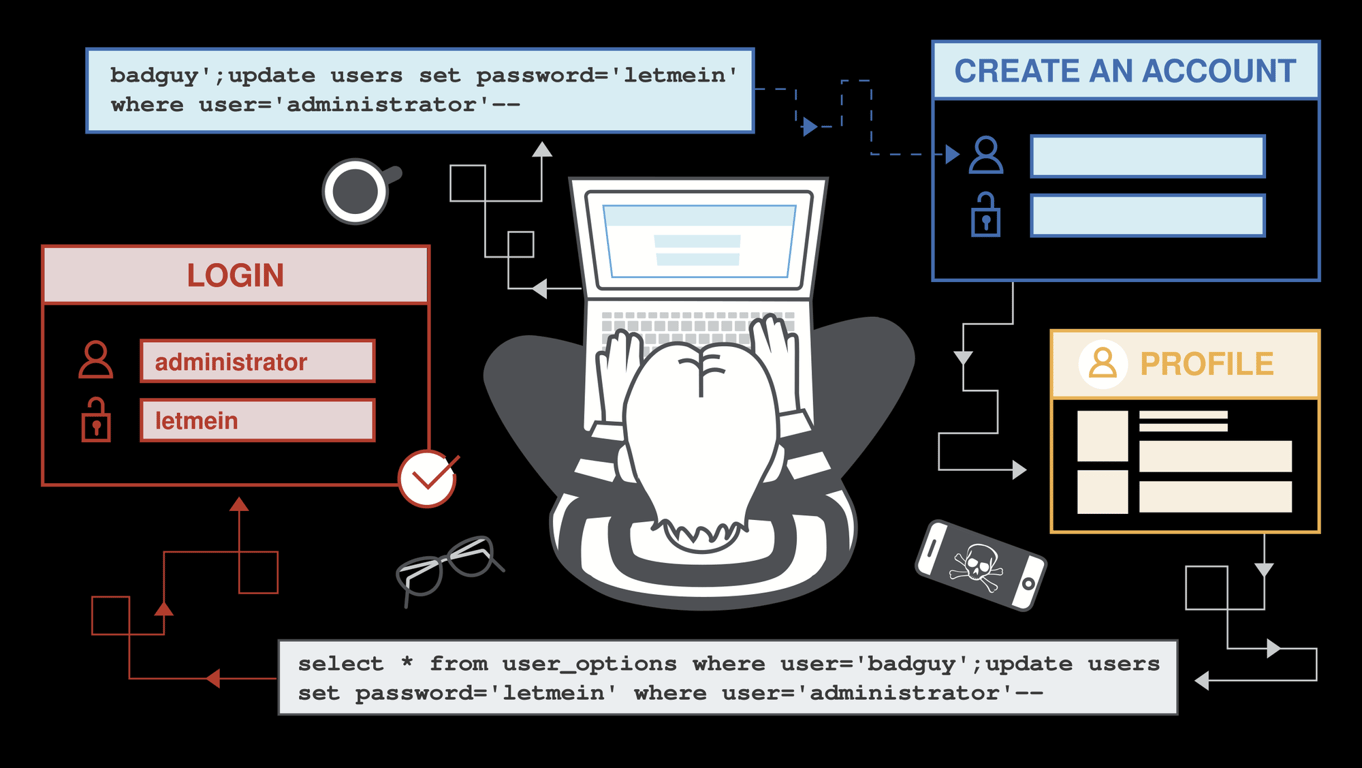
Second-order SQL injection
First-order SQL injection arises where the application takes user input from an HTTP request and, in the course of processing that request, incorporates the input into a SQL query in an unsafe way.
In second-order SQL injection (also known as stored SQL injection), the application takes user input from an HTTP request and stores it for future use. This is usually done by placing the input into a database, but no vulnerability arises at the point where the data is stored. Later, when handling a different HTTP request, the application retrieves the stored data and incorporates it into a SQL query in an unsafe way.
Second-order SQL injection often arises in situations where developers are aware of SQL injection vulnerabilities, and so safely handle the initial placement of the input into the database. When the data is later processed, it is deemed to be safe, since it was previously placed into the database safely. At this point, the data is handled in an unsafe way, because the developer wrongly deems it to be trusted.
Database-specific factors
Some core features of the SQL language are implemented in the same way across popular database platforms, and so many ways of detecting and exploiting SQL injection vulnerabilities work identically on different types of database.
However, there are also many differences between common databases. These mean that some techniques for detecting and exploiting SQL injection work differently on different platforms. For example:
- Syntax for string concatenation.
- Comments.
- Batched (or stacked) queries.
- Platform-specific APIs.
- Error messages.
How to prevent SQL injection
Most instances of SQL injection can be prevented by using parameterized queries (also known as prepared statements) instead of string concatenation within the query.
The following code is vulnerable to SQL injection because the user input is concatenated directly into the query:
String query = "SELECT * FROM products WHERE category = '"+ input +
"'"; Statement statement = connection.createStatement(); ResultSet
resultSet = statement.executeQuery(query);
This code can be easily rewritten in a way that prevents the user input from interfering with the query structure:
PreparedStatement statement = connection.prepareStatement("SELECT * FROM products WHERE category = ?");
statement.setString(1, input);
ResultSet resultSet = statement.executeQuery();
Parameterized queries can be used for any situation where untrusted input appears as data within the query, including the WHERE clause and values in an INSERT or UPDATE statement. They can't be used to handle untrusted input in other parts of the query, such as table or column names, or the ORDER BY clause. Application functionality that places untrusted data into those parts of the query will need to take a different approach, such as white-listing permitted input values, or using different logic to deliver the required behavior.
For a parameterized query to be effective in preventing SQL injection, the string that is used in the query must always be a hard-coded constant, and must never contain any variable data from any origin. Do not be tempted to decide case-by-case whether an item of data is trusted, and continue using string concatenation within the query for cases that are considered safe. It is all too easy to make mistakes about the possible origin of data, or for changes in other code to violate assumptions about what data is tainted.
Firewall
A firewall is a network security device that monitors incoming and outgoing network traffic and decides whether to allow or block specific traffic based on a defined set of security rules². Firewalls can either be software or hardware, though it’s best to have both. A software firewall is a program installed on each computer and regulates traffic through port numbers and applications, while a physical firewall is a
piece of equipment installed between your network and gateway³.
piece of equipment installed between your network and gateway³.
How does a firewall work?
Firewalls carefully analyze incoming traffic based on pre-established rules and filter traffic coming from unsecured or suspicious sources to prevent attacks. Firewalls guard traffic at a computer’s entry point, called ports, which is where information is exchanged with external devices. For example, “Source address 172.18.1.1 is allowed to reach destination 172.18.2.1 over port 22."
Think of IP addresses as houses, and port numbers as rooms within the house. Only trusted people (source addresses) are allowed to enter the house (destination address) at all—then it’s further filtered so that people within the house are only allowed to access certain rooms (destination ports), depending on if they're the owner, a child, or a guest. The owner is allowed to any room (any port), while children and guests are allowed into a certain set of rooms (specific ports).
Types of Firewalls
Firewalls can either be software or hardware, though it’s best to have both. A software firewall is a program installed on each computer and regulates traffic through port numbers and applications, while a physical firewall is a piece of equipment installed between your network and gateway.
- Packet-filtering firewalls, the most common type of firewall, examine packets and prohibit them from passing through if they don’t match an established security rule set. This type of firewall checks the packet’s source and destination IP addresses. If packets match those of an “allowed” rule on the firewall, then it is trusted to enter the network.
- Next-generation firewalls (NGFW) combine traditional firewall technology with additional functionality, such as encrypted traffic inspection, intrusion prevention systems, anti-virus, and more. Most notably, it includes deep packet inspection (DPI). While basic firewalls only look at packet headers, deep packet inspection examines the data within the packet itself, enabling users to more effectively identify,
categorize, or stop packets with malicious data. - Proxy firewalls filter network traffic at the application level. Unlike basic firewalls, the proxy acts an intermediary between two end systems. The client must send a request to the firewall, where it is then evaluated against a set of security rules and then permitted or blocked. Most notably, proxy firewalls monitor traffic for layer 7
protocols such as HTTP and FTP, and use both stateful and deep packet inspection to detect malicious traffic. - Network address translation (NAT) firewalls allow multiple devices with independent network addresses to connect to the internet using a single IP address, keeping individual IP addresses hidden. As a result, attackers scanning a network for IP addresses can't capture specific details, providing greater security against attacks. NAT firewalls are similar to proxy firewalls in that they act as an intermediary between a group of computers and outside traffic.
- Stateful multilayer inspection (SMLI) firewalls filter packets at the network, transport, and application layers, comparing them against known trusted packets. Like NGFW firewalls, SMLI also examine the entire packet and only allow them to pass if they pass each layer individually. These firewalls examine packets to determine the state of the communication (thus the name) to ensure all initiated communication is only taking place with trusted sources.
Packet-filtering firewalls are divided into two categories: stateful and stateless. Stateless firewalls examine packets independently of one another and lack context, making them easy targets for hackers. In contrast, stateful firewalls remember information about previously passed packets and are considered much more secure.
While packet-filtering firewalls can be effective, they ultimately provide very basic protection and can be very limited—for example, they can't determine if the contents of the request that's being sent will adversely affect the application it's reaching. If a malicious request that was allowed from a trusted source address would result in, say, the deletion of a database, the firewall would have no way of knowing that. Next-generation firewalls and proxy firewalls are more equipped to detect such threats.
In computer networking, a gateway is a network node that serves as an entrance or exit point between different networks. It acts as a bridge or intermediary that enables communication and data transfer between networks using different protocols or addressing schemes.
Gateways can take various forms depending on the network architecture and the networks they connect.
Common Types of Gateways
- Network Gateway: A network gateway is a device or software component that connects a local network (such as a LAN) to another network, typically the Internet. It acts as the point of connection and provides access to external networks by routing traffic between the local network and the external network.
- Protocol Gateway: A protocol gateway is responsible for translating and facilitating communication between networks that use different protocols. For example, it can convert data from one network protocol to another to enable communication between systems that speak different languages, so to speak.
- Application Gateway: An application gateway, also known as an application-level gateway or proxy server, is a device or software that provides security and performance-enhancing features for specific applications or protocols. It can inspect application-layer data, enforce security policies, and optimize network traffic for specific applications or services.
- Firewall Gateway: A firewall gateway is a specialized gateway that enforces security policies and filters network traffic based on predefined rules. It acts as a barrier between networks, inspecting packets and allowing or blocking traffic based on security criteria. Firewalls can be implemented as a standalone device or as part of a larger network gateway.
Gateways play a crucial role in network connectivity, security, and interoperability. They facilitate communication between networks with different architectures, protocols, or security requirements, enabling the seamless exchange of data and services.
Firewall/Packet Filtering
Firewall filtering, also known as packet filtering, is a core functionality of a firewall. It involves examining network packets as they pass through a firewall and making decisions on whether to allow or block them based on predefined filtering rules.
Firewall filtering operates at the network layer (Layer 3) or transport layer (Layer 4) of the TCP/IP protocol stack. When a packet arrives at the firewall, it is inspected based on various criteria such as source IP address, destination IP address, source port, destination port, protocol type, and other packet header information.
The firewall compares the packet's attributes against the filtering rules defined in its configuration. These rules can be set by network administrators and typically specify the conditions under which a packet should be allowed or denied. For example, a rule might state that incoming packets with a certain source IP address should be blocked, or that outgoing packets destined for a specific port should be allowed.
Based on the evaluation of the filtering rules, the firewall takes action on the packet. It can either permit the packet to pass through and reach its destination, or it can drop (block) the packet and prevent it from reaching its intended destination. Additionally, firewalls can log information about the filtered packets for auditing and troubleshooting purposes.
Firewall filtering is an essential mechanism for enforcing network security policies. It helps protect networks from unauthorized access, malicious traffic, and various types of cyber threats. By selectively allowing or blocking packets based on predefined rules, firewalls act as a barrier that filters and controls network traffic, enhancing the overall security posture of a network.
A web application firewall (WAF) is a specific form of application firewall that filters, monitors, and blocks HTTP traffic to and from a web service. By inspecting HTTP traffic, it can prevent attacks exploiting a web application's known vulnerabilities, such as SQL injection, cross-site scripting, file inclusion, and improper system configuration¹.
How a web application firewall typically works:
- Traffic Inspection: The WAF sits between the web server and the users, intercepting incoming requests and outgoing responses. It inspects the traffic at the application layer (Layer 7) of the network stack, which allows it to analyze the content of HTTP requests and responses.
- Rule-Based Filtering: The WAF employs a set of predefined security rules or policies to identify and block malicious traffic. These rules are based on known attack patterns and vulnerabilities. For example, a WAF rule might specify that any request containing a suspicious SQL statement should be blocked.
- Signature Matching: WAFs often use signature-based detection to identify known attack patterns. They compare the incoming requests against a database of attack signatures and, if a match is found, takeappropriate action, such as blocking or alerting.
- Behavior Analysis: Some advanced WAFs employ behavioral analysis techniques to identify anomalies and suspicious patterns in web application traffic. By establishing a baseline of normal behavior, the WAF can detect deviations that may indicate an attack, such as a sudden spike in request rate or unusual input patterns.
- Protection against Specific Vulnerabilities: WAFs are designed to address specific vulnerabilities commonly found in web applications. They provide protection against attacks like XSS, SQL injection, command injection, and directory traversal, among others. WAFs employ techniques like input validation, output encoding, and parameter sanitization to mitigate these vulnerabilities.
- Positive Security Model: WAFs can also implement a positive security model, where they allow only explicitly permitted requests. By defining acceptable request patterns, the WAF blocks any requests that deviate from these patterns, helping to protect against zero-day attacks and unknown vulnerabilities.
- Logging and Reporting: WAFs typically generate logs and reports about detected threats, blocked requests, and other security events. These logs can be analyzed to gain insights into attack patterns, aid in incident response, and fine-tune the security policies of the WAF.
Web application firewalls are an important component of a layered security strategy for web applications. They provide an additional layer of protection by mitigating common web application vulnerabilities and blocking malicious traffic, helping to ensure the security and availability of web-based services.
Web Application Security Testing and Assessment
Web application security testing and assessment is the process of evaluating the security of a web application to identify vulnerabilities, weaknesses, and potential security threats. It involves a systematic examination of the application's components, such as its code, configuration, and infrastructure, to ensure that adequate security measures are in place.
Web Application Security Testing Techniques
- Vulnerability Scanning: This technique involves using automated tools to scan a web application for known vulnerabilities, such as outdated software versions or misconfiguration.
- Penetration Testing: Also known as ethical hacking, penetration testing involves simulating real-world attacks to identify vulnerabilities in a web application. It typically involves a
combination of manual and automated techniques to exploit weaknesses and gain unauthorized access. - Code Review: In this technique, security experts review the source code of the web application to identify potential security flaws, such as input validation issues, insecure coding practices, or
vulnerabilities arising from the use of third-party libraries. - Security Headers Analysis: This technique involves analyzing the HTTP response headers sent by the web application to ensure they include appropriate security measures, such as Content Security Policy (CSP), Strict Transport Security (HSTS), or Cross-Origin Resource Sharing (CORS) policies.
- Authentication and Authorization Testing: This technique focuses on evaluating the effectiveness of authentication and authorization mechanisms implemented in the web application, such as password policies, session management, or access control checks.
Software Tools Used for Web Application Security Testing:
- Burp Suite: A comprehensive web application testing tool that includes features like scanning, intercepting and modifying HTTP requests, and performing manual and automated security testing.
- OWASP ZAP: An open-source web application security scanner that helps identify vulnerabilities and provides both automated and manual testing capabilities.
- Acunetix: A web vulnerability scanner that scans and identifies a wide range of security vulnerabilities in web applications, including SQL injection, cross-site scripting (XSS), and more.
- Nessus: A network vulnerability scanner that can also perform web application scanning to identify vulnerabilities and misconfigurations.
- Nikto: An open-source web server scanner that tests web servers for known vulnerabilities and configuration issues.
- Qualys Web Application Scanning: A cloud-based solution that offers automated scanning and detection of web application vulnerabilities.
It's important to note that while these tools can be helpful, manual testing and expertise from security professionals are crucial to ensure a comprehensive assessment of web application security.
Code Review
When conducting a code review for web application security, the goal is to identify security vulnerabilities and weaknesses in the application's source code.
Here are a few examples of security issues that can be detected through code review:
- Injection Attacks: This includes vulnerabilities like SQL injection, OS command injection, or LDAP injection, where untrusted user input is directly used in code execution without proper validation or
sanitization. - Cross-Site Scripting (XSS): This vulnerability allows attackers to inject malicious scripts into web pages viewed by other users, potentially leading to session hijacking, data theft, or defacement.
- Cross-Site Request Forgery (CSRF): In CSRF attacks, malicious actors trick authenticated users into unknowingly performing unwanted actions on a web application, exploiting the trust between the user and the application.
- Insecure Direct Object References (IDOR): This occurs when an application exposes internal or sensitive resources directly through user-controlled input, allowing unauthorized access to restricted
information. - Authentication and Session Management Issues: Code review can uncover weaknesses in password storage mechanisms, weak session management practices, or insecure authentication methods.
Now, let's explore a few software tools that can assist with code review for web application security:
- SonarQube: An open-source platform that performs static code analysis and offers security rule sets specifically designed for web application security, helping identify vulnerabilities, code smells, and bugs.
- Veracode: A commercial tool that supports static code analysis to identify security vulnerabilities, including those specific to web applications, using various programming languages.
- Checkmarx: A comprehensive source code analysis tool that detects security vulnerabilities in web applications, including those related to the OWASP Top 10.
- Fortify: A software security suite that includes static code analysis capabilities to identify and mitigate vulnerabilities in web applications during the development lifecycle.
- ESLint: Although primarily focused on JavaScript code style and quality, ESLint can be configured with security rulesets to catch common security issues and best practices in web application code.
- Bandit: A Python-focused open-source tool that performs static analysis to identify common security issues in Python applications, including web applications.
It's worth mentioning that manual code review by experienced security professionals is invaluable for identifying complex security issues automated analysis and manual inspection yields the most effective results.
Code review is a process where someone other than the author(s) of a piece of code examines that code. It helps developers learn the code base, as well as help them learn new technologies and techniques that grow their skill sets1.
Here are some examples of good and bad code review:
- Good: Code review is done in a timely manner, with clear feedback and suggestions for improvement.
- Bad: Code review is done too late or not at all. Feedback is unclear or unhelpful.
Insecure Direct Object References (IDOR)
Insecure Direct Object References (IDOR) occur when an application exposes internal or sensitive resources directly through user-controlled input, allowing unauthorized access to restricted information. Here's an example to illustrate this vulnerability:
Let's consider a web application that allows users to view their personal information by providing their user ID as a parameter in the URL. The application's code might have a vulnerable implementation that does not properly validate or authorize user access to the requested resources.
Example scenario:
- User A logs into the application and is assigned a unique user ID, let's say "12345".
- User A wants to view their profile information, so they navigate to a URL like:
https://example.com/profile?user_id=12345. - However, an attacker, User B, notices the pattern of the URL and decides to manipulate it.
- User B changes the user ID in the URL to a different value, such as "54321":
https://example.com/profile?user_id=54321. - The application retrieves and displays the profile information
associated with the modified user ID, allowing User B to access User A's confidential data.
In this example, the application lacks proper authorization or access control checks, enabling an attacker to bypass security measures and directly access sensitive information. This is an instance of an Insecure Direct Object Reference (IDOR) vulnerability.
To mitigate IDOR vulnerabilities, developers should implement proper authorization mechanisms, such as using session-based authentication, ensuring that access to sensitive resources is only granted to authorized users. Additionally, input validation and authorization checks should be performed on user-controlled input to prevent unauthorized access to resources.
It is important to note that the example provided is a simplified scenario, and IDOR vulnerabilities can manifest in various forms and contexts, depending on the design and implementation of the web
application. Thorough security testing and code review can help identify and address such vulnerabilities.
application. Thorough security testing and code review can help identify and address such vulnerabilities.
Secure Software Development
Secure Software Development is a set of fundamental, sound, and secure software development practices based on established secure software development practice documents from organizations such as BSA, OWASP, and SAFECode. It requires integrating security into each phase of the software development lifecycle, from requirement analysis to maintenance, regardless of the project methodology (waterfall, agile, or DevOps).
SSDF Practices
The SSDF practices are organized into four groups:
- Prepare the Organization (PO): Ensure that the organization’s people, processes, and technology are prepared to perform secure software development at the organization level and, in some cases, for individual development groups or projects.
- Protect the Software (PS): Protect all components of the software from tampering and unauthorized access.
- Produce Well-Secured Software (PW): Produce well-secured software with minimal security vulnerabilities in its releases.
- Respond to Vulnerabilities (RV): Identify residual vulnerabilities in software releases and respond appropriately to address those vulnerabilities and prevent similar vulnerabilities from occurring in
the future.
Each practice is defined with the following elements:
- Practice: The name of the practice and a unique identifier, followed by a brief explanation of what the practice is and why it is beneficial.
- Task: An action that may be needed to perform a practice.
- Notional Implementation Example: A notional example of types oftools, processes, or other method that could be used to help implement a task. No examples or combination of examples are required, and thestated examples are not the only feasible options.
- Reference: A pointer to an established secure development practice document and its mappings to a particular task.
SSDF Use
The SSDF can help an organization to align and prioritize its secure software development activities with its business/mission requirements, risk tolerances, and resources. The SSDF’s practices are outcome-based. Comparing the outcomes an organization is currently achieving to the SSDF’s practices may reveal gaps to be addressed. An action plan to address these gaps can aid in setting priorities that take into consideration the organization’s mission and business needs and its risk management processes.
In addition to risk, factors such as cost, feasibility, and applicability should be considered when deciding which SSDF practices to use and how much time and resources to devote to each practice. Automatability is an important factor to consider, especially for implementing practices at scale. Also, some practices are more advanced than others and have dependencies on certain foundational practices already being in place.
The SSDF’s practices, tasks, and implementation examples represent a starting point to consider; they are meant to be changed and customized, and to evolve over time. The intention of the SSDF is not to create a checklist to follow, but instead to provide a basis for planning and implementing a risk-based approach to adopting secure software development practices and continuously improving software development.
Software Security Principles and Secure Coding Practices
What is secure coding?
Secure coding, also referred to as secure programming, involves writing code in a high-level language that follows strict principles, with the goal of preventing potential vulnerabilities (which could expose data or cause harm within a targeted system).
Secure coding is more than just writing, compiling, and releasing code into applications. To fully embrace secure programming, you also need to create a secure development environment built on a reliable and secure IT infrastructure using secure hardware, software, and services and providers.
OWASP Secure Coding Guidelines
1. Input Validation
2. Output Encoding
3. Authentication and Password Management (includes secure handling of credentials by external services/scripts)
4. Session Management
5. Access Control
6. Cryptographic Practices
7. Error Handling and Logging
8. Data Protection
9. Communication Security
10. System Configuration
11. Database Security
12. File Management
13. Memory Management
14. General Coding Practices
2. Output Encoding
3. Authentication and Password Management (includes secure handling of credentials by external services/scripts)
4. Session Management
5. Access Control
6. Cryptographic Practices
7. Error Handling and Logging
8. Data Protection
9. Communication Security
10. System Configuration
11. Database Security
12. File Management
13. Memory Management
14. General Coding Practices
Session Management
Session management is the process of securely handling user authentication and authorization during a session on a website or web application. A session is a sequence of network HTTP request and response transactions associated with the same user. Modern and complex web applications require the retaining of information or status about each user for the duration of multiple requests. Therefore, sessions provide the ability to establish variables – such as access rights and localization settings – which will apply to each and every interaction a user has with the web application for the duration of the session.
Session management involves managing requests between a user and web-based app or service. Communication between a web browser and the server of the website or web app is usually done over HTTP or HTTPs. When a user visits a website, a session is made containing multiple requests and responses over HTTP.
Session management vulnerabilities are security issues that can arise when handling user authentication and authorization during a session on a website or web application. These vulnerabilities can be exploited by attackers to gain unauthorized access to sensitive information or perform malicious actions on the web application.
Mobile Device Security and Secure App Development
Mobile device security and secure app development are crucial aspects of ensuring the protection of user data and maintaining the integrity of mobile applications. With the increasing use of smartphones and mobile apps, it's essential to implement robust security measures to safeguard sensitive information and prevent unauthorized access. Here's an overview of mobile device security and secure app development practices:
Mobile Device Security:
- Device encryption: Implementing encryption techniques, such as full-disk encryption, ensures that data stored on the device is protected even if it falls into the wrong hands.
- Secure lock screen: Encourage users to set a strong passcode, PIN, or biometric authentication (fingerprint or face recognition) to prevent unauthorized access to the device.
- Regular OS updates: Prompt users to install operating system updates as they often contain security patches that address vulnerabilities discovered over time.
- App permissions: Ensure that apps request only the necessary permissions and educate users about the importance of reviewing and understanding these permissions before granting access.
- App reputation and downloads: Encourage users to download apps only from trusted sources, such as official app stores, to minimize the risk of installing malicious or compromised applications.
- Remote wipe and device tracking: Enable features that allow users to remotely wipe data or track their lost or stolen devices to protect sensitive information.
Secure App Development:
- Input validation: Validate and sanitize all user inputs to prevent common security vulnerabilities like SQL injection and cross-site scripting (XSS).
- Secure authentication: Implement strong authentication mechanisms, such as multi-factor authentication (MFA), to ensure that only authorized users can access the app.
- Encryption: Use encryption techniques, such as Transport Layer Security (TLS), to secure communication between the app and the server, as well as for storing sensitive data on the device.
- Secure coding practices: Follow secure coding guidelines and best practices, such as avoiding hardcoded credentials, using secure libraries, and regularly updating dependencies to address known vulnerabilities.
- Penetration testing: Conduct regular security assessments andpenetration testing to identify and address potential vulnerabilities in the application.
- User data protection: Implement measures to protect user data, suchas secure storage, encryption, and adherence to data protection regulations like the General Data Protection Regulation (GDPR) orrelevant regional laws.
- Secure backend infrastructure: Ensure that the backend systemssupporting the app are also secure, with proper access controls,monitoring, and regular security audits.
Mobile device security is the protection of smartphones, tablets, and laptops from threats associated with wireless computing. It involves securing the device itself and the data on it. Secure app development is the process of designing, developing, testing, and deploying applications that are secure by design. It involves building security into every phase of the application development process.
Here are some tips for building a secure mobile app:
- Incorporate the security team from day one.
- Test, test, and retest.
- Don’t assume the safety of third-party dependencies.
- Careful with that API.
- Think like an attacker.
- Eliminate attack vectors by minimizing permissions.
- Be mindful of what’s being stored on a device.
- Secure data transmission.1
IoT and Industrial Control System (ICS) Security
Security Challenges in IoT and ICS Environments
Security challenges in IoT (Internet of Things) and ICS (Industrial Control Systems) environments are numerous. Some of the security issues and challenges in IoT systems include:
- Lack of visibility: With the increasing number of connected devices, it can be difficult to keep track of all devices and their security status.
- Limited security integration: IoT devices often have limited security features and may not integrate well with existing security systems.
- Open-source code vulnerabilities: Many IoT devices use open-source code, which can contain vulnerabilities that can be exploited by attackers.
- Overwhelming data volume: The large amount of data generated by IoT devices can be difficult to manage and secure.
- Poor testing: IoT devices may not undergo rigorous security testing before being released to the market.
- Unpatched vulnerabilities: IoT devices may not receive regular security updates, leaving them vulnerable to known exploits.
- Vulnerable APIs: APIs used by IoT devices may have vulnerabilities that can be exploited by attackers.
- Weak passwords: Many IoT devices have weak default passwords that are easily guessed by attackers.
- Software and firmware vulnerabilities: The software and firmware used by IoT devices may contain vulnerabilities that can be exploited by attackers.
- Insecure communications: Communications between IoT devices and their controllers may not be properly secured, allowing attackers to intercept or alter data.
- Data leaks from IoT systems: Data collected by IoT devices may be leaked or stolen, compromising the privacy of users.
- Malware risks: IoT devices can be infected with malware, allowing attackers to take control of the device or steal data.
- Cyberattacks: IoT devices are vulnerable to various types of cyberattacks, including denial-of-service attacks, man-in-the-middle attacks, and more
Best practices for securing IoT devices:
- Change default router settings: Make sure to change the default privacy and security settings of your router, as these settings often benefit manufacturers more than you.
- Disconnect IoT devices when they are not needed: Only connect devices to the internet if they need internet connectivity to function.
- Pick a strong password and do not overuse it: Use a unique, strong password for every device to prevent hackers from guessing your password.
- Avoid using Universal Plug and Play: This feature can open up your network to attackers.
- Keep your software and firmware updated: Regularly update the software and firmware of your IoT devices to patch any known vulnerabilities.
Securing IoT devices and networks is important to protect against cyber threats. Here are some best practices to secure IoT devices and networks:
- Always keep your IoT up to date with the latest software updates.
- Use encryption as IoT devices collect large swaths of data, which is often the primary target of hackers.
- Automate security with antivirus software.
- Keep tabs on all connected devices.
- Take advantage of authentication tools.
- Regularly audit actions on your network.
- Disable unused devices and other entry points
Wherever you look, wherever you go, it doesn't really matter — you're never too far from the internet. Over the past decade, the world witnessed the construction of an immense digital infrastructure. One by one, innovations in digital technology connected the world online in ways previously unheard of, except in science fiction. Today, the internet of things (IoT) pervades life in a new fashion almost every single day. In fact, the global market for IoT was over $300 billion in 2020, per Fortune Business Insights. By 2080, it's predicted that the market will exceed $1.8 trillion — a nearly 600% increase.
This proliferation of IoT devices marks an equally significant concern for cybersecurity. The more devices connected to the internet, the more pathways for bad actors to enter your network. To stay safe, consumers and businesses alike should prepare well in advance of this change.
Several best practices for the internet of things that may secure your information moving forward.
Stay updated — Always keep your IoT up to date with the latest software updates. Manufacturers are always looking for ways to improve device security. As threats arise, they figure out how to prevent them. Once a fix is identified, they code that into their software update. If your devices are left without the newest protections, however, they may pose a risk to your network security.
Use encryption — IoT devices collect large swaths of data, which is often the primary target of hackers. One of the most effective ways to subvert bad actors is to encrypt your information. Despite its benefits, 98% of all IoT traffic is unencrypted, according to Palo Alto Networks. This leaves data exposed to malicious actors who want to listen in on your network and obtain sensitive information. Encryption tools make data unreadable for unauthorized users.
Automate security with antivirus software — When it comes to cybersecurity, the out of sight, out of mind approach doesn't really work. But that doesn't mean automation can't be a valuable tool in thwarting cybercrime. Installing antivirus software and enabling automated threat detection relieves you of needing to manually patrol your network. Cloud-based systems with machine learning capability are especially adept at understanding regular network performance and identifying anomalies
Keep tabs on all connected devices — When a device connects to your network, it opens a doorway into your home or organization. Nowadays, that can mean dozens — if not hundreds — of potential entry points for hackers to choose from. Protecting your information begins with knowing exactly what devices are on the network and ensuring that they're safe and secure.
Take advantage of authentication tools — Device-level security is just the beginning. From an organizational standpoint, user-level security is just as important. Companies should take steps to implement authentication protocols that restrict who has permission to access what on your network. This puts an added layer of security between your information and outside users.
Regularly audit actions on your network — By taking an opportunity to look back on what is happening on the network, you can assess security performance. Keeping a log of activity and metrics can help you monitor for strange behaviors and irregularities.
Disable unused devices and other entry points — It's important to minimize the potential attack surface. In other words, unused devices, sensors and routers may be forgotten about, but still pose a threat to network security. Identifying and disabling these entry points will further secure you and your information.
It’s also important to secure your router as it controls your network and any device in your house. You can also use an integrated solution that delivers visibility, segmentation, and protection throughout the entire network infrastructure
IoT attacks can cause serious damage to individuals and organizations. Here are some examples of IoT attacks:
- The Mirai Botnet was used to execute the worst DDoS attack against Internet performance management services provider Dyn back in October 2016. As a result, several websites went offline, including majors like CNN, Netflix, and Twitter¹.
- Verkada, a cloud-based video surveillance service, was hacked in March 2021¹.
- The Apache Log4j Vulnerability is one of the most serious IoT vulnerabilities that affects versions 2.0 to 2.14.1 and would allow an unauthenticated user to control the connected system for anything from data theft to cryptomining².
Implement Secure Wireless Infrastructure
WIRELESS NETWORK INSTALLATION CONSIDERATIONS
Wireless network installation considerations refer to the factors that ensure good availability of authorized Wi-Fi access points. A network with patchy coverage is vulnerable to rogue and evil twin attacks. The 5 GHz band has more space to configure non-overlapping channels. Also note that a WAP can use bonded channels to improve bandwidth, but this increases risks from interference.
Wireless Access Point (WAP) Placement
An infrastructure-based wireless network comprises one or more wireless access points, each connected to a wired network. The access points forward traffic to and from the wired switched network. Each WAP is identified by its MAC address, also referred to as its basic service set identifier (BSSID). Each wireless network is identified by its name, or service set identifier (SSID). Wireless networks can operate in either the 2.4 GHz or 5 GHz radio band. Each radio band is divided into a number of channels, and each WAP must be configured to use a specific channel. For performance reasons, the channels chosen should be as widely spaced as possible to reduce different types of interference:
- Co-channel interference (CCI) — when two WAPs in close proximity use the same channel, they compete for bandwidth within that channel, as signals collide and have to be re-transmitted.
- Adjacent channel interference (ACI) — channels have only ~5 MHz spacing, but Wi-Fi requires 20 MHz of channel space. When the channels selected for WAPs are not cleanly spaced, the interference pattern creates significant numbers of errors and loss of bandwidth. For example, if two access points within range of one another are configured in the 2.4 GHz band with channels 1 and 6, they will not overlap. If a third access point is added using channel 3, it will use part of the spectrum used by both the other WAPs, and all three networks will suffer from interference.
Site Surveys and Heat Maps
The coverage and interference factors mean that WAPs must be positioned and configured so that the whole area is covered, but that they overlap as little as possible. A site survey is used to measure signal strength and channel usage throughout the area to cover. A site survey starts with an architectural map of the site, with physical features that can cause background interference marked. These features include solid walls, reflective surfaces, motors, microwave ovens, and so on. The survey is performed with a Wi-Fi-enabled laptop or mobile device with Wi-Fi analyzer software installed. The Wi-Fi analyzer records information about the signal obtained at regularly spaced points as the surveyor moves around the area.
These readings are combined and analyzed to produce a heat map, showing where a signal is strong (red) or weak (green/blue), and which channel is being used and how they overlap. This data is then used to optimize the design, by adjusting transmit power to reduce a WAP's range, changing the channel on a WAP, adding a new WAP, or physically moving a WAP to a new location.
Controller and Access Point Security
Where a site survey ensures availability, the confidentiality and integrity properties of the network are ensured by configuring authentication and encryption. These settings could be configured manually on each WAP, but this would be onerous in an enterprise network with tens or hundreds of WAP. If access points are individually managed, this can lead to configuration errors and can make it difficult
to gain an overall view of the wireless deployment, including which clients are connected to which access points and which clients or access points are handling the most traffic.
to gain an overall view of the wireless deployment, including which clients are connected to which access points and which clients or access points are handling the most traffic.
Rather than configure each device individually, enterprise wireless solutions implement wireless controllers for centralized management and monitoring. A controller can be a hardware appliance or a software application run on a server.
An access point whose firmware contains enough processing logic to be able to function autonomously and handle clients without the use of a wireless controller is known as a fat WAP, while one that requires a wireless controller in order to function is known as a thin WAP.
Controllers and access points must be made physically secure, as tampering could allow a threat actor to insert a rogue/evil twin WAP to try to intercept logons. These devices must be managed like switches and routers, using secure management interfaces and strong administrative credentials.
Wi-Fi Protected Access
As well as the site design, a wireless network must be configured with security settings. Without encryption, anyone within range can intercept and read packets passing over the wireless network. These
choices are determined by device support for the various Wi-Fi security standards, by the type of authentication infrastructure, and by the purpose of the WLAN. The security standard determines the cryptographic protocols that are supported, the means of generating the encryption key, and available methods for authenticating wireless stations when they try to join (or associate with) the network.
choices are determined by device support for the various Wi-Fi security standards, by the type of authentication infrastructure, and by the purpose of the WLAN. The security standard determines the cryptographic protocols that are supported, the means of generating the encryption key, and available methods for authenticating wireless stations when they try to join (or associate with) the network.
The first version of Wi-Fi Protected Access (WPA) was designed to fix critical vulnerabilities in the earlier wired equivalent privacy (WEP) standard. Like WEP, version 1 of WPA uses the RC4 stream cipher but adds a mechanism called the Temporal Key Integrity Protocol (TKIP) to make it stronger.
Configuring a TP-LINK SOHO access point with wireless encryption and authentication settings. In this example, the 2.4 GHz band allows legacy connections with WPA2-Personal security, while the 5 GHz network is for 802.11ax (Wi-Fi 6) capable devices using WPA3-SAE authentication.
Neither WEP nor the original WPA version are considered secure enough for continued use. WPA2 uses the Advanced Encryption Standard (AES) cipher with 128-bit keys, deployed within the Counter Mode with Cipher Block Chaining Message Authentication Code Protocol (CCMP). AES replaces RC4 and CCMP replaces TKIP. CCMP provides authenticated encryption, which is designed to make replay attacks harder.Weaknesses have also been found in WPA2, however, which has led to its intended replacement by WPA3. The main features of WPA3 are as follows:
- Simultaneous Authentication of Equals (SAE)—replaces WPA's 4-way handshake authentication and association mechanism with a protocol based on Diffie-Hellman key agreement.
- Enhanced Open—enables encryption for the open authentication method.
- Updated cryptographic protocols—replaces AES CCMP with the AES Galois Counter Mode Protocol (GCMP) mode of operation. Enterprise authentication methods must use 192-bit AES,
while personal authentication can use either 128-bit or 192-bit. - Management protection frames—mandates use of these to protect against key recovery attacks.
Wi-Fi performance also depends on support for the latest 802.11 standards. The most recent generation (802.11ax) is being marketed as Wi-Fi 6. The earlier standards are retroactively named Wi-Fi 5 (802.11ac) and Wi-Fi 4 (802.11n). The performance standards are developed in parallel with the WPA security specifications. Most Wi-Fi 6 devices and some Wi-Fi 5 and Wi-Fi 4 products should support WPA3, either natively or with a firmware/driver update.
Wi-Fi Authentication Methods
In order to secure a network, you need to be able to confirm that only valid users are connecting to it. Wi-Fi authentication comes in three types: personal, open, and enterprise. Within the personal category, there are two methods: pre-shared key authentication (PSK) and simultaneous authentication of equals (SAE).
WPA2 Pre-Shared Key Authentication
In WPA2, pre-shared key (PSK) authentication uses a passphrase to generate the key that is used to encrypt communications. It is also referred to as group authentication because a group of users share the same secret. When the access point is set to WPA2-PSK mode, the administrator configures a passphrase of between 8 and 63 ASCII characters. This is converted to a 256-bit HMAC (expressed as a 64-character hex value) using the PBKDF2 key stretching algorithm. This HMAC is referred to as the pairwise master key (PMK). The same secret must be configured on the access point and on each node that joins the network. The PMK is used as part of WPA2's 4-way handshake to derive various session keys.
All types of Wi-Fi personal authentication have been shown to be vulnerable to attacks that allow dictionary or brute force attacks against the passphrase. At a minimum, the passphrase must be at least 14 characters long to try to mitigate risks from cracking.
WPA3 Personal Authentication
While WPA3 still uses a passphrase to authenticate stations in personal mode, it changes the method by which this secret is used to agree upon session keys. The scheme used is also referred to as Password Authenticated Key Exchange (PAKE). In WPA3, the Simultaneous Authentication of Equals (SAE) protocol replaces the 4-way handshake, which has been found to be vulnerable to various attacks. SAE uses the Dragonfly handshake, which is basically Diffie-Hellman over elliptic curves key agreement, combined with a hash value derived from the password and device MAC address to authenticate the nodes. With SAE, there should be no way for an attacker to sniff the handshake to obtain the hash value and try to use an offline brute-force or dictionary attack to recover the password. Dragonfly also implements ephemeral session keys, providing forward secrecy.
The configuration interfaces for access points can use different labels for these methods. You might see WPA2-Personal and WPA3-SAE rather than WPA2-PSK and WPA3-Personal, for example. Additionally, an access point can be configured for WPA3 only or with support for legacy WPA2 (WPA3-Personal Transition mode). Researchers already found flaws in WPA3-Personal, one of which relies on a downgrade attack to use WPA2 (wi-fi.org/security-update-april-2019).
Wi-Fi Protected Setup
As setting up an access point securely is relatively complex for residential consumers, vendors have developed a system to automate the process called Wi-Fi Protected Setup (WPS). To use WPS, both the access point and wireless station (client device) must be WPS-capable. Typically, the devices will have a push button. Activating this on the access point and the adapter simultaneously will associate the devices using a PIN, then associate the adapter with the access point using WPA2. The system generates a random SSID and PSK. If the devices do not support the push button method, the PIN (printed on the WAP) can be entered manually. Unfortunately, WPS is vulnerable to a brute force attack. While the PIN is eight characters, one digit is a checksum and the rest are verified as two
separate PINs of four and three characters. These separate PINs are many orders of magnitude simpler to brute force, typically requiring just hours to crack. On some models, disabling WPS through the admin interface does not actually disable the protocol, or there is no option to disable it. Some APs can lock out an intruder if a brute force attack is detected, but in some cases the attack can just be resumed when the lockout period expires. To counter this, the lockout period can be increased. However, this can leave APs vulnerable to a denial of service (DoS) attack. When provisioning a WAP, it is essential to verify what steps the vendor has taken to make their WPS implementation secure and the firmware level required to assure security.
separate PINs of four and three characters. These separate PINs are many orders of magnitude simpler to brute force, typically requiring just hours to crack. On some models, disabling WPS through the admin interface does not actually disable the protocol, or there is no option to disable it. Some APs can lock out an intruder if a brute force attack is detected, but in some cases the attack can just be resumed when the lockout period expires. To counter this, the lockout period can be increased. However, this can leave APs vulnerable to a denial of service (DoS) attack. When provisioning a WAP, it is essential to verify what steps the vendor has taken to make their WPS implementation secure and the firmware level required to assure security.
The Easy Connect method, announced alongside WPA3, is intended to replace WPS as a method of securely configuring client devices with the information required to access a Wi-Fi network. Easy Connect is a brand name for the Device Provisioning Protocol (DPP). Each participating device must be configured with a public/private key pair. Easy Connect uses quick response (QR) codes or nearfield communication (NFC) tags to communicate each device's public key. A smartphone is registered as an Easy Connect configurator app, and associated with the WAP using its QR code. Each client device can then be associated by scanning its QR code or NFC tag in the configurator app. As well as fixing the security problems associated with WPS, this is a straightforward means of configuring headless Internet of Things (IoT) devices with Wi-Fi connectivity. A quick response (QR) code is a barcode standard for encoding arbitrary alphanumeric or binary strings within a square block pattern. The codes can be scanned using any type of digital camera.
Rogue Access Points and Evil Twins
A rogue access point is one that has been installed on the network without authorization, whether with malicious intent or not. It is vital to periodically survey the site to detect rogue WAPs. A malicious user can set up such an access point with something as basic as a smartphone with tethering capabilities, and a non-malicious user could enable such an access point by accident. If connected to a LAN without security, an unauthorized WAP creates a backdoor through which to attack the network. A rogue WAP could also be used to capture user logon attempts, allow man-in-the-middle attacks, and allow access to private information.
A rogue WAP masquerading as a legitimate one is called an evil twin. An evil twin might just have a similar name (SSID) to the legitimate one, or the attacker might use some DoS technique to overcome the legitimate WAP. This attack will not succeed if authentication security is enabled on the WAP, unless the attacker also knows the details of the authentication method. However, the evil twin might be able to harvest authentication information from users entering their credentials by mistake.
Dissociation and Replay Attacks
In the normal course of operations, an access point and client exchange management frames to control connections. The access point normally broadcasts a beacon frame to advertise service capabilities. Clients can choose to first authenticate and then associate to an access point when they move into range of the beacon. The client or access point can use disassociation and/or deauthentication frames to notify the other party that it has ended a connection. A legitimate client might disassociate but not deauthenticate because it is roaming
between wireless access points in a distribution system. A disassociation attack exploits the lack of encryption in management frame traffic to send spoofed frames. One type of disassociation attack injects management frames that spoof the MAC address of a single victim station in a disassociation notification, causing it to be disconnected from the network. Another variant of the attack broadcasts spoofed frames to disconnect all stations. Frames can be spoofed to send either disassociation or deauthentication notifications. Disassociation/deauthentication attacks may be used to perform a denial of service attack against the wireless infrastructure or to exploit disconnected stations to try to force reconnection to a rogue WAP. Disassociation/deauthentication attacks might also be used in conjunction with a replay attack aimed at recovering the network key. The attacks can be mitigated if the wireless infrastructure supports Management Frame Protection (MFP/802.11w). Both the WAP and clients must be configured to support MFP.
between wireless access points in a distribution system. A disassociation attack exploits the lack of encryption in management frame traffic to send spoofed frames. One type of disassociation attack injects management frames that spoof the MAC address of a single victim station in a disassociation notification, causing it to be disconnected from the network. Another variant of the attack broadcasts spoofed frames to disconnect all stations. Frames can be spoofed to send either disassociation or deauthentication notifications. Disassociation/deauthentication attacks may be used to perform a denial of service attack against the wireless infrastructure or to exploit disconnected stations to try to force reconnection to a rogue WAP. Disassociation/deauthentication attacks might also be used in conjunction with a replay attack aimed at recovering the network key. The attacks can be mitigated if the wireless infrastructure supports Management Frame Protection (MFP/802.11w). Both the WAP and clients must be configured to support MFP.
Pre-shared key authentication is vulnerable to various types of replay attack that aim to capture the hash of the passphrase when a wireless station associates with an access point. Once the hash is captured it can be subjected to offline brute-force and dictionary cracking. In WEP, these are referred to as initialization vector (IV) attacks, because they exploit flaws in the mechanism that is supposed to ensure a unique keystream, given the same key. A type of replay attack is used to make the access point generate lots of packets, usually by deauthenticating a station, capturing its encrypted ARP packet, and replaying this rapidly, causing the WAP to cycle through IV values quickly, revealing the hash part.
WPA and WPA2 are not vulnerable to IV attacks, but a serious vulnerability was discovered in 2017 (krackattacks.com). A KRACK attack uses a replay mechanism that targets the 4-way handshake. KRACK is effective regardless of whether the authentication mechanism is personal or enterprise. It is important to ensure both clients and access points are fully patched against such attacks.
Jamming Attacks
A wireless network can be disrupted by interference from other radio sources. These are often unintentional, but it is also possible for an attacker to purposefully jam an access point. This might be done simply to disrupt services or to position an evil twin on the network with the hope of stealing data. A Wi-Fi jamming attack can be performed by setting up a WAP with a stronger signal. Wi-Fi jamming devices are also widely available, though they are often illegal to use and sometimes to sell. Such devices can be very small, but the attacker still needs to gain fairly close physical proximity to the wireless network.
The only ways to defeat a jamming attack are either to locate the offending radio source and disable it, or to boost the signal from the legitimate equipment. WAPs for home and small business use are not often configurable, but the more advanced wireless access points, such as Cisco's Aironet series, support configurable power level controls. The source of interference can be detected using a spectrum analyzer. Unlike a Wi-Fi analyzer, a spectrum analyzer must use a special radio receiver (Wi-Fi adapters filter out anything that isn't a Wi-Fi signal). They are usually supplied as handheld units with a directional antenna, so that the exact location of the interference can be pinpointed.
Advanced Persistent Threats (APTs)
What Is an APT Attack?
An advanced persistent threat (APT) is a cyberattack in which an intruder gains and maintains a long-term presence within a network. The consequences of an APT attack are vast and include:
- Loss of data and intellectual property.
- Infrastructure sabotage.
- Service outage.
- Total site takeovers.
APTs are multi-stage attacks that take weeks to set up and last for months or even years. An APT is different from common cyberattacks in four critical ways:
- An APT is more complex than a usual online threat. Attacks require full-time teams to maintain a hidden presence in the target network.
- APTs are not hit-and-run attacks. Once hackers access a network, their goal is to remain inside for as long as possible.
- An APT is mostly a manual attack that does not rely on automation.
- APTs are not a threat to a large pool of targets. Attacks go after a specific company, so each breach has a custom plan that fits only thetarget’s defenses.
An APT attack requires a great deal of effort and resources. Hackers typically go after high-value targets, such as enterprises and corporations. However, APT attackers frequently target small firms in the supply chain of larger organizations.
Reference: https://phoenixnap.com/blog/apt-attack
Hackers use less defended companies as an entry point, so businesses of all sizes must know how to recognize an APT attack.
What Is the Main Goal of an APT Attack?
The goal of an APT attack is to break into the network without alarming the system and spend enough time inside to steal data. All valuable data is a potential target for an APT, including:
- Intellectual property.
- User PII.
- Classified data.
- Infrastructure data.
- Access credentials.
- Sensitive communications.
Besides stealing data, an APT’s objective can also include sabotaging infrastructure, destroying individual systems, or completing site takeovers. Each attack has a unique purpose, but the goal is always a mix of data breaches, espionage, and sabotage.
APT Attack Detection: What Are the Signs of an APT Attack?
APT hackers use advanced methods to hide their activity, but certain system anomalies can indicate an attack is in progress.
Unexpected Logins
Stolen login credentials are one of the main ways APT attackers gain network access. Frequent logins to servers at odd hours may indicate an ongoing APT attack. Hackers could be working in a different time zone or operating at night to decrease the chance of detection.
An Increase in Backdoor Trojans
If tools detect more backdoor trojans than usual, an APT attack could be the cause. APT attackers use backdoor Trojans to ensure continued access in case the login credentials change.
Spear-Phishing Emails
Spear-phishing emails are a clear sign of a potential APT. Hackers may be sending these emails to upper-management employees with hopes of reaching restricted data.
Data Bundles
APT attackers often copy and store the data they want to steal to another location in the network. Once isolated and in a bundle, the files are an easier transfer target.
Attackers place bundles in places where the team does not typically store data. Regularly scan for and inspect any misplaced or unusual data files.
Strange Database Activity
Odd database activity may be an indicator of an APT. Look out for sudden increases in database operations involving massive volumes of data.
Suspicious Behavior of Admin Accounts
Take note of any change in the behavior of administrator accounts. APT hackers rely on admin rights to move laterally through the network and infect larger surfaces. The creation of new accounts with strange parents is also a sign of a potential APT.
APT Attack Lifecycle: The 4 Stages of an APT Attack
Summary: Planning, infiltration, expansion, and execution.
Stage 1: Planning
(Research the target, assemble a team of hackers, acquire or build th enecessary tools, test the target’s detection capability)
Every APT project requires a custom plan on how to beat the target’s protection systems. Hackers must perform the following steps during the planning stage:
- Define the target and the goal of the operation.
- Identify the necessary skills and hire team members.
- Find (or create) the right tools for the job.
- Learn about the target architecture, access controls, and all hardware and software solutions.
- Define how best to engineer the attack.
Once they gather all the information, attackers deploy a small version of the software. This reconnaissance program helps test alarms and identify system weak spots.
Stage 2: Infiltration
(Distraction with a DDoS attack, initial infiltration)
The attacker gains access to the network. Infiltration typically occurs through one of three attack surfaces:
- Web assets.
- Network resources.
- Authorized human users.
To gain initial access, APT hackers use various attack methods, including:
- Advanced exploits of zero-day vulnerabilities.
- Social engineering techniques.
- High-target spear phishing.
- Remote file inclusion (RFI).
- RFI or SQL injections.
- Cross-site scripting (XSS).
- Physical malware infection.
- The exploitation of application weaknesses (especially zero-day bugs).
- Domain Name System (DNS) tunneling.
A common tactic during the infiltration is to launch a simultaneous DDoS attack. DDoS distracts the staff and weakens the perimeter, making it easier to breach the network.
Once they achieve initial access, attackers quickly install a backdoor malware that grants network access and allows remote operations.
Stage 3: Expansion
(Expand access accross the network, move laterally through the system, gather target data in bundles)
After they establish a foothold, attackers expand their presence within the network. The expansion involves moving up the user hierarchy and compromising staff members with access to valuable data. Brute force attacks are a usual tactic during this stage.
Malware is critical to APT as it allows hackers to maintain access without detection. The malware helps the attacker to:
- Hide from system controls.
- Navigate between network segments.
- Gather sensitive data.
- Monitor network activity.
- Detect new entry points in case existing ones become inaccessible.
At this stage, the attacker has reliable and long-term network access. Security controls are unaware of the danger, and the intruder can start completing the attack objective. If the goal is to steal data, attackers store information in bundles and hide them in a part of the network with little to no traffic.
Stage 4: Execution
(White noise attack, exfiltrate data, leave a backdoor for future attacks)
Once they collect enough data, the thieves try to extract the information. A typical extraction tactic is to use white noise to distract the security team. Data transfer happens while the network personnel and the system’s defenses are busy.
APT teams typically try to complete the extraction without giving away their presence. Attackers often leave a backdoor after they exit the system with the goal of again accessing the system in the future.
If the APT attack’s goal is to sabotage a system, the execution phase acts out differently. Hackers subtly gain control of critical functions and manipulate them to cause damage. For example, attackers can destroy entire databases and then disrupt communications to prevent disaster recovery services.
Again, the goal is to do damage without the security team finding out about the intruders. This stealth approach allows repeat attacks.
How to Prevent an APT Attack
Summary: Thorough traffic monitoring, strategic whitelisting, strict access controls with zero trust policies, up-to-date security patches, build phishing awareness, regular scans for backdoors.
Standard security measures such as antivirus programs cannot effectively protect a company from an APT attack. APT detection and protection require various defense tactics and collaboration between
network administrators, security teams, and all users.
network administrators, security teams, and all users.
Monitor Traffic
Monitoring traffic is critical for:
- Preventing backdoor setups.
- Blocking stolen data extraction.
- Identifying suspicious users.
Examining traffic inside and outside the network perimeter helps detect any unusual behavior. A web application firewall (WAF) on the network’s edge should filter all traffic to servers. A WAF prevents application-layer attacks like RFI and SQL injections, two common attacks in the APT infiltration phase.
Internal traffic monitoring is also vital. Network firewalls offer an overview of user interactions and help identify irregular logins or odd data transfers. Internal monitoring also allows a business to watch over file shares and system honeypots while detecting and removing backdoor shells.
Whitelist Domains and Applications
Whitelisting is a method of controlling what domains and applications are accessible from a network. Whitelisting reduces the APT success rate by minimizing the number of attack surfaces.For whitelisting to work, a team must carefully select acceptable domains and applications. Strict update policies are also necessary as you must ensure users are always running the latest version of all
applications.
applications.
Establish Strict Access Controls
Employees are typically the most vulnerable point in a security perimeter. APT intruders often try to turn employees into an easy gateway to bypass the defenses.
The best method to protect a business from malicious insiders is to rely on the Zero Trust policy. Zero Trust security limits access levels of each account, granting access only to resources a user requires to perform the job.
In a Zero Trust environment, a compromised account limits the intruder’s ability to move through the network.
Another useful security measure is to use two-factor authentication (2FA). 2FA requires users to provide a second form of verification when accessing sensitive areas of the network. An additional layer of
security on each resource slows down intruders moving through the system.
security on each resource slows down intruders moving through the system.
Keep Security Patches Up to Date
Keeping patches up to date is vital to preventing an APT attack. Ensuring network software has the latest security updates reduces the chance of weak points and compatibility issues.
Prevent Phishing Attempts
Phishing frauds are a usual entry point for an APT attack. Train employees to recognize phishing attempts and teach them what to do when they encounter one.
Email filtering helps prevent the success rate of phishing attacks. Filtering and blocking malicious links or attachments within emails stops penetration attempts.
Perform Regular Scans for Backdoors
APT hackers leave backdoors across the network after they gain illegal access. Scanning for and removing backdoors is an effective method of stopping current and preventing future APT attempts.
Experts suggest looking for:
- Command shells (WMI, CMD, and PowerShell) that establish network connections.
- Remote server or network administration tools on non-administrator systems.
- Microsoft Office documents, Flash, or Java incidents that invoke new processes or spawn command shells.
Remember to scan endpoint devices for backdoors and other malware. APT attacks often involve a takeover of an endpoint device, so detecting and responding to a compromise is a priority.
The consequences of an APT attack can be extreme. Loss of data and reputation are almost a guarantee, so do everything in your power to prevent an attack. Luckily, now you know what an APT is and how to recognize one, so you are ready to reinforce and protect your workloads.
 Made with Bullet